[FIX] Lost Desktop Shortcuts In Windows 7

In Windows 7 there are cases where the Desktop shortcut can be lost suddenly, without any prior notice. Apparently this is the responsible cause due to the Syst

Kapil Arya
11x Microsoft MVP · Admin
1 min read
Add as a preferred
source on Google

In Windows 7 there are cases where the Desktop shortcut can be lost suddenly, without any prior notice. Apparently this is the responsible cause due to the System Maintenance feature. Actually System Maintenance feature removes those Desktop shortcuts which had never used for three months, it also removes broken desktop icons. The solution to above problem is here.

FIX : Lost Desktop Shortcuts In Windows 7

You can follow this:

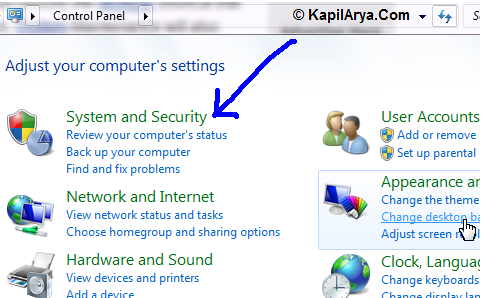
1. Click Start -> Control Panel. In Control Panel window, select Find and fix problems under System and Security.
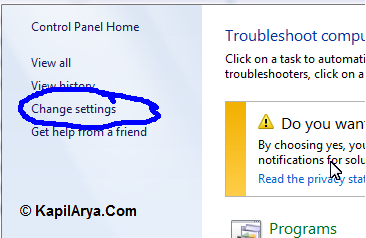
2. In the left pane of next window displayed, click Change settings.
3. In Change troubleshooting settings of next window, select Off.
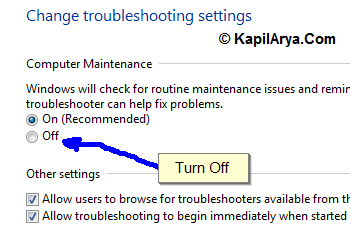
Your problem is fixed now. Please note that this will also disable the automatic maintenance on your system so that if in future you may want to turn it on.

Hope this helps!

Share this article
https://www.kapilarya.com/fix-lost-desktop-shortcuts-in-windows-7

Shareable URL

Article by

Kapil Arya
11x Microsoft MVP · Admin

Kapil holds Microsoft MVP title in Windows IT Pro expertise, 11-times in a row (2014-2025). He is 8-times Windows Insider MVP as well, and author of 'Windows Group Policy Troubleshooting' book. In 2015, Microsoft India accomplished him as 'Windows 10 Champion'. Being passionate Windows blogger, he loves to help others on fixing their system issues. Kapil has worked with official Microsoft Community Engagement Team (CET) on several community projects. You can subscribe him for news/updates and fixes for Windows.

Leave a Comment

Your email address will not be published. Required fields are marked *