

I am using Windows 8 since its release, and I got things working as well like a charm. But life without errors seems incomplete and to fill these incompleteness, I got an error on my Windows 8 installation.
Actually when I booted my laptop to Windows (running Windows 8 and Windows 7 in parallel), it gives me following error:
Your PC needs to be repaired
File: \windows\system32\ntoskrnl.exe
Error code : 0xc0000221
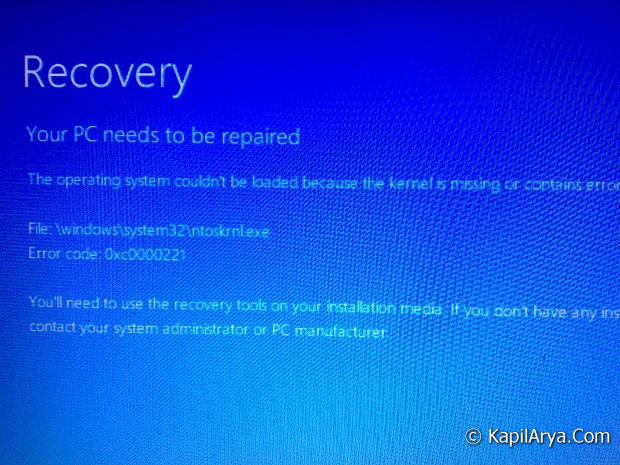
I can’t sort out what the exact issue is? Since I haven’t made any changes to Windows files which could result such error, so getting such error is apparently seems surprised. Well lets see what you need to do when you get this…
FIX : Windows 8 “Error 0xc0000221” (Kernel Error)
1. Press the F8 key on such error screen, which would take you to Startup Settings.
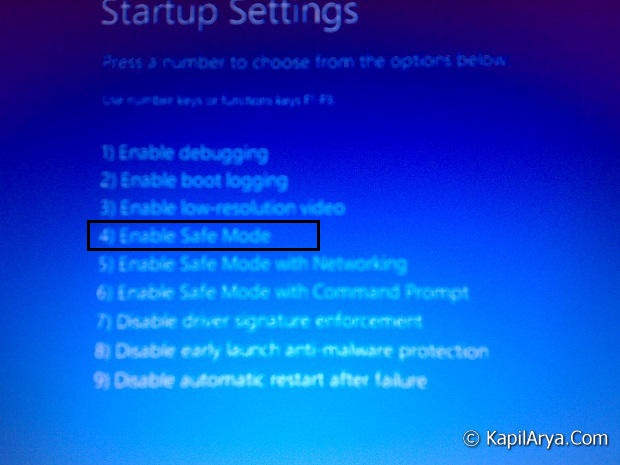
2. Now select the option 4 that is for Enable Safe Mode.
3. It will enter you to Safe Mode. May be you’ll rebooted.

4. Obviously Safe Mode is already having some ugly appearances and you can’t get services like network connections etc. working in it as well. So better to restart here.
5. Finally once you rebooted, you’ll get primary installation means back to your working station without the kernel error.
That’s it!






Exactly same error I m getting… will fix now ;)
Why we got this error??????????????????????????????????????
Great d=find Kapil!
Sir I m running Windows 8 CP, each time I boot it, it goes some wired dis checking how can i disable it? its really frustrating!!!!!!!!!!!!!! Pls, help
^^ It might be problem with your installation. Try re-installing Windows. However, it should display to press any key before skip disk checking. Isn’t it?
@ Siertv, This is beta version, so bugs are obvious ;)
Your post is a timely contrbuition to the debate
I have tried with the safe mode but still couldn’t resresolve the issue. Recently I have changed the motherboard since previous one wasn’t functional.
^^ Resetting may fix this issue, try it and see if that helps.
Sir I’m trying this but after Scanning and Repairing drive(c):62 % complete. Showing error
^^ You may have a look at this:
http://www.kapilarya.com/weird-scanning-repairing-of-drives
I am having that but in a really weird way, its a loop thats allways showing the error, even when i removed the os drive and leaved just an usb with ”windows 8 boot”.!!!!
^^ You need to boot from installation media and repair your system, see if it helps: http://www.kapilarya.com/how-to-perform-automatic-or-startup-repair-in-windows-10
i cant select the option 4.it just brought back to the error page
^^ You may press F4 or number key 4 (if you’re on Windows 10). That should boot you into Safe Mode. For more info, visit: http://www.kapilarya.com/how-to-boot-windows-10-into-safe-mode
My laptop switches off, right after showing the “recovery page”, what can I do?
^^ Perform Startup repair: http://www.kapilarya.com/how-to-perform-automatic-or-startup-repair-in-windows-10
Hi. My computer has started with the error code but when I press button 4 to enter safe mode it does not work. Any idea how to enter safe mode please?
^^ You can try F4. More details here: http://www.kapilarya.com/how-to-boot-windows-10-into-safe-mode
Hi, Im running windows and everytime I press safe mode it just sends me back to the original your pc needs to be repaired screen.
please give me the solution of error code 0xc0000428 in window8.1 64bit laptop
^^ Check: https://www.kapilarya.com/fix-error-0xc0000428-the-digital-signature-for-this-file-couldnt-be-verified
Hi! I have the same problem, but I am using Windows 10. My problem is that I can’t press any key, but my keyboard is on and plugged in, please I need help
^^ To boot Windows 10 into Safe Mode, please check: https://www.kapilarya.com/how-to-boot-windows-10-into-safe-mode
Hi. When I press F8 first it gets me the same message once again. After pressing F8 a second time, it gets me a screen that say BitLocker and to input some sort of key. What should I do (as I have no key or any idea of what they are talking about)
^^ It seems like your system drive is encrypted with BitLocker. You need to decrypt it with the required key. It might possible someone else may have enabled BitLocker protection on your device.