[How To] Add Run Command To Windows 7 Start Menu

When we talk about the comparison of Windows OS, we’ll find that the Run command is missing in Windows 7 start menu. We all know that Run command is most

Kapil Arya
11x Microsoft MVP · Admin
1 min read
Add as a preferred
source on Google

When we talk about the comparison of Windows OS, we’ll find that the Run command is missing in Windows 7 start menu. We all know that Run command is most used command on Windows. In fact the Run command is hidden by default in Windows 7.
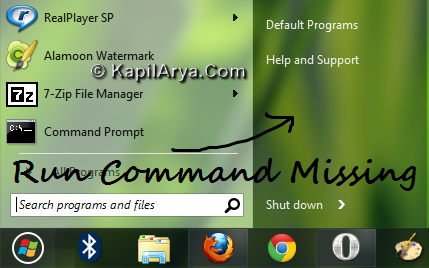
Now since it is missing in start menu of Windows 7, so we should discuss a way to bring it down to the same. Here is that way:

How To : Add Run Command To Windows 7 Start Menu

1. Right click on desktop, select Personalization. In the right pane, click on Taskbar and Start Menu option under See also.
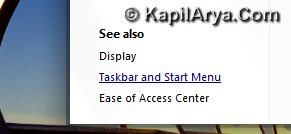
2. Now on Taskbar and Start Menu Properties, select Start Menu. Then click Customize.
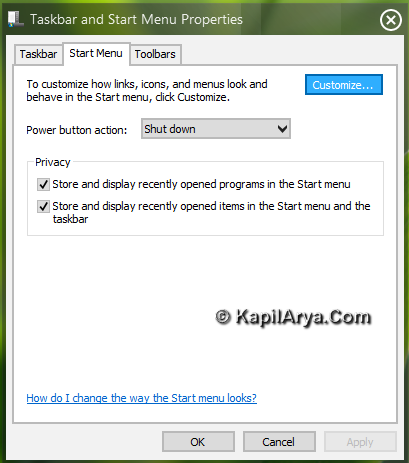
3. Now put a check mark against Run command option. 
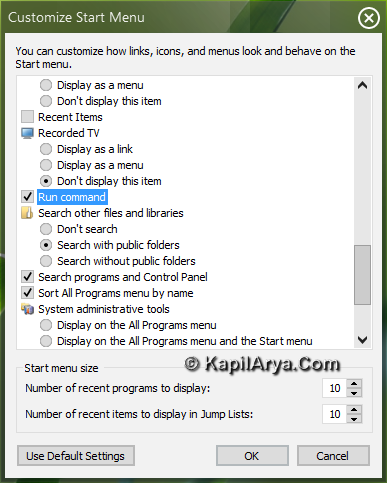
4. Click on OK, then OK followed by Apply in Taskbar and Start Menu Properties window.
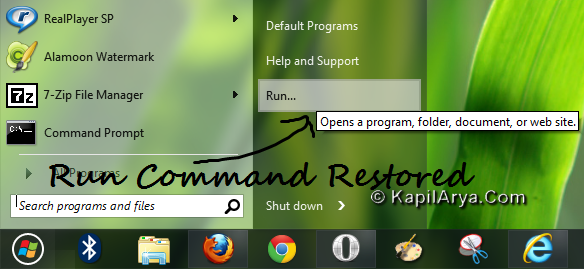
Hope you find the article useful!

Share this article
https://www.kapilarya.com/how-to-add-run-command-to-windows-7-start-menu

Shareable URL

Article by

Kapil Arya
11x Microsoft MVP · Admin

Kapil holds Microsoft MVP title in Windows IT Pro expertise, 11-times in a row (2014-2025). He is 8-times Windows Insider MVP as well, and author of 'Windows Group Policy Troubleshooting' book. In 2015, Microsoft India accomplished him as 'Windows 10 Champion'. Being passionate Windows blogger, he loves to help others on fixing their system issues. Kapil has worked with official Microsoft Community Engagement Team (CET) on several community projects. You can subscribe him for news/updates and fixes for Windows.

3 Comments
lee

ohh.,

good tip it saves a lot of time;)

Bell

nice one .. know it already have some alternative now

andre

thats gud!! Thanks

Leave a Comment

Your email address will not be published. Required fields are marked *