

It is an usual thing happens a lot when you are getting red X / exclaimation mark over the network connectivity icon. It happens due to corrupt network permissions or having corrupt network registry keys. In this article we’ll tell you how to fix it.

Actually there are two methods to fix this, here are they:
Page Contents
FIX : Network Icon Showing Error Symbol In Windows 7, 8
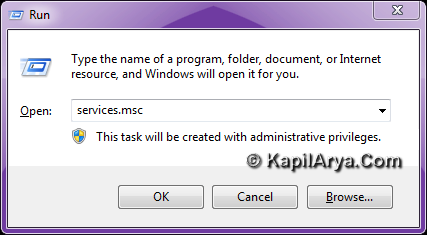
1. Press the  + R combination on keyboard followed by putting services.msc in the Run dialog box and hit Enter.
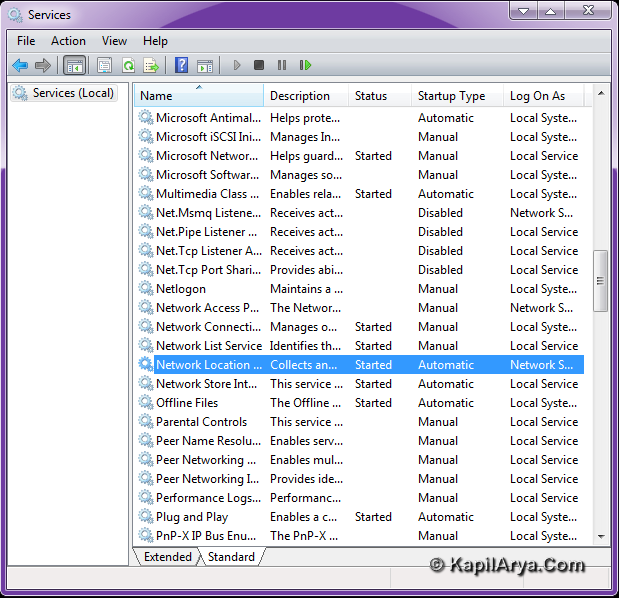
2. It will open the Services window. Look further for Network Location Awareness service. If it is showing Automatic under Startup type column, discard this method.
3. If it is not showing Automatic, then make it Automatic by double click on it and following below image.
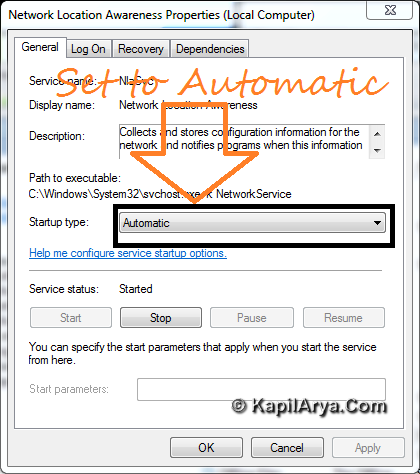
4. Use the Stop button once then Start button and vice versa. That’s it. The issue is fixed now. Check after reboot.
Get The Registry Fix
You can download following registry fix and right click over it and select Merge. Click Yes for prompts so appear.
After a reboot, your problem should be fixed!

![The mapped network drive could not be created [Detailed fix]](https://www.kapilarya.com/assets/Network-Drive.jpg)

![Stop sharing a folder in Windows 11 [Guide]](https://www.kapilarya.com/assets/Network.png)


hi! the first method not worked for me but thanks for second. Its working!!!
you’re just amazinggggggggggggggggg………………………..
hey KAPIL,
my wireless driver is showing error code 10 and unable to update and i m not able to access wifi tell me what to do plsssss. so urgently…..
Rgds… kay
”@ kay, i think u must reinstall the driver.
thanks buddy nice work!! love your job
@ KAY, Yeah its true that re installation of driver may help in this case.
However check through BIOS options, whether WLAN Switching is enabled or not.