[FIX] “We Couldn’t Sign You In. Bad Length” Error For Windows Store

If you're receiving "We couldn't sign you in. Bad Length'' while signing in to Windows Store or in any other Microsoft device, try this fix.

Kapil Arya
11x Microsoft MVP · Admin
2 min read
Add as a preferred
source on Google

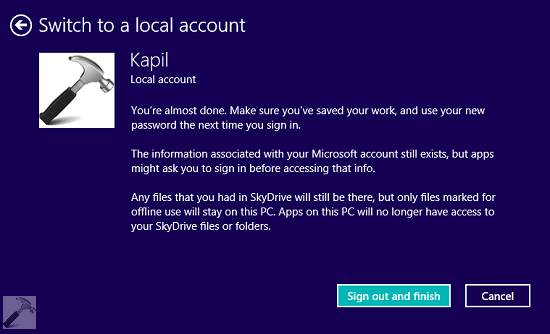
4. Now click Sign out and finish here to complete switching to local account from Microsoft account.
We Couldn't Sign You In. Bad Length Error For Windows Store

Read : [FIX] Can’t Switch To Microsoft Account In Windows 8 Or Later

5. After restarting the system, again open PC Settings app and go to your account section. Now click Connect to a Microsoft account.

We Couldn't Sign You In. Bad Length Error For Windows Store

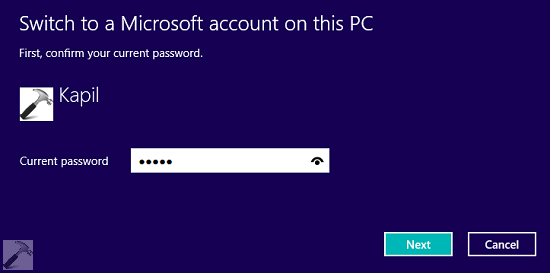
6. Type in your local account password – same as we entered in step 3. Click Next.
We Couldn't Sign You In. Bad Length Error For Windows Store

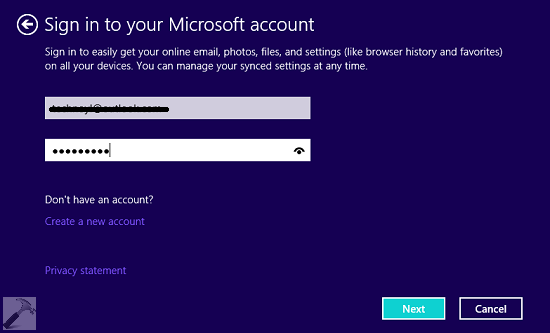
7. Moving on, in the following screen, type your Microsoft account credentials and hit Next option.
We Couldn't Sign You In. Bad Length Error For Windows Store

8. Finally, you’re now again switched to Microsoft account and with this the problem must be solved at your end.
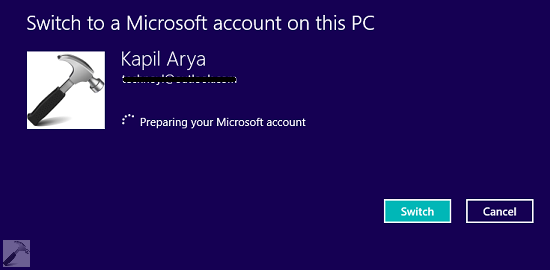
We Couldn't Sign You In. Bad Length Error For Windows Store

Hence, you can now try to sign-in and you’ll find that issue has been resolved automatically.

Let us know if this helped you or you have any other suggestion.
Share this article
https://www.kapilarya.com/we-couldnt-sign-you-in-bad-length-windows-store

Shareable URL

Article by

Kapil Arya
11x Microsoft MVP · Admin

Kapil holds Microsoft MVP title in Windows IT Pro expertise, 11-times in a row (2014-2025). He is 8-times Windows Insider MVP as well, and author of 'Windows Group Policy Troubleshooting' book. In 2015, Microsoft India accomplished him as 'Windows 10 Champion'. Being passionate Windows blogger, he loves to help others on fixing their system issues. Kapil has worked with official Microsoft Community Engagement Team (CET) on several community projects. You can subscribe him for news/updates and fixes for Windows.

5 Comments
Keith

It worked! Just want to say that this worked for me and I’m so happy cause my Netflix works now!!

Kapil Arya Author

^^ Glad we could help :)

John

Just wanted to say it worked for me too, no more mucking around on windows love mail.
Many thanks
John

Kapil Arya Author

^^ Glad it helped! :)

rajesh

my microsoft account is unable to log in i.e *email removed for privacy* in pc so give my password i forgot

Leave a Comment

Your email address will not be published. Required fields are marked *