

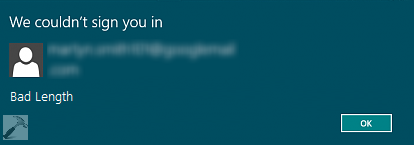
There exists various scenarios when you can receive Bad Length error while using a Microsoft device. So no matter, if you’re on Windows Store, OneDrive, Xbox One or simply on Windows 8 or later operating system – the bad length error may appear if something is wrong with associated Microsoft account. In such cases, when you opt to use for your Microsoft account, you receive this error:
Page Contents
We couldn’t sign you in
<username>
Bad Length
[OK]
The basic root cause behind this problem is yet not documented anywhere in Microsoft‘s support. So there is no selective fix to solve this problem. But there exists an workaround which have helped a considerable number of users who have faced such kind of hitch on their system. That workaround is mentioned here, you can also try its similar approach on your Microsoft device (other than Windows operating system) and see if it helps :
FIX : “We Couldn’t Sign You In. Bad Length” Error For Windows Store
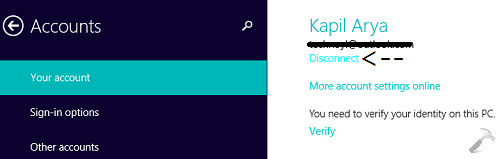
1. Open PC Settings app on your system and go to your account section. Since you’re facing issue, you’re obviously using Microsoft account on your system, hence click Disconnect as shown here:
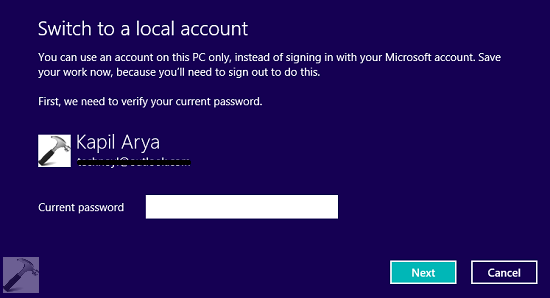
2. Then you’ll receive following screen, type your Microsoft account password here:
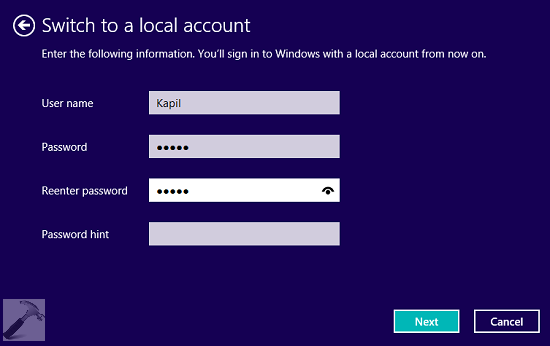
3. Next, type in the required information here in order to switch into local account:



It worked! Just want to say that this worked for me and I’m so happy cause my Netflix works now!!
^^ Glad we could help :)
Just wanted to say it worked for me too, no more mucking around on windows love mail.
Many thanks
John
^^ Glad it helped! :)
my microsoft account is unable to log in i.e *email removed for privacy* in pc so give my password i forgot