

To keep your Windows running smoothly, it is highly recommended that you use latest version of device drivers. By default, Windows keep checking for updates to your device drivers and it automatically upgrade them to newest version. Also, if you like, you can manually update your device drivers by following steps mentioned here:
Steps to manually update your device drivers in Windows 10
Recently, while upgrading one of the device driver, we came around following error which prevented us from installing latest version of that driver:
Page Contents
Windows encountered a problem installing the driver software for your device.
Windows found driver software for your device but encountered an error while attempting to install it.
This device cannot start. (Code 10)
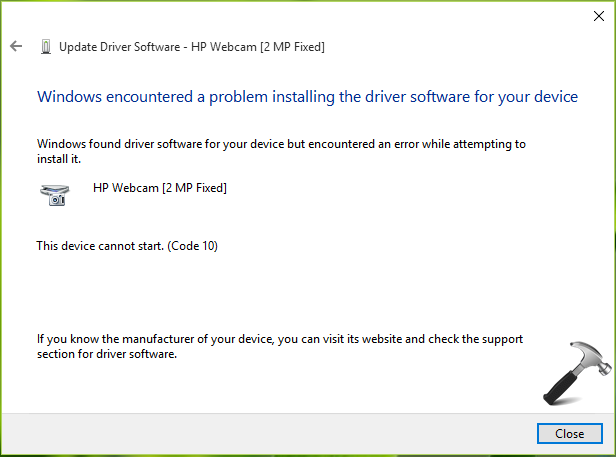
As you can see that error code is 10 here, at which Microsoft suggests to update driver. But we’re already getting the error code while updating so we should look for another alternative. Error code 10, in some cases may indicate malfunctioning of device hardware and you should perform an inspection for it at your nearest computer repair shop. If you can confirm that hardware is working fine, you can try these fixes to bypass this issue:
FIX : Windows Encountered A Problem Installing The Driver Software For Your Device In Windows 10/8.1/8/7
FIX 1 – Run Hardware and Devices Troubleshooter
Windows contains few automated troubleshooters which can help you to solve common issues with its different features. To solve this problem, I will suggest you to run Hardware and Devices troubleshooter using steps mentioned here to automatically resolve this hiccup:
Steps to run Hardware and Devices troubleshooter in Windows 10
If running this troubleshooter makes no differences in the situation, go for FIX 2.
FIX 2 – Using Device Manager
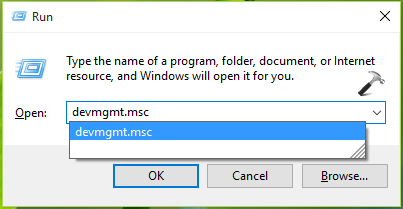
1. Press  + R and type devmgmt.msc in the Run, hit Enter key to open Device Manager snap-in.
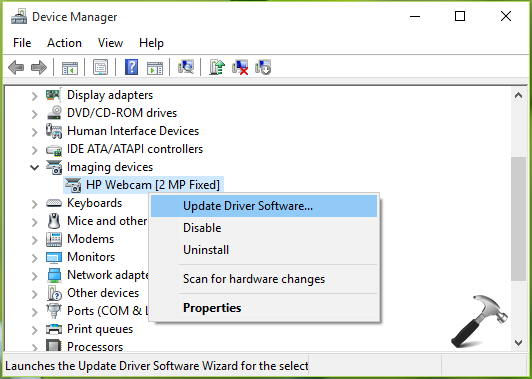
2. In the Device Manager window, right click on the device with which you’re facing the issue and select Update Driver Software.
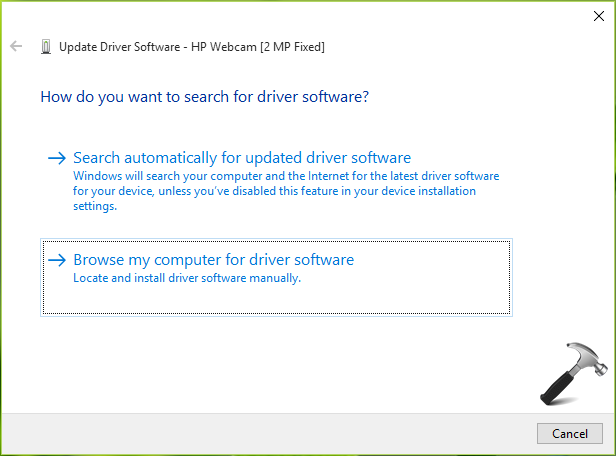
3. Next, in the update wizard, choose Browse my computer for driver software option.
4. Then in next screen, in Search for driver software in this location input box, type C:\Windows\WinSXS. Click Next.
*Substitute C: with your system root drive.
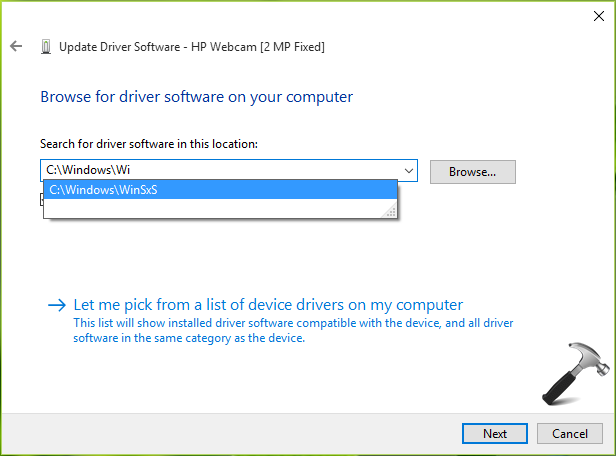
5. Now Windows will begin the search for update driver in that location. This may take a while but will fix the issue for your device.
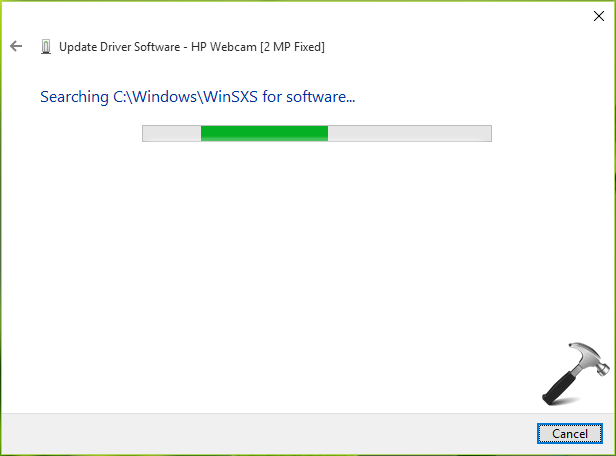
You can then retry to update the driver as usual and it would work without any errors.
Hope this helps!

After resetting my Windows 10 PC, none of my USB ports were working. I only had ad ps/2 keyboard that I was able to use. This method worked perfectly and all my USB ports are back up and running. One thing I did prior to finding this post was to restart the computer by holding the shift key and then pressing restart. Then using F7 through the advanced startup options I was able to disable driver singing. Not sure if that made a difference. Anyways, thanks Kapil!! I spent hours looking for a solution to this and you were able to provide it
^^ Glad we could help 😎
Awesome, Worked like a charm!!!
^^ Thanks for feedback!
same problem
really awesome thanku
^^ 😊
It is really Owesome, work like charm…. thanks for the help
^^ Happy to help!
Thanks a lot Kapil. You are a life saver.
^^ Excellent!
Thank you bro. The best solution than I found.
^^ Happy to help 😊
kapil a big thanks to you..this is the only think worked for me…i was insanly working over it from last week…tried win updatre different drivers..softwares etc..everything but failed…
THANX A LOT BRO…AND I WISH U AVERY SUCCESSFUL LIFE…
THN AGAIN
^^ Very nice, thanks for feedback!
thanks man!!!
i spent about one week trying to get my lumia 535 phone connected to my pc but all to no avail. with this info., i spent just a minute and I am done. thanks once again…….
^^ Thanks a lot for your feedback!
it was helpful topic for me
but problem appears again when i plugged my phone off
Omg ur a life saver love you man thanks *_* working perfect now works even on windows 7
Most Helpful…
Thanks bro..
Working very well
^^ Glad it helped 😎
A BIG Thanks to you bro..
I was working on it from last few days… finally problem got solved by ur help..
You are working awesome…
once again THANK U SO MUCH..
^^ Thanks a lot for your awesome feedback 😊
thnk u sir :) :)
^^ Cool 😎
awesome,worked…
Thanks
^^ Perfect 😎
you know what is the problem with my pc it shows a kind of a warning sign (it is a yellow triangle with a ! inside of it)and when i wanna update it doesnt say error 1 it says The data is invalid please help i really need to fix this fast!
Is this gonna work with Display Adapter>Unknown Devices?
^^ Nope.
Worked like a charm on Windows 10 Pro
you re great! really easy way to solve this problem. i downloaded lots of programme for this problem but i didnt get any solve.. thank you so much for this :)) god bless you man
^^ You’re most welcome 😊
Thanks for the info but I’m still getting an error which says “Windows found driver software for your device but encountered an error while attempting to install it.”
Any other suggestions?
^^ Please go ahead with suggestions mentioned here, see if they helps you: social.technet.microsoft.com/Forums/windows/en-US/88af2647-a74a-474b-98d5-3e7cb3db2c28/there-must-be-a-real-solution-to-windows-found-driver-software-for-your-device-but-encountered-an?forum=itprovistahardware
I did the same thing and it isn’t working
I have spent hours trying to fix this. Microsoft assistance was not helpful. Found this today after countless searches. Fixed it first time.
^^ Awesome 😎
Kapil – Thank you for the fix my friend it worked like a champ!!!1
^^ Glad I could help, Mark 😎
Thank you so much! After once changing a new laptop for another new laptop and now after having this one, shy of two months, the audio stopped. Went through chat with LG and I was directed here. After trying your plan B, it worked immediately. Now I can continue with my Español lessons. Muchas gracias!
^^ Glad to see, it helped you Alicia!
This worked perfectly. I had a computer crash recently and I was having all kinds of problems with drivers. I could not even get a Microsoft branded wireless mouse installed until I found this article. I realize Im am a year behind, but if you see this comment can you explain why this failure occurs? I would think it should direct itself to this folder so Im curious if its just code error, maybe something I did or what. I thought it was me adding a 500GB SSD drive maybe, but the computer has run with that for the last year with no issue until it crashed. Funny the whole thing actually crashed when I was pairing a bluetooth Xbox remote in the first place.
^^ Glad it helped, Mike!
Thank You So Much. It’s Very Helpful
^^ Glad it helped you!
Hi,
Thanks for the troubleshooting steps.. Worked in Win 7 also.. Helped me to solve the issue after 2 days of troubleshooting. Thanks to Kapil Arya :)
^^ Awesome! 😊
Hi sir,
This is sandeep. Sir i tryed the same sollution But its still not working for me.
The operation returned because the timeout period expaired.
It shows like above line.
Please fix it.
Thanks.
perfect! weeks of troubleshooting trying to get my touchpad working again after a windows update caused it to stop working
^^ Glad to help 😊
This Solved my problem, Thank you very much!!!
Details- after an unexpected power failure the keyboard and mouse would not work on my Windows 10 Desktop PC.
I was able to plug in an old PS/2 style keyboard and that worked, but many tries updating/deleting/updating drivers could not get my USB keyboard or mouse to work. Many internet searches I found nothing.
I rolled back to a checkpoint didn’t work and I was just about to reinstall windows when I came across your solution.
Used your windows/sxs suggestion to manually updated the driver for the keyboard and mouse and a quick reboot and everything seems to be fine.
Again, thanks for your help, this saved me days of reloading and configuring software.
^^ Thank you very much for your feedback!
c:\windows\winSxs worked and solved the problem, thank you so much
^^ You’re most welcome Mr U S 😊
C:\Windows\winSxs worked and solved the problem, thank you very much
^^ Happy to help Eka 😊
Bless
It’s still faulty
After MANY hours/days of searching for and trying various things to solve my “USB controller drivers not found”, even paying for driver software that did not help,..YOU PROVIDED THE FIX!!!!!!!!!!!! How can I send you a few bucks?
^^ Glad I could help 😎
My Microsoft mouse 1000 suddenly stop working, although the keyboard using the same USB micro receiver was still working fine. On another machine both worked perfectly. I tried uninstalling / reinstalling driers and every suggestion I could find online – nothing worked. Finally I found your article and it worked!!
I am eternally grateful!!
^^ Glad to help Marius 😎
After several advices on the web without any results, found this :)
This is help! THANKS!!!
^^ Glad we could help!
This device cannot start. (Code 10)
{Operation Failed}
The requested operation was unsuccessful.
I tried all the things but still same problem. I have windows 10 pro
my windows is updated to latest version.
^^ Please refer: https://www.kapilarya.com/fix-this-device-cannot-start-code-10-in-windows-10.