

UPDATE : In Windows 8.1, Microsoft has added AutoPlay options in PC Settings app. Follow PC Settings -> PC and device -> Autoplay.
In Windows 8, whenever we insert a media via USB port or DVD drives etc., we’re asked what we have to do with that media. Regardless of Windows 7, in Windows 8 these Auto Play options are shown at the right top corner of the screen. So you have to tap to choose what is your priority.
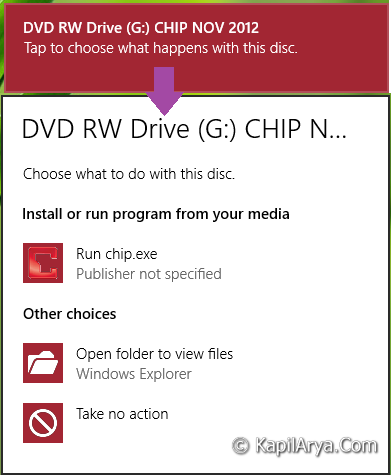
In some scenarios, it may be possible that you might not prompted that what you have to do with inserted media. In such cases, running System File Checker will not help you because it will confirm with no integrity violations found.
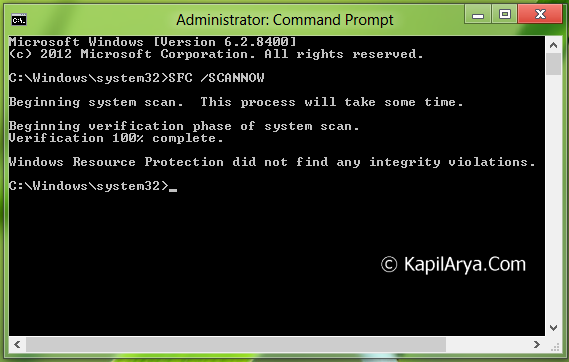
So if SFC /SCANNOW doesn’t helps us in solving this issue, then what to do? In that case, we’ll go for the manual method:
FIX : “AutoPlay” Options No Longer Working In Windows 7, 8
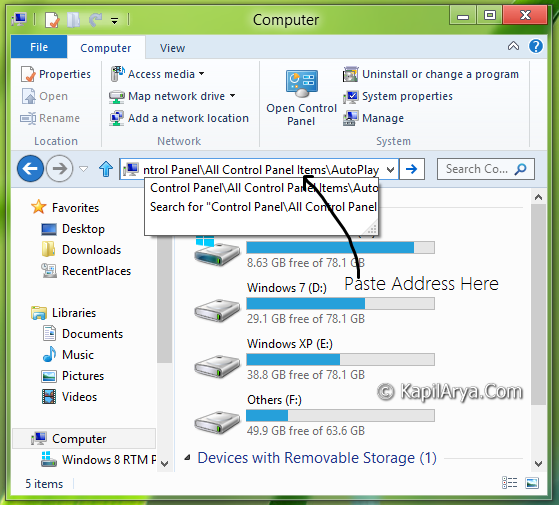
1. Open Windows Explorer (  + E) and in the address bar, type following location followed by Enter key:
Control Panel\All Control Panel Items\AutoPlay
2. On the AutoPlay window, make sure you have enabled Use AutoPlay for all media and devices.
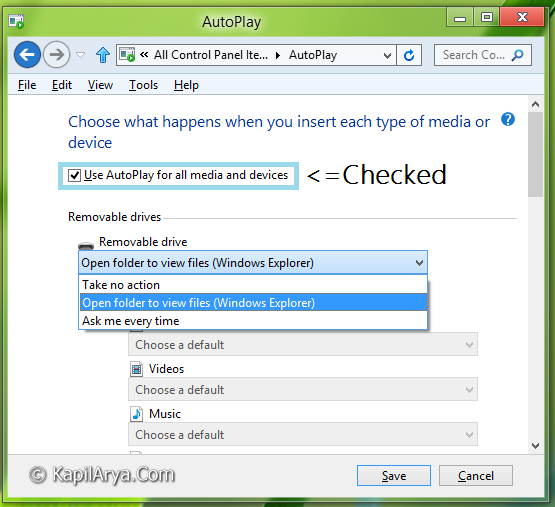
Click on Save, your problem should be solved after a reboot. If the issue still persists, you may checkout this Registry Trick To Disable “Autoplay” In Windows 7, 8 post.
That’s it!




Thanks for another gud tip Kapil
Nice article bro :D
I can only see the option configure this drive for backup