

In Windows 8, you can easily configure the sound options like in the previous Windows editions we do. The sound control window consists of all new sound settings as far Windows 8 is concerned.
So to configure the sounds settings for new mail, you just need to pick a new sound file of your wish, and successively you can add it to play on Windows when a new mail arrive to you. So lets take the route to configure sound for new mail arrival…
Change Sound For New Mail Notification In Windows 8.1
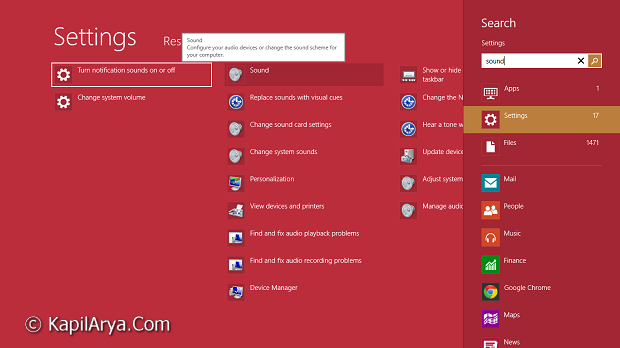
1. Press  + W and put sound in Search box. Click Sound.
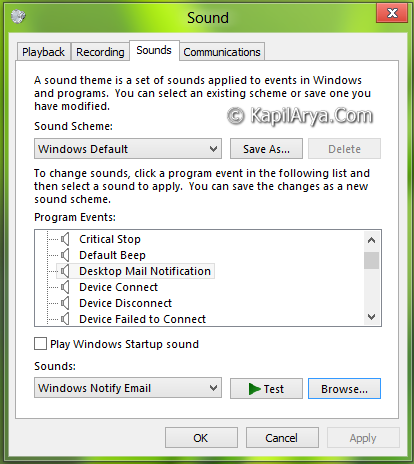
2. On the Sounds tab, choose Desktop Mail Notification event, then click on Browse.
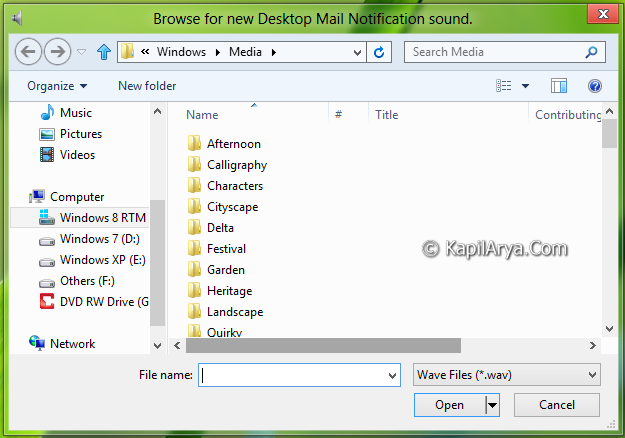
3. Choose your desired sound to play on new mail notification using this window:
4. Once you have picked your required file, click on Test to play the file for once as examine. Click Apply followed by OK and that’s it to configure. So now onwards, whenever a new mail comes to you, Windows will play your chosen sound.
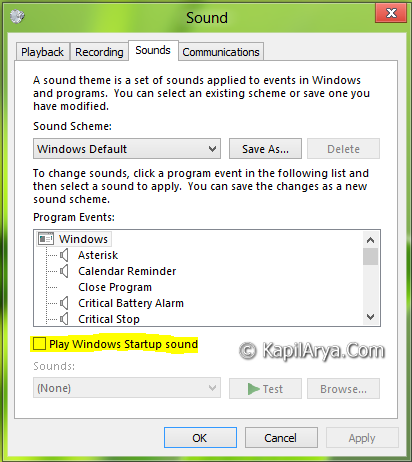
BONUS TIP : You can also enable Windows start up sound from the same window as showed in step 2, by clicking Play Windows startup sound, as it is disabled by default. You can also checkout this Startup Sound Enabler For Windows 8, 8.1.
Hope you find the post useful!



is there any way to choose same sound for hotmail and outlook???
Sir, how can we change same settings start up sound
^^ Its default and non-editable :)