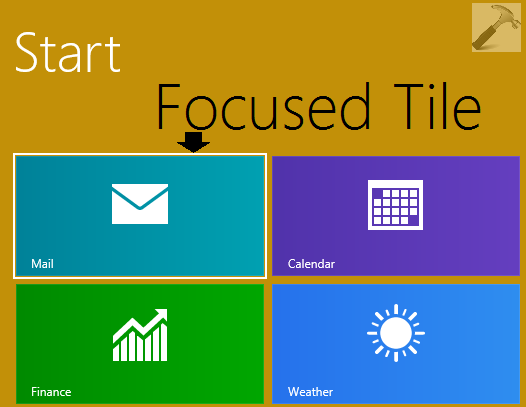
Modern App tiles gives you the real-time view of your favorite content on your Windows 8.1 Start Screen. But if these tiles not behave normally, they would look outdated and frustrating. Recently, I came around an issue; and that was about the tiles becoming focused whenever I used to scroll them horizontally. In this scenario, the app tiles got a white color line around it and this behavior was seen only with the tiles at top side of Start Screen. Following screenshot showing you the focused tile so far:
The issue becomes more critical when face it on a non-touch Windows 8.1 system. Thus the touchpad has to make out all the actions and therefore it is mandatory for us to fix the issue as soon as possible, so that you can scroll over the tiles normally. Here is how you can get rid of this problem:
FIX : Windows 8.1 Start Screen App Tiles Become Focused
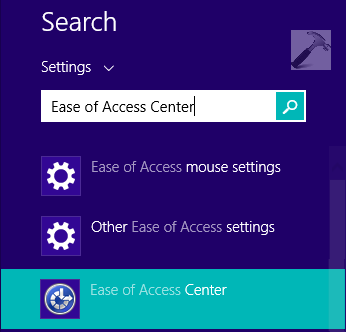
1. Press  + W, type ease of access and pick Ease of Access Center from the search results.
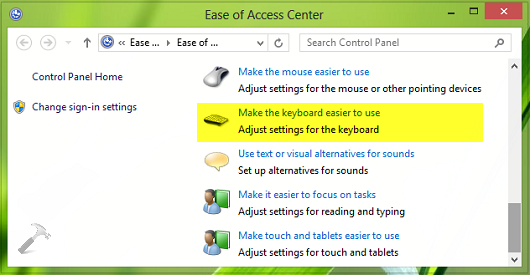
2. In the Ease of Access Center window, scroll down and click Make the keyboard easier to use.
3. Moving on, finally in the Make the keyboard easier to use window, uncheck the Underline keyboard shortcuts and access keys option. Click Apply followed by OK.
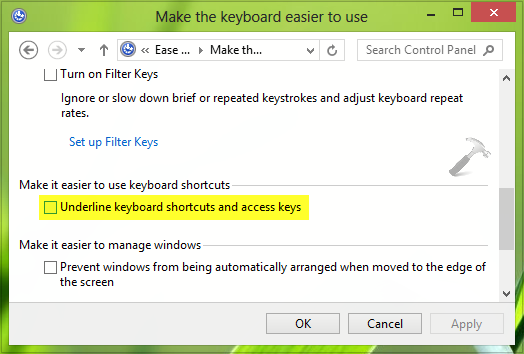
This should immediately fixed the hitch but I will recommend you to reboot once to get things normal.
Hope this helps!