

If you’re using latest stable release of Windows Phone, you might have found it tightly integrated with Microsoft services. Like for backup of chat, Outlook is associated service. In the similar way, for storage of photos and videos, cloud storage based service OneDrive (formerly SkyDrive) is linked there. Well, Windows Phone 8 have the capability to automatically upload your photos and videos to OneDrive. In such a case, the data will uploaded to OneDrive of that account, which you’ve used primarily as Microsoft account to set up your phone.
In many scenarios, you might want to disable the automatic upload of your private pictures or videos due to privacy issues. You should always be careful, where your private stuff is and how it can be accessed. Thus, it becomes a matter of primary concern, that you should configure the setting for auto upload. Here is how you can disable automatic upload of your content to cloud:
Disable Automatic Photo & Video Upload To OneDrive In Windows Phone 8
1. Go to Start Screen, tap Settings tile.
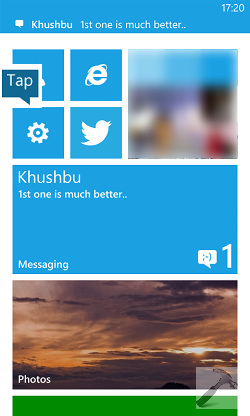
2. In the SETTINGS screen, under the hood of system, look for the backup option and tap the same.
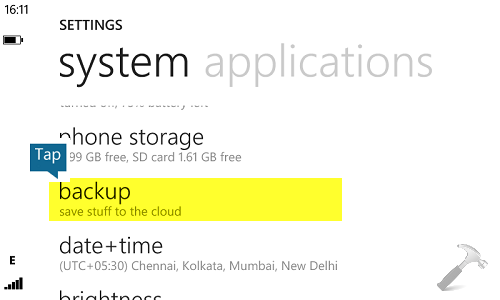
3. In the backup screen, tap photos.
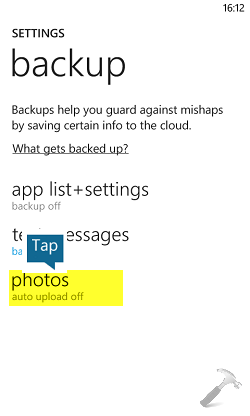
4. In the SKYDRIVE/ONEDRIVE STORAGE screen, for both the photos and videos, select Don’t upload.
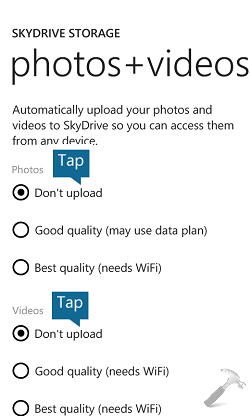
Thus in this way, your Windows Phone 8 is configured in such a way that it won’t upload the photos and video to cloud until you do it manually.
That’s it!




Thank you…. This worked
^^ Glad we could help :)
I have set this to don’t upload but it still does
So simple, yet works. I’ve been frustrated for months now as every photo I take (including accidental takes, blurred shots and rejects) are uploaded to the cloud.
Apart from some saved photos that I keep on my phone,I prefer downloading all of my photos to a PC. There I determine what I want to keep and what I don’t, and make copies to appropriate folders, from where I have future backups scheduled.
OneDrive doesn’t differentiate, it fills the cloud with everything and anything and then sends me reminders to buy more space. Very interesting business model.