

We know that by default, Windows comes with four libraries. They are Documents, Music, Pictures, Videos. As their name suggests, the data accordingly attached to them. However, there exists the possibility to keep music files in Videos library. Today, I came around an issue associated with Videos library as you can see in the following image:
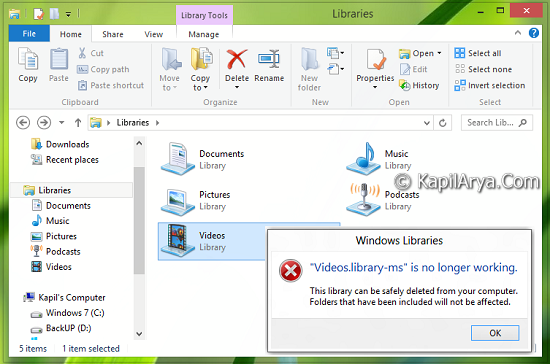
You can get this error with other libraries as well, like:
- Pictures.library-ms is no longer working
- Documents.library-ms is no longer working
- Music.library-ms is no longer working
If you’re the victim of this issue, then you can fix it easily with solution provided below. Here is the way to cure this problem:
FIX : Library-MS Is No Longer Working In Windows 10/8/7
1. Press  + E and to open Windows/File Explorer.
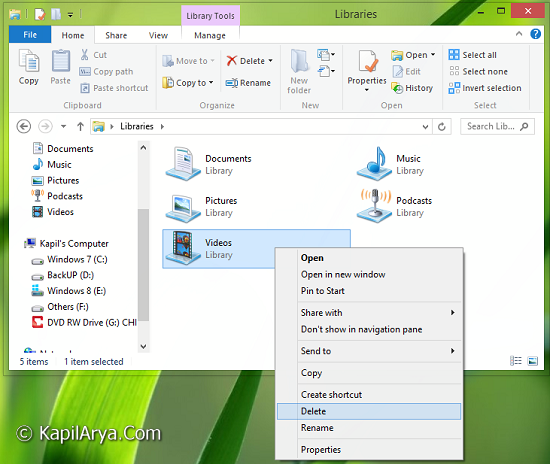
2. Point out the library on which you’re getting the error. In my case, Videos library was the root cause. Right click it, pick Delete. In case you’re using Windows 7, you’ll be prompted for confirmation to delete. Confirm it by selecting Yes.
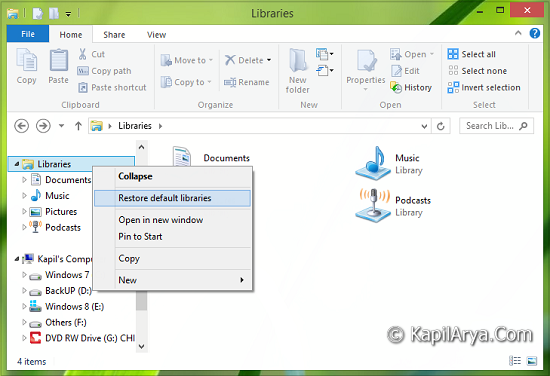
3. After deleting the corrupted library, in the left pane of left pane of Explorer, right click on Libraries. Select Restore default libraries.
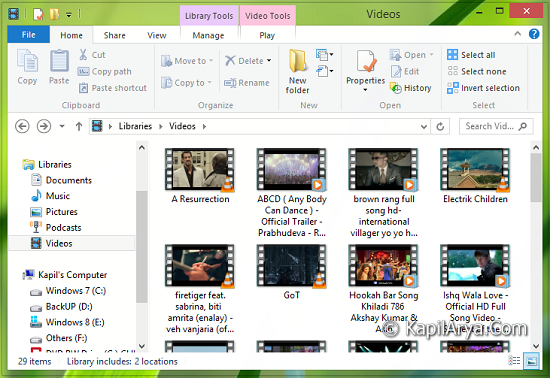
4. Once the library is stored, click on the library you’re issued with. This time you’ll no longer see the error code and you can access it as it was accessible by default.
Hope this helps!




THANK YOU FOR THE SUPPORT WORKED LIKE A CHARM
There is no library folder the Windows Explorer folder, only documents, pictures, videos, desktop. I have done a computer “search” for “libraries” and nothing is found.
^^ It is located in the left pane only :)
thank you very much it worked and now back on i was trying to back up my documents and photos with windows 7 coming to an end and got completely messed up
peter
^^ Glad to help peter!