

We all know that there is no Start Button and Start Menu in Windows 8, so third party tools are the best solutions to bring these things back. Since there is no Start Menu, so there is no direct option to shutdown, restart, sleep, switch user etc.
However pressing Alt+F4 combination brings these options for us. But what would you say if we get access to these options from taskbar? Amazing! Well in this article, I’m going to share a tool to you which will bring the missing options for you straight from taskbar.
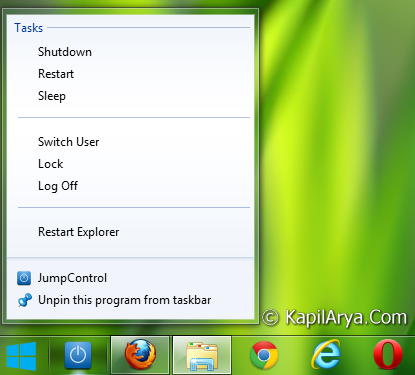
“JumpControl” is such a tool developed by our friend protosphere @ DA, which let us to access all power options from taskbar. All you need to do is to follow these steps:
Use Power Button For Taskbar In Windows 8
1. First download the zip archive containing necessary files at http://www.deviantart.com/download/174318766/JumpControl_by_ProtoSphere.zip.
2. Extract the zip archive using decompression software like 7-Zip. You’ll get following files:
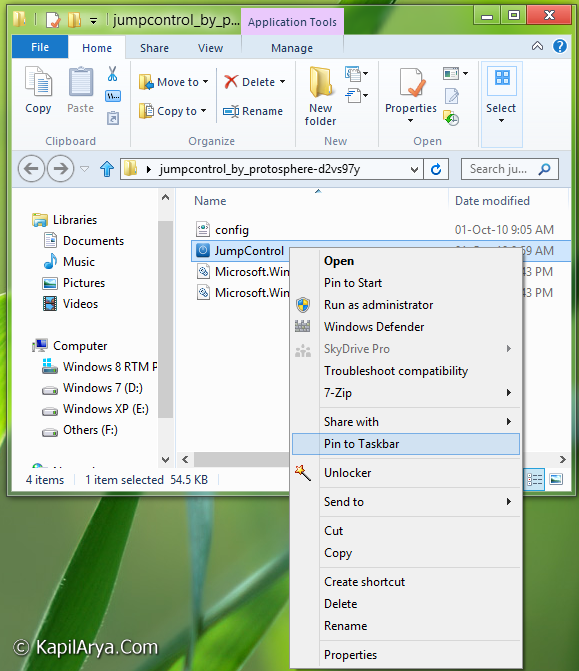
3. Right click on the file JumpControl.exe and pin it to taskbar. That’s it. Now just right click on pinned icon to get access all power options shown in first image.
Hope find the tool useful!




Great utility bt doesn’t knw y my EXPLORER crashes using this?
^^ Seems like developer bug! Any special error?
Thnks 4 reply, No any other errors, all works fine except intermediate crashes. nice to shutdown in most cases :)