

While having a huge important data on our systems, we all like to make a backup of it. In Windows 7 and 8, same backup tool named as Windows 7 File Recovery is provided to make simple backup of your data. In addition to this tool, Windows 8 also consists File History named feature for making the backup procedure even more simpler. However, in Windows 8.1, Windows 7 File Recovery feature is removed by Microsoft.
Today, one of my reader reported me about a weird error he faced regarding Windows 7 File Recovery. When he tried to access File History in Windows 8 it says, “Windows 7 backup is currently configured and must be disabled to configure File History”. Then when he clicked to configure Windows 7 Backup, he got this error:

Page Contents
An internal error has occurred : The specified resource name cannot be found in the image file. (0x80070716)
By doing some research about this issue, I finally realized that services related violation is causing it. So, I tried to disable the related component services that are expected to cause the error. Luckily, I got a solution and here it is:
FIX : The Specified Resource Name Cannot Be Found In The Image File (0x80070716) In Windows 10/8/7
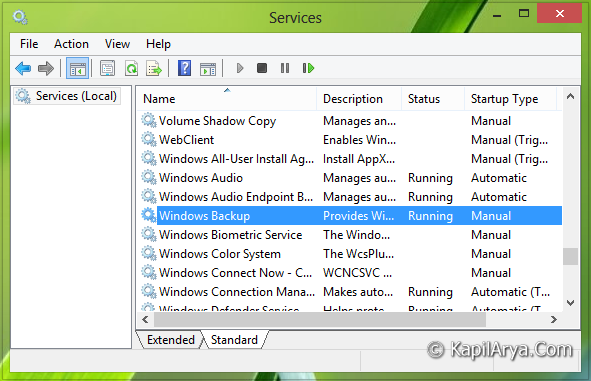
1. Press  + R and put services.msc in Run dialog box. Click OK to open Services.

2. In the Services window, scroll down and look for Windows Backup service. It must be showing running status. Double click on the same service to modify its status.
3. In the following window, choose the Startup type to Disabled. Click Apply followed by OK.
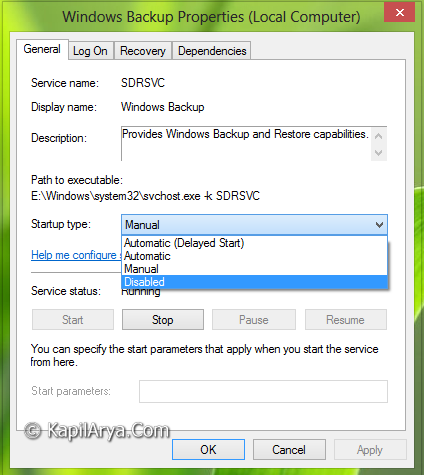
Do a reboot after closing Services window. Your issue should be fixed up significantly.
That’s it!





I can’t find it windows 7 recovery tools in windows 8.1.are they removed or still exist under some other settings. Help pls
^^ Unfortunately, they are removed in Windows 8.1 and is substituted as File History.
stays on topic and states valid points. Thank you.