

Windows 8.1 basically consists of two parts; one the Modern UI based section and other is the classical Desktop based UI. Thus, whenever you look to switch between these two UIs, Windows plays an animation for doing so. Whether you are switching apps, snapping apps in either side of screen, open or close any Modern UI app, there is an animation. We’ve already seen the way to disable first time user sign-in animation. Now lets see how to disable the animations completely.
Reason behind disabling the animations is simple and straightforward; its to improve system productivity and performance. By disabling animations, you can bypass the time expenditure taken by them, which in turn will improve system responding time. By deactivating animations, there are no side effects on your system. In fact by doing so, there are positive effects and that is improvement in system efficiency. In Windows 8.1, you can simply disable the animations using following way:
How To Disable Animations In Windows 8.1
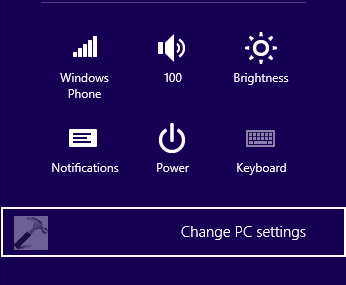
1. Press  + I key on Desktop and click Change PC Settings from the Settings charm so appear.
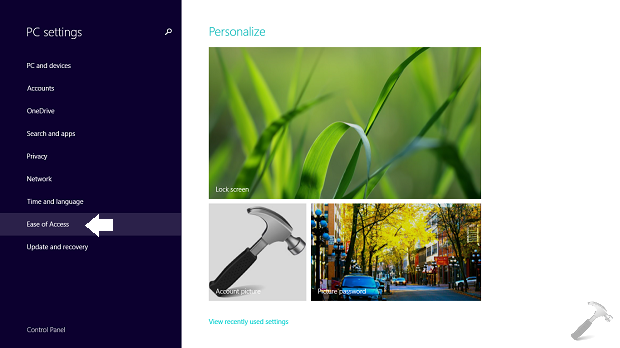
2. Moving on, in the left pane of PC Settings window, click Ease of Access option so far (refer below shown image).
3. Finally, in the Ease of Access settings screen, click Other options in the left pane. Now in the corresponding right pane, under the hood of Visual options, turn Off or move the slider to left for Play animations in Windows option.
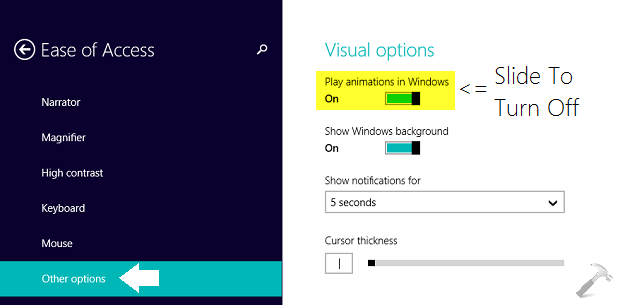
As soon as you turn Off the option as mentioned in step 3, you can go to Start Screen and start playing around with Modern Apps, you’ll observe that animations are gone. If you like to have animations again, you can turn On the same option as mentioned in step 3.
Hope you find the tip useful!

Nice trick!!!