

As long as latest virus and spyware definitions are installed on your Windows Defender app, your Windows operating system is safe and secure. When these definitions became outdated, security threats on your system may increase. Hence, being a smart Windows user, you should often update Windows Defender with latest virus and spyware definitions to stay safe.
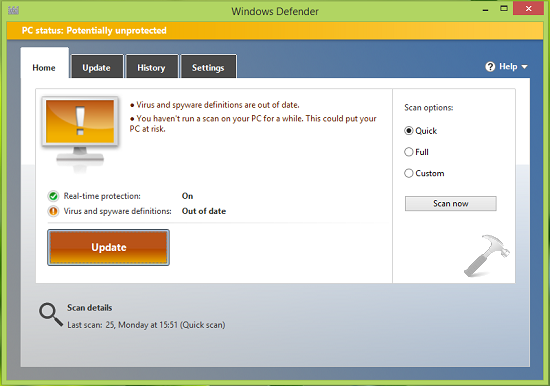
However, there are some scenarios which may came around, where you can’t update Windows Defender the newest definitions. In such cases, following error messages can be received:
Page Contents
Virus and spyware definitions couldn’t be updated
The app couldn’t check for virus and spyware definition updates. Check your Internet Connection and try again.
Error code: 0x8024402c
Error description: The definition updates couldn’t be installed because the proxy server or target server names can’t be resolved.
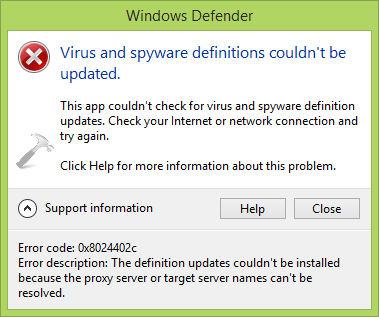
In some cases the error codes may be 0x80240022, 0x80004002, 0x80070422, 0x80072efd, 0x80070005, 0x80072f78, 0x80072ee2, 0x8007001B. The problem is common for all of them, and that is you can’t update Windows Defender at all.
FIX : Virus And Spyware Definitions Couldn’t Be Updated In Windows Defender For Windows 10/8/8.1/7
If you’re also facing this problem on your Windows 7 or later running machine, here are the fixes you can follow:
IMPORTANT : Before you try the fixes, make sure about following points:
1. You have latest Windows Updates installed.
2. You’re signed in as administrator and UAC is set to Always notify level.
3. Windows Defender Network Inspection and Windows Defender services are running in Services window (use services.msc command to get this).
4. You’ve an active and stable Internet connection.
FIX 1 – Remove The Current Signature File Of Windows Defender
1. Make sure Windows Defender is closed. Press  + R, type following command and press Enter key.
Msiexec /x {A5CC2A09-E9D3-49EC-923D-03874BBD4C2C}
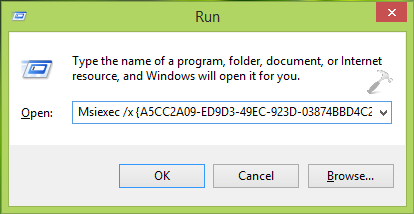
2. Now open Windows Defender and re-try to update. If it starts to update, finish that operation, install definitions and reboot.
FIX 2 – Install Latest Definitions Manually
Another thing you can try is to install latest virus and spyware definitions by downloading them manually using these links:
For Windows Defender installed on Windows 8, 8.1 and 10 = 32-bit edition | 64-bit edition
For Windows Defender installed on Windows 7, Vista, XP = 32-bit edition | 64-bit edition
FIX 3 – Run Microsoft Fix it
You can also run the official Microsoft Fix it for this problem, which helps to fix this problem and enable automatic updates for Windows Defender. Download it from here:
Reboot the machine after running Fix it.

In this way, you can refer these fixes and we hope they will solve the problem. In case if the issue still persists, please drop a comment and we’ll be happy to help you!




It didn’t work..It says ”This aaction is only valid for products that are currently installed”…And the others didn’t help as well WTF is this problem? Is this why we pay microsoft?
^^ Seems like you’ve installed another third-party antivirus and its registry keys are causing issue. Check the following hive and remove its registry keys:
HKEY_LOCAL_MACHINE\SOFTWARE\Microsoft\Windows\CurrentVersion\Uninstall
Reboot, and retry fixes.
thanks this really helpfull
Uninstall and then reinstall. Take 5 mins and worked for me.
i’am steal error code : 0x80073b01 and if i Uninstall Windows Defender it can’t be??
Starting ‘Windows Defender Network Inspection Service’ (it was set to Manual in Services) fixed the issue for me.
^^ Thanks for sharing this Topaz 😊