

Windows 8 or later by default provides you an option to pin a folder directly to Start Screen. This is bit handy if you have large database and want to access your favorite folders instantly.
Here it the option shown in screenshot:
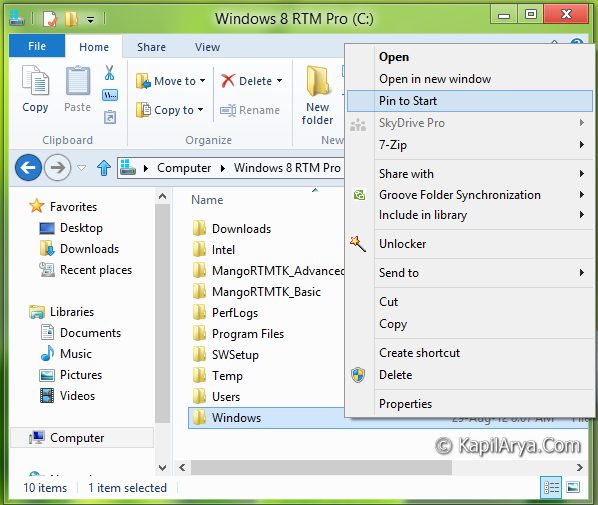
But sometimes the option for Pin to Start may not be useful for you and in such case you’d like to remove it. So in this article, we’re going to share you the way to erase this option.
It’s basically a registry method, so lets start:
How To : Remove “Pin To Start” From Context Menu
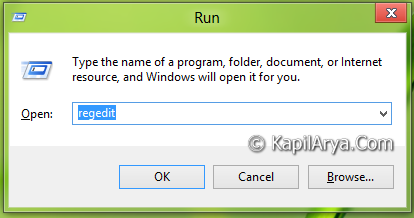
1. Press  + R and put regedit in Run dialog box to open Registry Editor (if you’re not familiar with Registry Editor, then click here). Click OK.
2. Navigate here:
HKEY_CLASSES_ROOT\Folder\shell
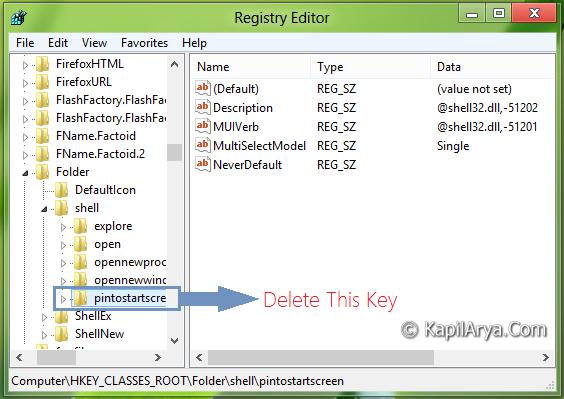
3. In the left pane, look out for key pintostartscreen and make a back up of this key by right click and then select Export and save it to desired location.
4. Now delete the same key viz. pintostartscreen. Exit Registry Editor.
5. So we’re done now. You can check it by right click on any folder in File Explorer.
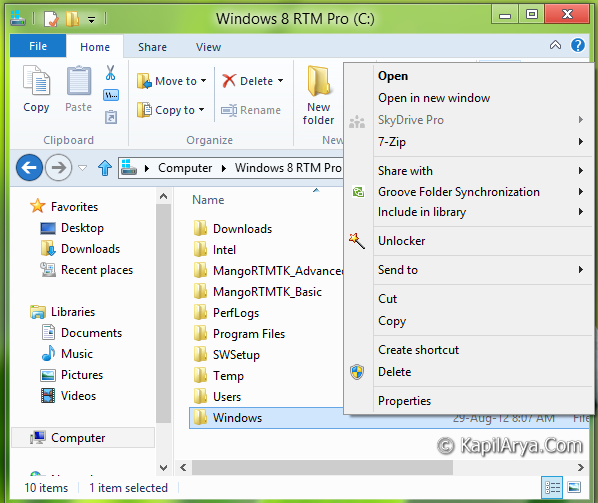
Hence you’ve successfully removed the Pin to Start option. In the future, if you want to restore it, just open the back up file with Registry Editor.
That’s it!






Nice tip Sir!
Hi thanks for the nice article…
Can it doesn’t have any adverse effect on explorer process?
Thanks for smart trick :)
Nice find mate Kapil, Cheers!
^^ Thanks guys :D
@ Packard Helion, Use backup in such cases :)
Hello KAPILARYA.COM,
This was fine one, can you tell me how can I remove the Open in new window option in same context menu?
How did yuo got these locations, I mean why I cant find these things..lol
@NEO, bcoz Kapil sparks n u don’t! :P
thanks for info Kapil, and for win 8.1
[HKEY_CLASSES_ROOTFoldershellexContextMenuHandlersPintoStartScreen]
^^ Ditto :)
I can confirm that (1) in Windows 8.1 the key to delete is indeed (as mmg1818 said) HKEY_CLASSES_ROOTFoldershellexContextMenuHandlersPintoStartScreen; (2) it works.