

In most of our posts, if a crucial method is involved, we suggest you to create a System Restore point first. It simply preserves an option for you to go back, if something doesn’t works as you expected. However, sometimes System Restore fails to work and may treat you with some error code. Today, in this post, we’re going discuss one such error which users often came around.
Here is the complete error message:
Page Contents
System Restore did not complete successfully. Your computer’s system files and settings were not changed.
System Restore failed while restoring the directory from the restore point.
Source: AppxStaging
Destination: %Programfiles%\Windows Apps
An unspecified error occurred during System Restore. (0x80070091)
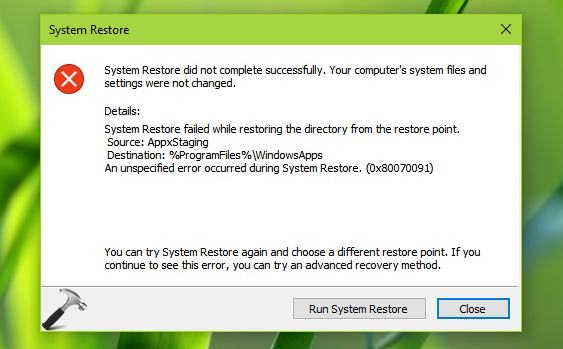
So if you’re getting this error while restoring your machine, the root cause of this error is WindowsApps folder housed in your system root drive i.e. C:\Program Files\WindowsApps. After researching a bit on this issue, we found that if you rename this folder to something else and retry System Restore, the problem no longer occurs.
But renaming WindowsApps folder is not easy because it contains all of your system apps and while you perform renaming operation, even if a single app from the folder is running in background, you won’t be able to rename the folder. Hence the renaming operation should be done in Windows Recovery Environment (RE) using Command Prompt. Here is the step-by-step approach to perform the troubleshooting:
FIX : System Restore Failed While Restoring The Directory From The Restore Point (0x80070091) In Windows 10
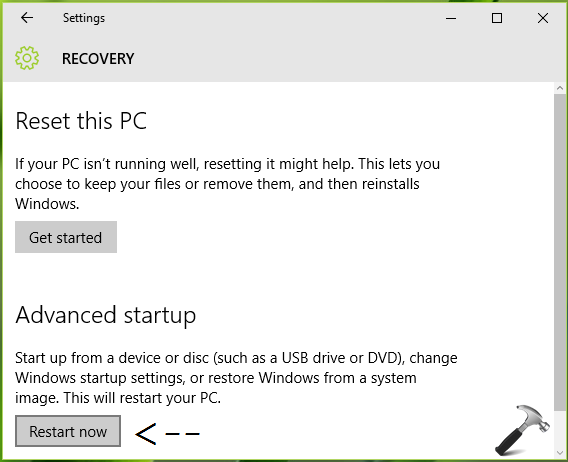
1. Open Settings app and select Update & security > Recovery. On Recovery pane, under Advanced startup, click Restart now.
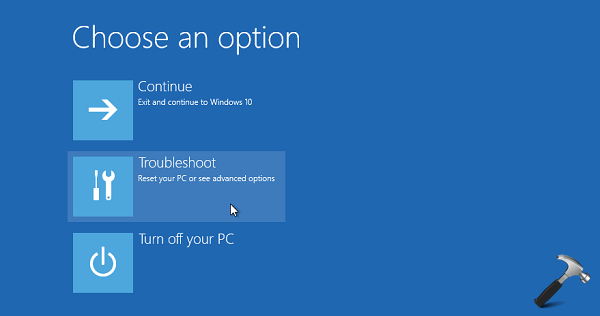
2. Now on below shown screen, you’ve to opt for Troubleshoot option:
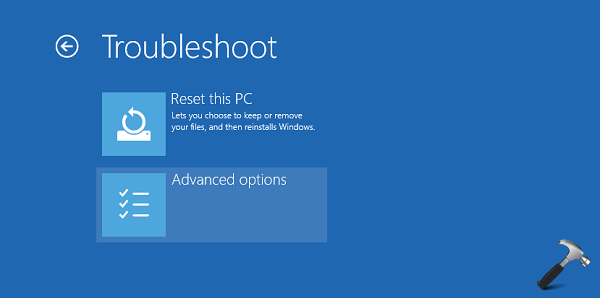
3. Then hit Advanced options entry in following screen:
4. Moving on, select Command Prompt from Advanced Recovery Options screen.
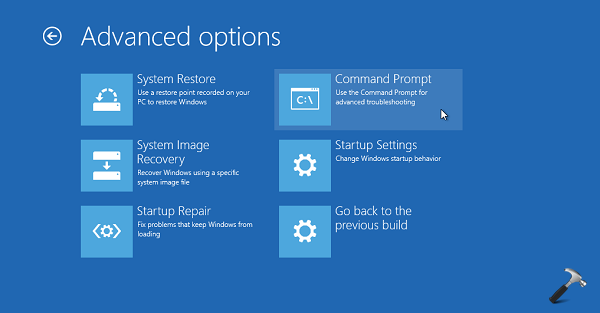
After you select Command Prompt, Windows will reboot into Command Prompt mode.

5. Select your admin account and enter your selected account password to continue.

6. Type following commands one-by-one and press Enter after each:
D:
cd Program Files
takeown /f WindowsApps
icacls WindowsApps /grant Administrators:F
attrib WindowsApps -h
rename WindowsApps WindowsApps.old
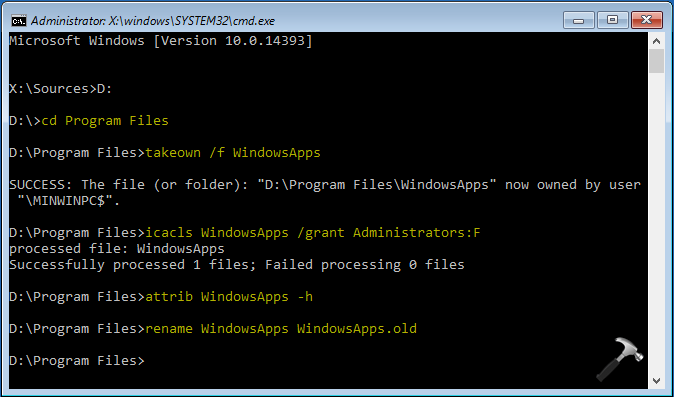
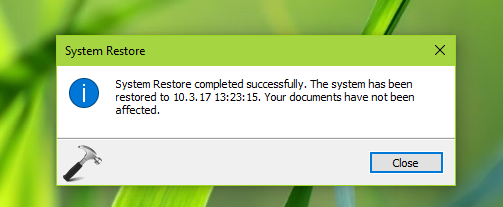
Now close Command Prompt and continue to your Windows 10. You can then retry to restore your system and it should work without any error.
Check following video for illustration of this method:
That’s it!




Sir,After complete your fix, Can I delete the ‘WindowsApps.old’ folder?
OMG…
Sir, I don’t know,which word will be able thank you properly.
Thanks a lot Sir.
I’m done with this.
I love you Sir…
^^ Glad we could help 😎
Hi Kapil, I received the same error message when I did a system restore. I followed all your steps but when I got to the part for Sources D: It responded with, your device is not ready. I didn’t know where to go from there. Can you help? I’m unable to open my start menu and I have no sound.
Thank you,
Denise
^^ Hi Denise, try rebooting and then see if you can go ahead with the steps.
Hi Kapil, followed instructions..selected D: then input ‘cd program files’–received ‘The system cannot find the path specified’. Same response in three other Windows 10 computers. Same response using C:. Any thoughts on how to get past this hurdle? Thanks in advance.
Hi Kapil.
This didn’t work for me, although the WindowsApps folder in C:\Program Files has been renamed. Searching my computer also shows WindowsApps folders in C:\Users\admin\AppData\Local\Microsoft, C:\Users\Default\AppData\Local\Microsoft and C:\Users\defaultuser0\AppData\Local\Microsoft. Should I rename any of these?
Cheers,
Dennis
^^ Hey, there is no need to rename those folders as the error clearly mentions %Programfiles%\Windows Apps folder 😊
Hi Kapil. Following my entry of D:, when I type in “cd Program Files” I get a response that says System cannot find the path specified. What to do? I have tried it using E: but get the same response.
^^ Jerry, can you check with C: drive please 😊
Kapil,
My configuration is OS on C, Data on D, DVD RW on E, and External Backup on F.
When I tried using the C drive, the Windows 10 Mail App was wiped out and wouldn’t function, requiring a System Image repair.
What to do?
Jerry Anderson
^^ If the steps worked for you with C: drive, then you can later rename WindowsApps.old back to WindowsApp. This should make the apps working again.
First of all, thanks a lot for this guide! Really saved me. I got it to work and did the system restore fine, but I am unable to rename the “WindowsApps.old” folder back to “WindowsApps”.
I did find another folder that is “WindowsApps” when I unhid my hidden files and folders. Does it matter if that’s the case?
^^ If “WindowsApps” folder exists, and all apps are working fine, there is nothing that you needs to worry about 😊
I’m not sure. What specific apps should I take note of? What should I do with the the “WindowsApps.old” folder? Once again, thank you very much!
^^ All the built-in apps such as Photos, Edge etc. and it’s up to you, if you like to leave WindowsApp.old folder as it is.
Prompt “attrib” or “takedown” are not recognized when when addressing either drive. (C or D)???
^^ What about rest commands? Suggest you to retry the commands carefully.
So when i type rename WindowsApps WindowsApps.old i get the following message “A duplicate file name exists,or the file cannot be found ” what shoud i do ? im stuck in this for ages already
^^ Manually verify, and rename WindowsApps.old to something else. Now retry with command and see if you can go ahead.
Is it possible to go back and not do a system restore at all?
^^ Possible. Try either options of ‘Going back to previous build’ or ‘System Image restore’, if you have the backup with you.
Hello Kapil. Appreciate your help. I managed to change WindowsApps to WindowsApps.old but now when I try restore get the following message: System Restore did not complete successfully. Your computer’s system files and settings were not changed.
Details:
System Restore failed to extract the original copy of the directory from the restore point.
Source: %ProgramFiles%WindowsApps
Destination: AppxStaging
The restore point was damaged or was deleted during the restore.
You can try System Restore again and choose a different restore point. If you continue to see this error, you can try an advanced recovery method.
Any suggestions?
^^ I believe something is wrong with the restore point you created and as suggested, you may try other recovery option such as System Image backup: https://www.kapilarya.com/how-to-restore-windows-10-system-image
Hey Kapil Arya
At the end of the process here’s what I get, keep in mind that I have tried this before but I keep getting the system restore error 0x80070091
C:\Program Files>rename WindowsApps WindowsApps.old
A duplicate file name exists, or the file
cannot be found.
^^ If you’ve followed the steps twice, this might occur. Manually rename WindowsApps.old to something else and then retry steps mentioned here.
Don’t know what’s happened , all fine until exited out of c prompt now no way can I get into windows , completely buggered the system now will have to go to computer shop to get repaired
Unless I can reverse the whole procedure in c prompt , on start up but that seemed impossible
The whole window system seems to have crashed, everything went fine right up until I went to the c prompt exit and go back to windows, but it simply would not reboot and I’ve now got a black screen looks as if now I will have to go to a computer shop and get the computer repaired not sure if I would want to tackle this type of repair again now!
System recovery works if I go into boot mode but it will give me the same problem if I do it normally. Why? In addition, after the recovery at startup, Windows does not create the automatic recovery point (even if the restore is successful) and I have to create it manually. How do I solve? Unfortunately I also carried out a reinstallation of Windows in place but it did not go well in the sense that the error of the restoration is I had it yesterday and today! Help me!
Hello Kapil,
I got the same problem as Scottie D. Wilkinson.
My Windows 10 Home wouldn’t load after the update. So I ended up in a blue Recovery screen. I had 3 Restore Points on the list, and when I used the newest one, I got:
“System Restore failed to extract the original copy of the directory from the restore point.
Source: %ProgramFiles%WindowsApps
Destination: AppxStaging
The restore point was damaged or was deleted during the restore.”
…and that Restore point disappeared from the list after that.
So I tried to use two other different Restore Points on the list and each time it says “the Restore was successful”, but Windows wouldn’t load anyway.
And I don’t have a System Image backup available.
Any suggestions? Thanks in advance
^^ Please try repairing the boot records, see if that helps you: https://www.kapilarya.com/fix-windows-10-master-boot-record-corrupted.
Worked for me but couldn’t use name “D” so continued with drive name “C” … Followed directions as above completely ignoring all the errors that popped-up. After renaming folder and restarting computer the folder was renamed and system-restore now works!
“Thanks!
^^ Glad it helped, thanks for your feedback!
Hello
I’m in the “takeown / f WindowsApps” step
I receive this message:
ERROR: The system cannot find the specified file.
I did the steps exactly like the picture
^^ Make sure you correctly identified system root drive letter.
I got a .mpal virus
And I don’t know how to do what you said
To recover data, I want to do a system restore
You can tell me exactly how to solve this problem
My error code: 0x800705aa
I managed to change the name of the windows apps
But after the restore system again
I received this error:
system restore failed to exctract the file c: / windows fonts / krtica.ttf
error cod: 0x80071160
Do you have a solution for this?
^^ Have you completed all steps/commands mentioned in the article?
I have two files, one is windowsApps.old
And another windowsApps.old1
I named the second one myself because a .old had already been created
I get this error
system restore failed to exctract the file c: / windows fonts / krtica.ttf
error cod: 0x80071160
I once managed to recover but chose the wrong time and went back to the time I got the virus.
Now I get the above error when recovering before the virus
Hi,when I type takeown /f Windows apps an error showing me “the system cannot find the file specified”. Can you pls resolve this.
Worked for me. Thanks a lot.
^^ Glad to help!
Hi,
Thanks for the system restore trick and it’s done.
But after system restore my window colud not update.
i have two folder of WindowsApps and WindowsApps.old can i merge it or delete WindowsApps.old folder.
Any one can help me for Windows Update issue “Something went wrong. Try to reopen setting late.”
^^ As Windows could not update, I suggest to run Windows Update troubleshooter from Settings app > Update & security > Troubleshoot > Additional troubleshooters.
Dear Kapil Arya In my case (I have a PC with Windows 10 Pro Insider Preview – Build 21322.rs_prerelease.210220-1651 version installed.
I have a motherboard ASUS Prime Z490-P (with bios 1602 beta installed) with mounted an Intel i9 10900k processor, 64 gb of memory at 3600 Mhz, a GPU Nvidia Gigabyte GeForce RTX 3070 GAMING OC 8G, overclocked with AORUS ENGINE software (+176 +518 values, with no problems), some SDD disks and one V-NAND SSD 970 EVO Plus NVme M.2 of 1 TB.)
I obtained only a black screen with the arrow moving around the infinite booting.
Now I can’t access my windows pc and I am in a big trouble.
Could you explain me how to reverse the situation to have at least Windows 10 functioning?
Thanks in advance.
After installing a software ‘Simatic net’, I tried to restore C drive to get back to before installation point. But I receive this error mentioned above . and then I understand that my C drive has lower space. Before I did system restore, C drive free space was 24 GB but now is 18GB.
I just want to delete these new files that is created by failed operation and do not want to undo that system restore.
Any advice?!
If you restore the system after solve issue, Will not be damaged again by restoring a previous restore point?
^^ System Restore won’t damage your system. It just restores last known good configuration.
I need help . It tells me that the specified path cannot be found. Why could it be? . Thank you
It worked! Thank you very much!