

We all know Store app enables us to add new apps to our Windows operating system. Sometimes, Store app may not able to start and it closes immediately as soon as you launch it. If you’re facing this behavior on Windows 10, then make sure you’ve already switched to Microsoft account. Following article enlists further suggestions to fix this problem:
Fix: Can’t open Windows Store in Windows 8 or later
Recently, we came around a strange error while using Store app in Windows 10. In this case, launching Store app failed with following error message:
Page Contents
The server stumbled
We all have bad days
The error code is 0x80072EFD, in case you need it.
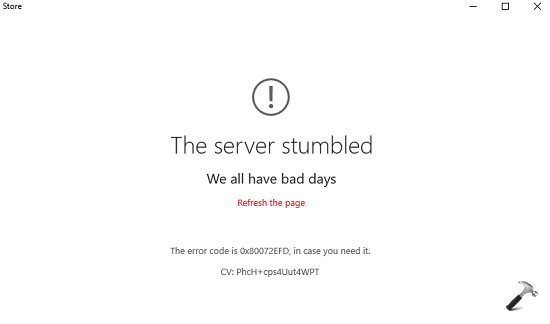
The previous suggestions we have didn’t worked for this issue. Hence we need to try something new that could easily solve the problem. If you’re too facing this issue, here are the ways you can try to fix it:
FIX : Error 0x80072EFD – The Server Stumbled For Windows Store
FIX 1 : Reset Proxy Settings
1. Open administrative or elevated Command Prompt.
2. Type following command and press Enter key:
netsh winhttp reset proxy
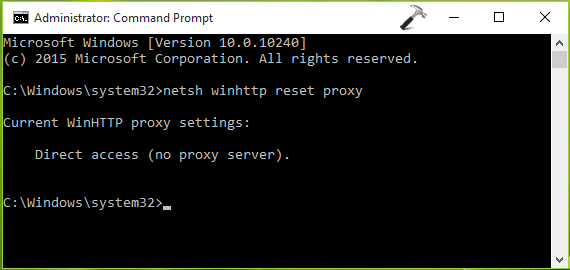
3. Once command successfully executed, close the Command Prompt and start Store app. The Store should be able to load now.
FIX 2 : Reset Windows Store cache
1. Press  + R and type following into Run dialog box, click OK:
WSReset.exe
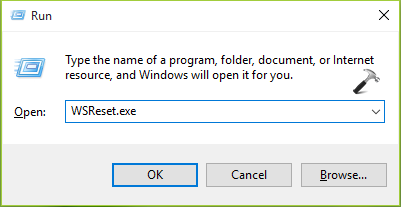
2. After you click OK in previous step, the Store app will open and load. In case, if still fails to launch, reboot and see if it helps.
FIX 3 : Re-register Store app
If above mentioned fix didn’t worked, you can try to re-register the Store app using steps mentioned here:
How to Re-register Store app in Windows 10
Alternatively, you can try to create a new user account and check if the Store works on that. If Store works on it, go ahead with that user account.
Hope something helps! Go here to fix, if Store app gets launched when you try to open Settings app in Windows 10.




None of these did anything.
Thanks, first method works.
^^ Glad we could help :)
none of these worked ..still getting error
^^ Have you checked by creating new user account, whether issue persists on that?
yes changing proxy settings worked for me THANX BRO!!!!!!!
^^ Glad to see it helped! :)
why this problem can’t be fixed by a simple update? I’ve been trying everything to get the bloody Store work ever since the Win 10 update.
It works for me too. Thanks from France!
^^ Awesome :D
Thanks for the help. The first fix worked just fine.
:)
^^ Thanks for feedback :)
please help me
Not work idea on these error 0x80072EE7
^^ Try creating new user account and check if Store works on that.
I tried all of these fixes and none of them worked. Then I decided that perhaps the fact that AVG had failed prior to my getting the error with the Windows Store was significant. I couldn’t uninstall AVG in the standard way so I searched on how to use the AVG remover tool. That did the trick and AVG was uninstalled. And when I ran the Store app it worked perfectly. I am now using AVAST as my AV tool
^^ So AVG blocked your Store app, great to hear the issue is resolved now :)
your first method was solved my problem.
Thank you
^^ Cool 😊
so thanx
THANKX FOR YOUR METHODS!! MY STORE IS WORKING :)
^^ Happy to help ☺️
Worked! thanks!
^^ Nice!
Thanks a bunch. The information was very useful and I hope I may get answers for many of my questions in the future too.
Nothing works. I’m going to back up my files and try resetting the system. I’ve wasted many, many hours over the course of weeks trying to fix this. I’m so sorry I ever “upgraded” from Windows 7 to Windows 10.
Hi Kapil, none of this worked for me. What is next?