Windows 10 has gone through many improvements in past versions. Whether it is matter of features, updates, booting or personalization options, Microsoft has worked in all the departments to make their OS better. One of those consistent improvements are in the field of personalization.
Microsoft earlier released dark theme for Windows 10. Then they made File Explorer to support dark theme in V1809. After that, Microsoft out with light theme in Windows 10 with version 1903. However, following the personalization improvements, some users may not be able to keep older choices with newer updates. We will discuss one such case in this article.
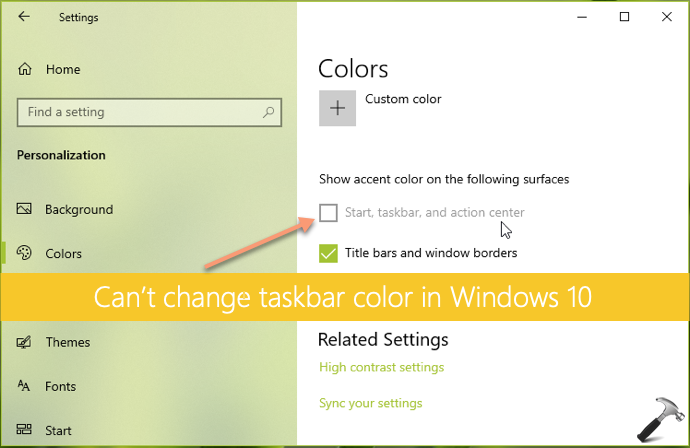
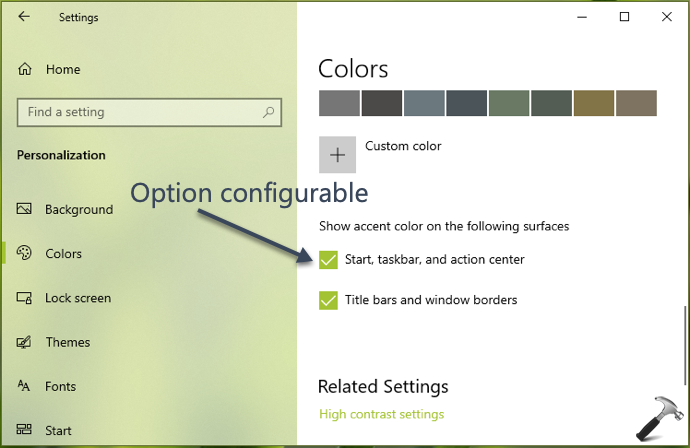
If you’re running Windows 10 V1903 or later, you might have realized that you can no longer change taskbar color. Because when you go to Settings app > Personalization > Colors, you’ll find that show accent color on Start, taskbar and action center option is simply greyed out. This can be clearly seen in the screenshot shown below.
Here is how you can deal with this problem.
FIX: Can’t Change Taskbar Color In Windows 10
Usually, only the users on Windows 10 Version 1903 has complained about this. And the reason behind this is simply the presence of ‘light theme’. Because Version 1903 comes with light them enabled by default. Following the design behaviour of light them, you’ll not be able to show accent color on Start Menu and related items such as taskbar and Action Center.
To combat this situation, you’re supposed to first select Custom option for Choose your color. Next, you must set Choose your default Windows mode to Dark.
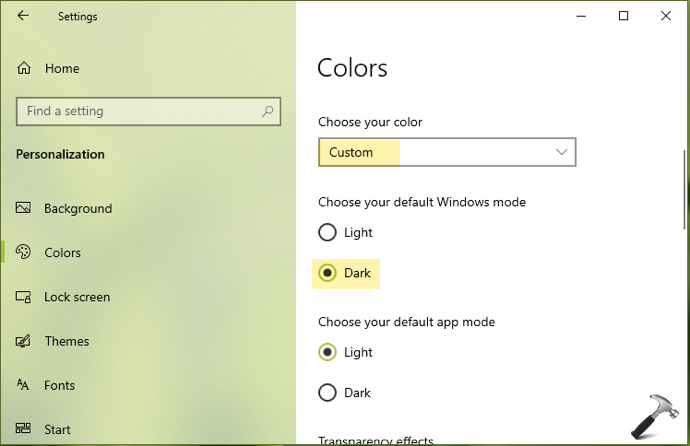
Then you can scroll down and you’ll find that option to show accent color on Start, taskbar and Action Center is now configurable. This means you can select and apply your desired color on taskbar.
Checkout this video demonstration for more:
In this if you still face problem in changing the taskbar color, feel free to drop us comment and we’ll figure it out for you!