

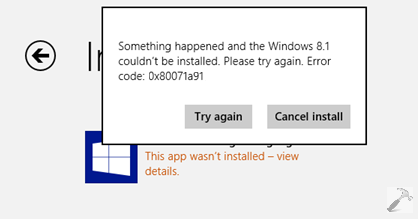
Few days ago, Microsoft announced the Update for Windows 8.1 and made this available to end users. You can get the update by installing latest Windows Updates available to your system or manually get the update files as mentioned in this article. Well, almost after a week, we have came around many users facing issues while installing the Windows 8.1 Update i.e. KB2919355. One such common error users are receiving is 0x80071a91. The error description is as follows:
Page Contents
Something happened and the Windows 8.1 couldn’t be installed. Please try again. Error code: 0x80071a91
[Try again] [Cancel install]
Well, Microsoft has confirmed the issue and thus they have made available the another small yet powerful fix / Windows Update (KB 2939087) to clear out this hitch. In this article, we’ll discuss about the patch released by the Windows team, so that you can bypass the problem of failed installation for Windows 8.1 Update.
FIX : “Something Happened And The Windows 8.1 Couldn’t Be Installed. Error Code: 0x80071a91”
In order to fix the error 0x80071a91 while installing Windows 8.1 Update, you need to install the KB2939087 definitions to your existing Windows 8.1 installation. Here the download links you can use to download the official fixes released by Microsoft via Microsoft Download Center:
Download Link For KB2939087 [32-BIT]
Download Link For KB2939087 [64-BIT]
The above linked fixes would work for Windows RT 8.1, Windows 8.1 (All editions). After installing them, you need to restart you machine and after reboot the issue should be fixed.
Hope this helps!






Wouldn’t it be better to withdraw the entire Windows 8 series ? It’s rubbish ! Have used Windows since the NT4-era. No problems with any “servicepacks” before Windows 8. Now i am back to working OS:es like XP x64 and Vista x64 ! 7 and 8.x are too buggy and too much software don’t work with them….
If a car had worked poor as Windows 8.x it would have been withdrawn from the market instantly.
^^ Can’t agree on this :) I am too using Windows since long time and Windows 8 is the OS worked perfectly for me. However Modern UI in Windows 8 was needed the improvements after its first introduction and Windows 8.1 & its Update made the necessary correction. Please let me know what bugs you have came around :D