PIN is very convenient sign-in option for Windows 10. It helps you to login with basic 4 to 6-digits PIN which is easy to remember, as compared to traditional password. You can also configure PIN complexity to create more complex PINs.
However, sometimes managing PIN may trouble users. While altering the PIN, the users may came around following error:
Page Contents
We couldn’t sign you in – The device that is required by this cryptographic provider is not ready for use.
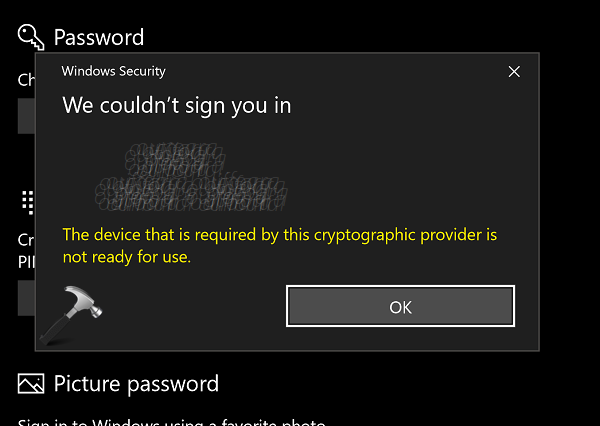
Due to above mentioned error, users may not be able to change, add or remove PIN in Windows 10. If you’re also victim of this issue, here’s how you can fix it.
FIX: ‘The Device That Is Required By This Cryptographic Provider Is Not Ready For Use’ In Windows 10
FIX 1 – General Suggestions
1. Make sure Trusted Module Platform (TPM) 1.2 or later is supported on your device. The TPM must be enabled in BIOS settings. BIOS should also be updated.
2. Ensure that Cryptographic Services is running and set to Automatic, in Services snap-in.
3. Try creating new user account and verify if you’ve issue with PIN on that account. In some cases, this will help you to isolate the issue if it only happens with your current profile that might be corrupted.
If this doesn’t helps, try FIX 2.
FIX 2 – By Resetting ACLs On Ngc Folder
This problem might also occur, if Access Control Lists (ACLs) on Ngc folder are corrupted. Thus you must reset ACLs for Ngc folder to make PIN working again.
Right click on Start Button and select Command Prompt (Admin). In the Command Prompt window, type following command (replace C: with your system root drive) and press Enter.
icacls C:\Windows\ServiceProfiles\LocalService\AppData\Local\Microsoft\Ngc /T /Q /C /RESET
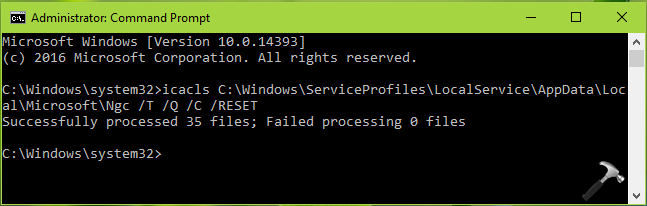
Close Command Prompt. You might need to add a new PIN now and it should work as expected.
Perform a repair upgrade, if nothing helps.
Let us know via you comments, if you still have the issue!
![Windows needs your current credentials [Fix]](https://www.kapilarya.com/assets/password_icon_1783831080.jpg)