

Our following guide shares you the steps to upgrade to Windows 10 using ISO file:
How to install Windows 10 upgrade using ISO file
However, following the above mentioned guide some users may face issues with product key which we will discuss in this article. Actually, when you run the setup for edition upgrade or repair upgrade, the setup starts okay but then after “We’re getting some things ready” title, it shows following message:
Page Contents
Setup has failed to validate the product key
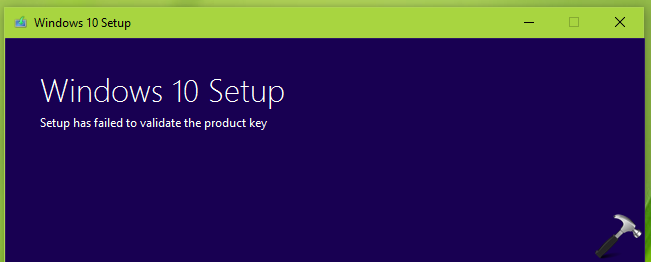
Nothing can be done beyond this stage, unless you explicitly opt for clean install. If you’re also facing this problem, try out these suggestions first:
- Make sure you’ve latest Windows Updates installed
- Run the Disk Cleanup utility to erase temporary files and try to run setup again
- Try installing latest Windows 10 version via Windows Update instead
- If your system is part of domain, temporarily remove it from domain and perform upgrade then
- Remove third-party security software temporarily from the machine
- Run System File Checker scan and see if that helps
If you still have the issue, try the below mentioned solution which is supposed to work in this case.
FIX: Windows 10 Setup Has Failed To Validate The Product Key
1. Extract Windows 10 setup ISO file using any decompression software such as 7-zip.
2. Open Notepad.
3. Type/copy following contents into the new file:
[Channel]
Retail
[VL]
0
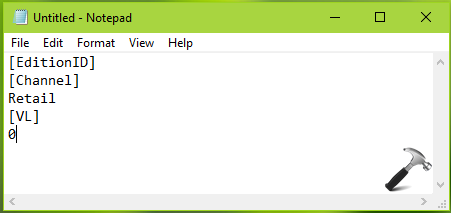
4. Now save the file by “ei.cfg” name and choose Save as type to All Files. Make sure you save this file to sources folder inside the setup ISO file.
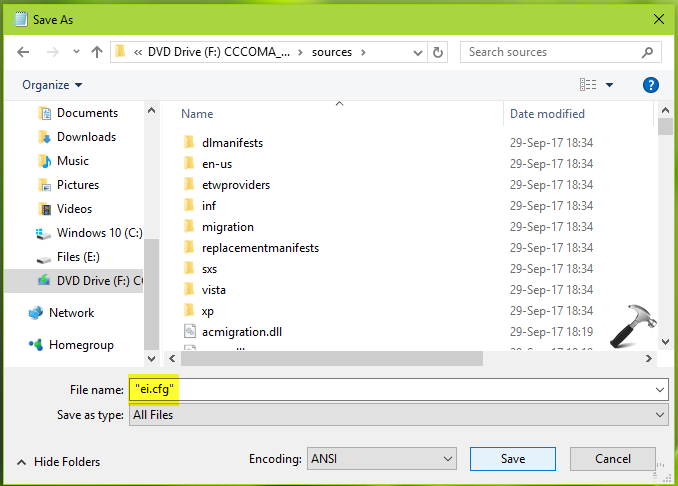
5. Now run the setup.exe file to start installation wizard or create the bootable USB to make clean install. This time the error should not occur.
Hope this helps!






Thanks for a easy to follow solution that works.
^^ Glad we could help 😊
Worth baring in mind that if you are doing this that if there is a CFG file present in the sources folder, remove this, create a new file as above and it works! Took me some working out though.
^^ Right!
Worked like a charm after trying so many other solutions.
^^ Happy to help 😊
Thank you, worked perfectly
^^ Glad it worked 😎
After several attempts of upgrading to Windows 10 from Windows 7 including changing product key with no luck the fix that worked for me was
3. Type/copy following contents into the new file:
[EditionID]
[Channel]
Retail
[VL]
0
Thanks
^^ Happy to help Tariq 😊
Yip, this worked for me too, much to my surprise :-)
Thank you.
^^ Glad to help Paul 😎
couldn’t worked for me
Didn’t worked for me
^^ Try clean install instead.
Almost worked it did everything until checking for updates and half a long time nothing happen. How long does that part take. I shut it down
^^ As you’ve shut down so on the next attempt, make sure you skip update checking part.
I have a copy of Windows 7 Pro. After Windows 10 installed, I was unable to activate. Using the Troubleshooter for Activation, it claimed that I had a digital license for Windows 10 Home, but not Windows 10 Pro. Any reason why I didn’t get an upgrade to Windows 10 Pro?
A solution that worked first time. Thank you
^^ Glad to help David 😊
Hallo
What happens to the old files and programs in
Windows 8.1 If I Upgrade to Windows 10.
Best Regards
Christian
^^ Upgrade shouldn’t affect your data, when you select to keep it.
didn’t work for me. followed every single step but in no luck so far
Nothing did work for me in this guide. What worked tho was burning a new Windows 10 installation media on a usb stick. Ran it on the desktop with windows explorer and everything worked. No more error message.
Hood luck!
I used this method on an HP Laptop. Once Windows 10 was installed it said that it needed a product key. The device ended up needing to be re-imaged. A better solution is to install windows 10 using an ISO copy of Windows 10 1709. Windows update can then install the latest version from there.
Hi i was about to finish and now it says
THINGS THAT I NED TO TAKE CARE
IT SAYS COMPUTER IS NOT COMPATIBLE TO WINDOWS 10 AND TO CANTACT MANUFACTURE
IT SAYS INTEL R(HD) GRAPHICS THAT IT WILL HAVE PROBLEMS WITHT HE DISPLAY IN WINDOWS 10
WHY AM I GETTING THIS MESSAGE? DO I HIT CONFIRM BUTTON OR SHOULD I STOP INSTALLATION?
THIS IS MY WORK COMPUTER AND I AM NOT SURE IF THE WINDOWS RUNNING IS LEGIT
THANK YOU
^^ It seems the display driver on your system is incompatible for newer installation. You may temporarily remove it and proceed with installation. After installation, install display driver in compatibility mode.
After an upgrade from Win 7 to Win 10, it seems that the Task Scheduler
has a problem and does not start the automatic maintenance task such as Windows Defender
which runs just fine manually as well as using the Run command in the Task Scheduler itself.
I have found that there appears to be two Windows Defender folders in the Task Scheduler
and one is empty but the other is the one I used to execute the Run command. Could the two
folders be causing confusion with the Task Scheduler so that it does not execute the automatic
maintenance tasks? I suppose the empty folder is left over from the Win 7 upgrade.
doesn’t work even following and trying a;; mentions above
Thank you so much this worked perfectly and Windows installed and activated with no problems.
^^ Glad we could help!
I do NOT want to do a clean install.
> 5. Now run the setup.exe file to start installation wizard or create the bootable
> USB to make clean install.
Which one will avoid the clean install? Run set.exe… or create the bootable USB?
OMGi cant believe this worked.
i tried so many other fixes.
^^ Glad to help Rickal!
Thanks, it work
^^ Glad to help!