

Safe Mode is the something in which Windows starts with minimal resources. Safe Mode is generally helpful when you’re facing a critical issue on your system. We verify the issue, if it persists it Safe Mode or not. This will help us to isolate the issue and thus we can fix it accordingly. You can boot Windows 10 into Safe Mode using following guide:
How to boot Windows 10 in Safe Mode
However, there is a connected issue with Safe Mode. Sometimes users may find that their Windows operating system is stuck in Safe Mode. No matter how much time they restart, it keeps booting into Safe Mode. As I already mentioned that Windows uses least resources in Safe Mode and thus most of things won’t work for you in Safe Mode. So if your system is stuck in Safe Mode, you may want it to boot into normal mode so that you can make the system productive again.
Here are the couple of fixes you can try, if your Windows 10 keeps booting into Safe Mode.
Page Contents
FIX: Windows 10 Stuck In Safe Mode
FIX 1 – Using System Configuration Utility
1. Press  + R and put msconfig in Run dialog box to open System Configuration Utility. Click OK.

2. In the System Configuration Utility window, switch to Boot tab and under Boot options, uncheck Safe boot option. Then check Make all boot settings permanent option. Click Apply followed by OK.

3. Then select Yes in the confirmation prompt appears next.
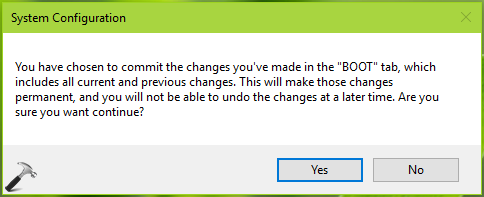
Reboot the machine and see if you can boot to normal mode now.
FIX 2 – Using Command Prompt
1. Right click Start Button and select Command Prompt (Admin).
2. In the administrative Command Prompt window, type following command and press Enter key:
bcdedit /deletevalue {current} safeboot

3. Close Command Prompt and reboot the machine.
After rebooting your machine, your system should boot straight to normal mode. Check following video for illustration:
Hope this helps!


Im stuck in safe mode on my android device