Few days ago Microsoft announced the Windows 8.1 Update, you can read more about it here. A new feature inside this update is that users can pin the Modern Apps to their taskbar. Also when users open any Modern App, they are shown at taskbar. I agree with the fact that pinning might be helpful for some, but showing Modern Apps which are currently running at taskbar doesn’t seems interesting to me. So I started digging the setting to avoid it using my favorite Local Group Policy Editor and eventually I came around a solution.
Before moving to the solution, let us understand the situation with an example. In the below screenshot, three Modern Apps are running on the system namely OneDrive, Internet Explorer and OneNote. So by default, we have these 3 apps listed on the taskbar as shown.
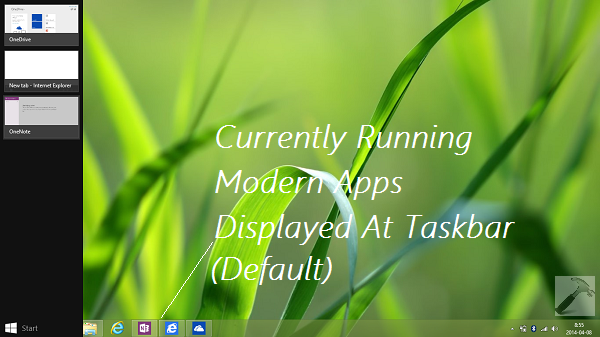
Now since we don’t want the Modern Apps to be listed or displayed at taskbar anymore, we should have this condition:
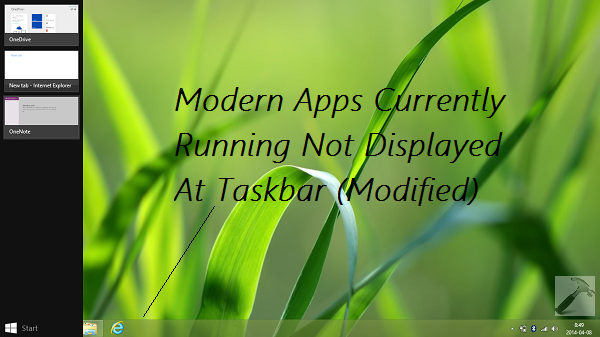
Now, here is how to make this possible:
How To Prevent Modern Apps From Displaying At Taskbar While Running In Windows 8.1 Update
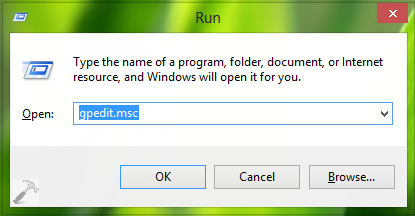
1. Press  + R and put gpedit.msc in Run dialog box to open Local Group Policy Editor. Click OK.
2. In the left pane, navigate here:
User Configuration -> Administrative Templates -> All Settings
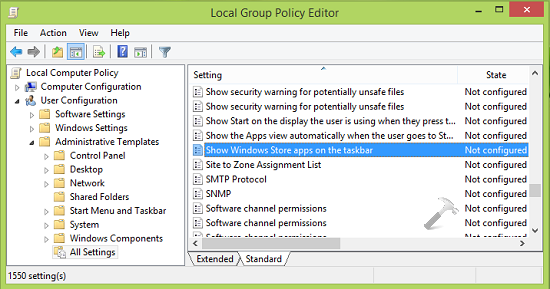
3. Now in the right pane, scroll down to look for setting named Show Windows Store apps on the taskbar; which must be showing Not Configured status be default. Double click on the same to modify:
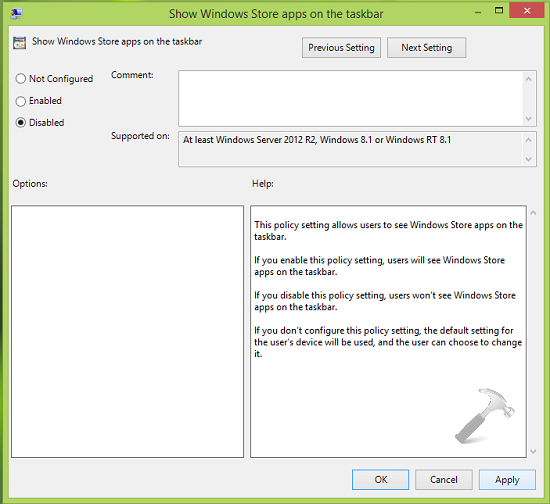
4. In the above shown window, select Disabled in order to prevent Modern Apps from displaying at taskbar while running. Click Apply followed by OK. Close the Local Group Policy Editor and reboot the machine to see results.
Hope you find the tip useful!