

When you upgrade from your previous Windows edition to Windows 10, the role of Modern Setup Host becomes important in the process. It is the crucial element to allow or terminate certain processes during upgrading. Even after your upgrade to Windows 10 is done, this element helps the OS to run Modern or Universal app packages. You can verify this by checking Task Manager on Windows 10, and by locating Modern Setup Host as background process.
Although, Microsoft has not yet documented much about this component. But an error received while upgrading to Windows 10 brings our focus on presence of Modern Setup Host. While upgrading, we came around following error:
Modern Setup Host has stopped working
A problem caused the program to stop working correctly. Windows will close the program and notify you if a solution is available.
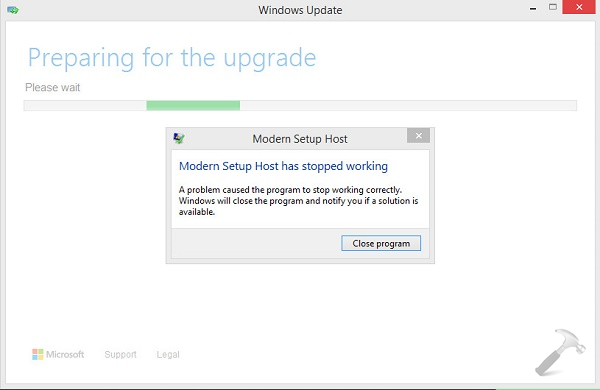
If you review this event log for this crash, you’ll find that installation of Windows 10 has failed with some error code like 0x80070652, due a faulting package. Here is how to overcome this problem:
Page Contents
FIX : “Modern Setup Host Has Stopped Working” While Upgrading To Windows 10
FIX 1 : By Clearing The Software Download Folder Contents
1. Press  + R key combination on your keyboard and paste following into Run dialog box and click OK:
C:\Windows\SoftwareDistribution\Download
*Substitute C: with your system root drive.
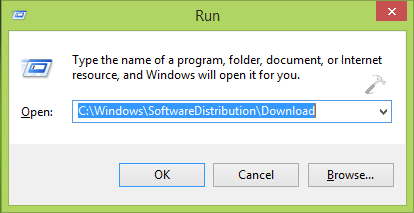
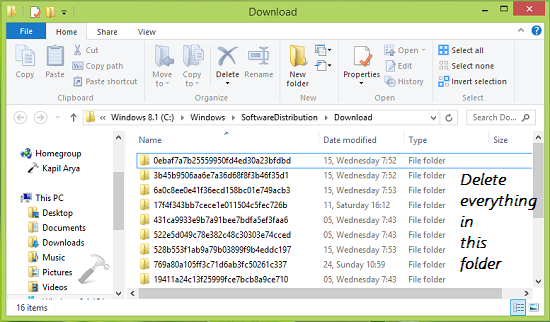
2. Clear all the contents of Downloads folder so opened:
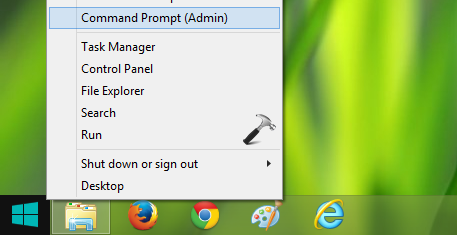
3. Now right click Start Button, select Command Prompt (Admin) and open administrative Command Prompt.
4. Type following command in the Command Prompt window and press Enter key.
wuauclt.exe /updatenow
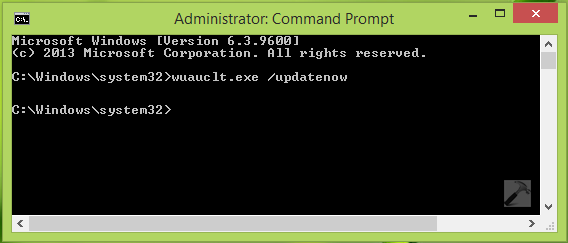
Once the command is successfully executed, you can Close Command Prompt and reboot. After restarting the machine, re-try to upgrade and this time everything will go fine. If the issue still persists, refer FIX 2.
FIX 2 : Using Windows 10 Upgrade Assistant
1. Download the Windows 10 Media Creation Tool for the same edition and architecture you’ve currently installed. Run the tool and let it download the upgrade. You’ll found that it will stuck while creating installation media, so exit that wizard.
2. Now press + R key combination on your keyboard and paste following into Run dialog box and click OK:
C:\$Windows.~WS\Sources\Windows\sources\setupprep.exe
*Substitute C: with your current system root drive.
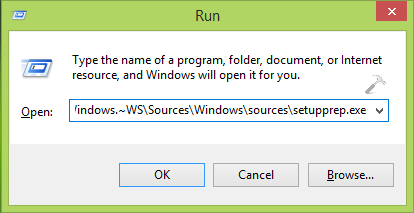
Once you clicked OK in last step, the setup will launch, which will help you to proceed with installation.
Hope this helps! Go here to checkout how to make clean install of Windows 10 using ISO file.





Hi Kapil. Great explanation. But none of these has worked for me. I’ve made sure antivirus and malware software is off and also freed up space on C:
I’m hoping there are other options apart from installing the ISO….any ideas would be gratefully received.
It’s 2016 now, and the free upgrade is due to expire in less than 29 days, judging from the numerous inquiries about the modern setup host stopping, I would assume that Microsoft is very aware that there is a problem!
My guess is that they want people to give up in frustration and buy a copy of Windows® 10, or else they would have certainly addressed the issue by now.
^^ They are aware of this problem. I believe this might be resolved by Anniversary Update: https://www.kapilarya.com/windows-10-anniversary-update-expected-to-arrive-this-july
My comment is the same as Tammy Tamponski….Tried the above solutions and still get the error message. My Windows 7 is working fine, to heck with Windows 10.., Thanks Microsoft, guess I was one of those selected who will be required to pay if I ever want Windows 10 on this computer. Also does the same on one other computer we have… maybe they go by our address.
Spent a whole day attempting these and various other “solutions” found on the WWW – none worked. Bit the bullet and opted for a fresh install, rather than keep apps & data, from my Windows 10 Pro USB on my Laptop and spent half a day reinstalling my apps and syncing my data with my main PC. So the fresh install was in fact quicker than faffing around trying to keep my apps & data! I don’t think there is a solution for the dreaded Modern Setup Host has stopped working, and certainly none that MS are ever going to assist with or debug.
Tried all suggestions, still no luck upgrading to Windows 10 on 2 PCs.