

We here at Kapil Sparks™ use Mozilla Firefox as default browser, it worked fine every time for us. But when we tested the latest betas, we found the hanging habits of Firefox. Thus talking about flash sites like Youtube, whenever you open any video of Youtube and play it; Firefox becomes unresponsive. Most of users has complaints about it, so in this article we’re going to fix them.
Here is the error message displayed when you play flash on Firefox:
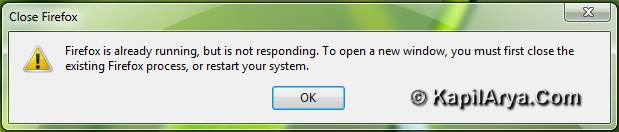
Read the second line carefully in above error screenshot, it is saying to close existing windows to open a new window. Means you’ll definitely loose the current windows and also the important work you’re doing on them. Also in some cases, Firefox takes too long to recover in stable state.
So without wasting your time anymore, here is how to fix this issue:
FIX : Mozilla Firefox Hangs Whenever Flash Is Displayed
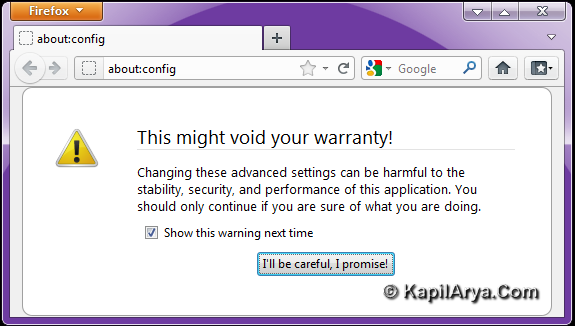
1. In the address bar of Firefox, type about:config. Now click “I’ll be careful, I promise!”.
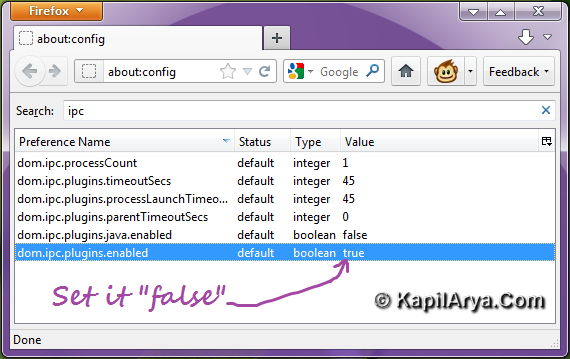
2. In the search box, input ipc. Now you’ll see the results as shown below. Edit the following preference:
dom.ipc.plugins.enabled – Default is true. Double click to set it as false.
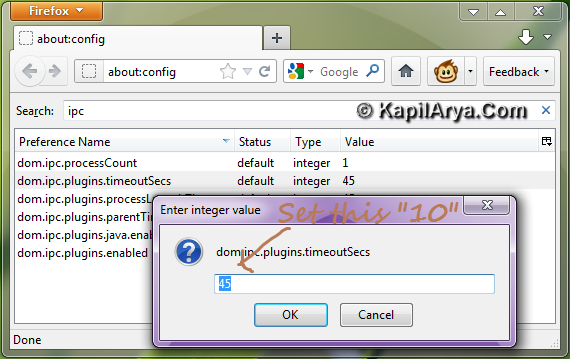
3. Finally, edit the following preference:
dom.ipc.plugins.timeoutSecs – Default value is 45. Double click on preference and input 10.
4. That’s it! We’re done now. Close Firefox and restart it. Now go to Youtube and check the performance, it should work fine. Please drop your comments if something is not working.
That’s it!



is this works for older versions?
^^ Yeah! Well which version you are using?
Thnx 4 reply. I’m using 3.6 now :)
^^ Make sure about following preferences:
dom.ipc.plugins.enabled.npswf32.dll – true
dom.ipc.plugins.enabled.nptest.dll – true
Great Kapil thanks for the help :D
I think if u r using flashgot add-on ff hangs more
AWESOME BRO !!!!!!!!!!!!!!!!
update all ur existing plugins,there wud be no such error :xD
i loved your site, thanks!
Hi!
I have the same problem with Chrome ^^ IE ?
now tell me the fix i dont know how to tweak chrome plz. help……..
^^ If you have same issue with all browsers, then root cause isn’t browser related!
Open command prompt with administrator privileges and type following commands one by one and reboot:
excellent mate ;*
I have fixed chrome :D bt IE still have same problem ?? what to do next?
@ zuneifer, install the latest updates on ie :)
@ kapil, thank you 4 outstanding article ;)
@ QXP
agreed. flashgot n another similar flash plugins hangs ff
rgds. alex
@ Kapil, try this command:
ipconfig /all > network.txt & network.txt
^^ Irrelevant Command :P
thing to wonder is firefox community doesn’t hav noticed it yet :)
awesome article bro..
what a great fix… thank you
i use firefox alot this eror seems update error on latest beta
they r making now most unstables but i think stable version have minimum issues..
well try to restore configurations in such cases ::::)
Hey. Very nice blog!! Man .. Excellent .. Wonderful .. I’ll bookmark your web site and take the feeds additionally…I am glad to find a lot of helpful information here within the article. Thank you for sharing.