

Generally, in Windows, we can send files to DVD Drive with just a right click on a file and then select DVD Drive as the target. This is the basic thing that works on almost all Windows. But what if Windows doesn’t recognize the DVD Drive for this operation?
Page Contents
Windows 8 Can’t Recognize DVD Drive To Send Files Into It
Suppose you have bunch of files that you want to burn to a DVD. You selected all the files and then right clicked and picked the option Send to -> DVD Drive. So if your default DVD Drive is E, and Windows take the DVD Drive as F (as it is malfunctioned), then it will tell you to insert the DVD Drive. Below is the screenshot taken on infected computer:
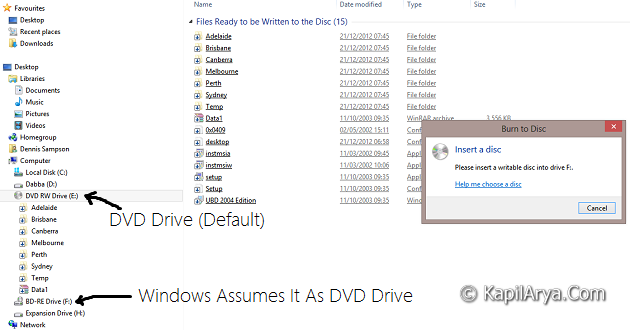
Because of this issue, Windows assumes that default DVD Drive is F there, where you can’t insert DVD instead of E. So you can’t burn the files to your desired location, until you fix it.
Instead Burn to Disc prompt will you irritate you as long as do to choose Send to -> DVD Drive option.
Fix Using Registry Editor
This issue can be fixed up easily with the help of Registry Editor. You here need to change the attributes with drives associated, so that they have correct functionality. Here is what you need to do:
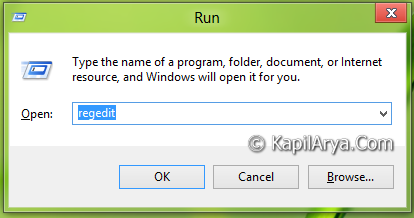
1. Press  + R and put regedit in Run dialog box to open Registry Editor (if you’re not familiar with Registry Editor, then click here). Click OK.
2. Navigate to this location:
HKEY_LOCAL_MACHINE\SYSTEM\MountedDevices
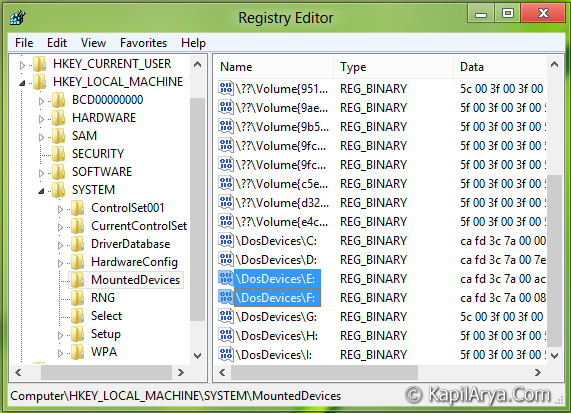
3. Since we’re issued with E and F drives here, and also Windows assumes that F is the default DVD drive (which is not in fact) so delete the DWORD DosDevicesF: after making a backup of it.
4. Rename the DosDevicesE: to DosDevicesF: finally by right click on DosDevicesE: and selecting Rename. Close the Registry Editor and reboot to see effects.
Hope it solves your problem!



Great article Kapil, thanks… Can u tell me will it can be solved form disk management as well?
LOL.. +1
@TseVen, yes it can. :)