

Earlier, we’ve seen how to load hive in Registry Editor, in this following article:
How to load or unload hive in Registry Editor
We know that loading hive is quite important for administrators and it technically helps us to load registry about those user accounts which are facing some issues with their profile. Today, while loading hive using Command Prompt at boot, we came around following error due to which loading hive failed.
Page Contents
Cannot load X:\Windows\System32\config\SAM: The process cannot access the file because it being used by another process.
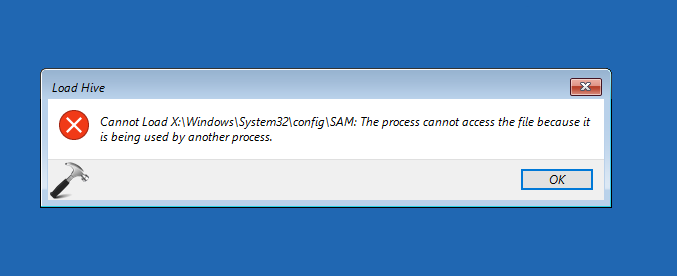
This is expected error which you will receive while loading user account via Security Account Manager (SAM) file. SAM file is basically a database file in Windows and it stores user account password and other relevant information.
FIX : “The Process Cannot Access The File Because It Is Being Used By Another Process” While Loading Registry Hive In Windows 10/8/7
The root cause behind you’re getting this error is mounting SAM file from incorrect folder. Actually, when you’re loading hive and look out for the SAM file in Load Hive window, Registry Editor by default opens config folder under X: drive. Here this X: comes due to Command Prompt at boot which defaults X: drive rather than using actual system root drive. Now since X: drive is nothing but its the memory in which Command Prompt is working, this error message comes into play.
Hence to solve this issue, you need to click the folder list under Look in section of window shown below. Then carefully locate your system root drive, note that it is always not C: drive.
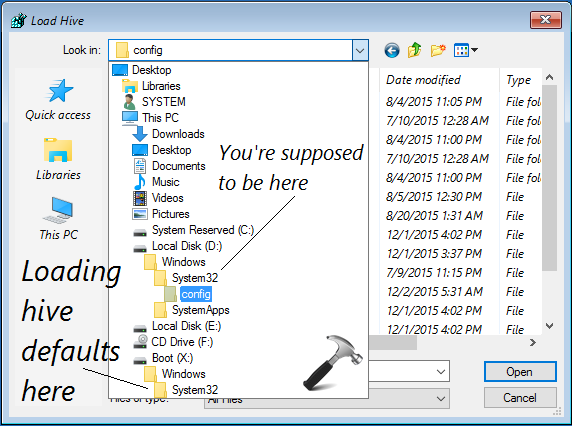
Then navigate system root drive > Windows > System32 > config. In the config folder, choose SAM file. This should work up and the loaded hive can be find under local machine branch of registry database:
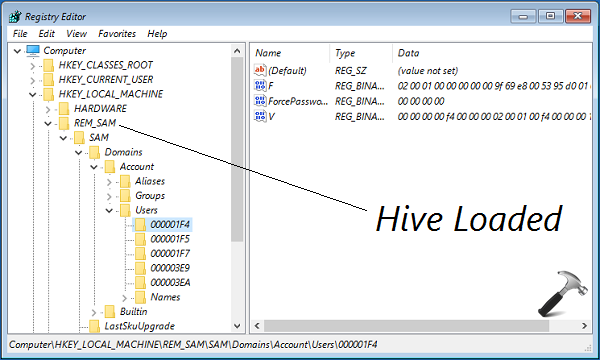
That’s it! See this fix if you can’t modify registry values.



Thank you Sir!!
Question, I am here to enable Administrators account but the F key is 15 instead of 11 which is Disabled and suppose too change to 10, but I am not sure now since it is 15 and not 11 :( Any advice?
Thank you in advance!
^^ Proceed as suggested here: https://www.kapilarya.com/fix-lost-administrative-rights-in-windows-10
Great – finally something that worked! Note that if you get a “Hive in use” type message, the SAM you’ve chosen is not the one you need to find (it should be in the C or D folder).
^^ Glad it worked for you 😊
I only see C (usb boot) and x drive. No other drive. Can’t log into the only account on the laptop.
Hellooo bro. Please help me, i don.t allow to c drive. C drive blank.. not any file in here,, thanks broo,, please help me
Hello, the c drive is not opening, when i click on it nothing happens. The photo shows that there is windows then system 32 then config in drive d which in my case is drive c but it does not show any what has been shown above. Please help, i am looking on the internet from past 1 week for this. I accidentally removed all the administrators and now facing this problem. Please help.
^^ Please check with any other drive, such as D, E etc.
i can’t choose the Hive i don’t know what’s the problem.
Hello. This is by far the most far I have gone with this issue. But I cannot find the SAM in C or d only in X. How do i go about it. Too many folders in D. Should I open each and every?? By the way, I was going to spend money fixing this issue, so I will donate to you favorite charity or send you bitcoin if this is resolved.
^^ You should have Windows > System32 > config in the drive on which Windows is installed.
Hi Kapil,
I only see SAM and not REM_SAM
^^ It seems loading hive failed on your system. Can you retry steps and check.
SAM file in use .. can’t open, Why is it in use ?
^^ That file is used to store user passwords and hence may be in use.
Once the administrator user is created with this method, what is the password for the administrator?
^^ There is no password required, as it is built-in admin account.
OUTSTANDING!
My C Drive is inaccessible in this load hive drop down. it shows it, but it appears as a drive with no size. Clicking on it does not open it.
When I clicked “Config” it said “you don’t currently have permission to access this folder”
I also did all the steps correctly.
^^ Make sure you select Config in correct location.
I have the same problem as other user indicated: My C Drive is inaccessible in this load hive drop down. it shows it, but it appears as a drive with no size. Clicking on it does not open it.
The fix for the inaccessible C Drive for me was to put in the BitLocker key before opening the Command Prompt.
^^ Expected, when you’ve BitLocker enabled on OS drive.
Wrong. Doing this gets the same response.
I only have one system32 on Boot x folder
Other is empty
There is no other local disk
It’s just c and d is empty and x. What should I do?
^^ See if you can continue with X.
User still says Admin, but computer will only log in as a temp. Have decided to restore to factory settings but am so restricted I can’t figure out how. My first step was to have a working admin and am trying to follow your instructions. My SAM file is in use, when I go to rename it I get the same message. Tried to use Look in, but can’t find it
Well, Kapil, you really are Microsoft Most Valuabe Professional, no doubt !
I knew there would be a solution on the internet, for this NET HELPMSG 2221 and it is here!
I tried microsoft support chat twice, got 2 guys doing remote help, they didn’t find the problem and their only solution was to reinstall windows and consequently lose all the programs and drivers … what a nightmare that would be, with all the old probrams and peripherics I have!
I’m glad I didn’t do it and followed your instructions … so many hours of work saved!
You really have a gift, thank you so much!
I wish you all the best.
^^ Glad to help jose 😎