

This article talks about yet another unexpected Microsoft Management Console (MMC) snap-in failure issue. Actually, while working with one of the snap-in under Windows 10, the snap-in lost its functionality and gets freeze. It would no longer accept user inputs.
Under this condition, the snap-in displays following error message:
Page Contents
The snap-in performed a non-valid operation and has been unloaded. To continue working with this snap-in, restart MMC or try loading the snap in again.
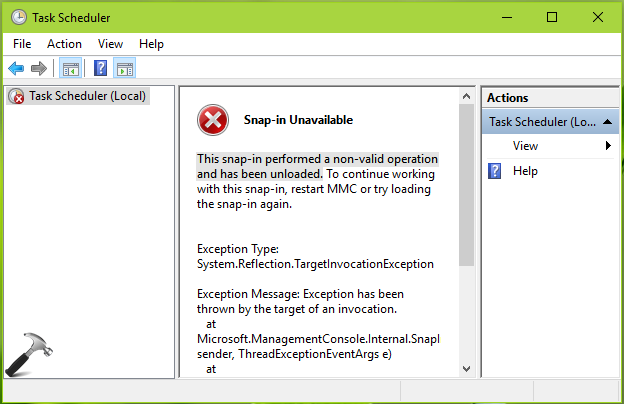
As per the error message suggested, we tried to load the snap-in again. For few time it worked okay but then again the same error message. This keeps happening with Task Scheduler snap-in, in our case. But this issue may occur with other snap-ins as well, such as Device Manager, Services snap-in etc. To avoid this problem, here is what to do.
FIX: This Snap-in Performed A Non-Valid Operation And Has Been Unloaded In Windows 10/8/7
FIX 1 – General Suggestions
1. Run the System File Checker scan. If SFC fails, run DISM commands.
2. Boot into Safe Mode with minimal resources, see if you can boot fine. If issue doesn’t persists in Safe Mode, it might be possible that some 3rd-party software is culprit here and you need to use hit and trail method with clean boot to find it. Just run msconfig command, go to Services tab and check Hide all Microsoft services and then hit Disable all button. Reboot and check the status of issue. Do this step-wise, for each programs, one-by-one disable the corresponding services and keep checking, check if the issue resolves.
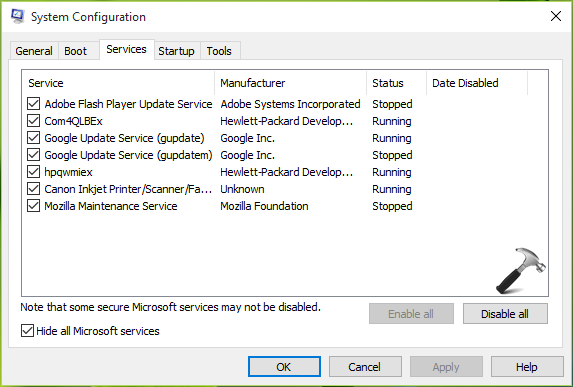
If the problem still continues, go ahead with FIX 2.
FIX 2 – Using File Explorer
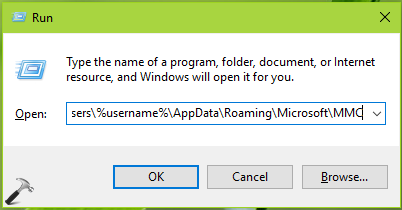
1. Press  + R and put
 C:\Users\%username%\AppData\Roaming\Microsoft\MMC in Run dialog box. Click OK. Make sure you replace C: with your system root drive.
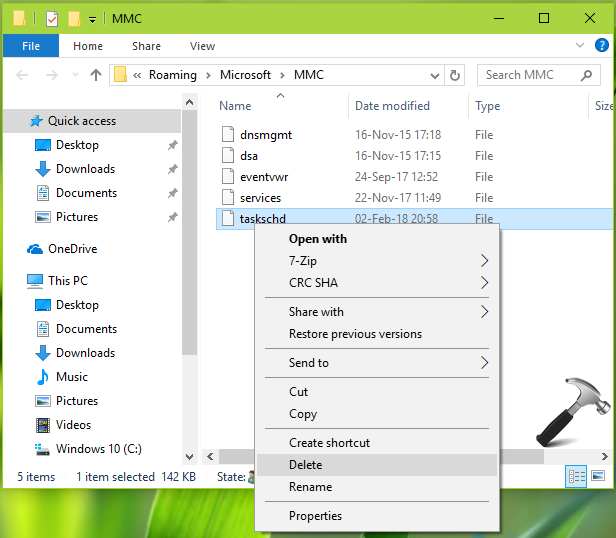
2. In the MMC folder, delete the file for the snap-in, for which you’re facing this problem. For example, if you’re facing this issue with Task Manager, delete the taskschd file.
3. Reboot the machine. After restarting your system, open the snap-in and this time it should work flawlessly.
Perform repair upgrade, in case if problem still persists, anyway.
Hope this helps!

![[FIX] An Attempt Was Made To Reference A Token That Does Not Exist](https://www.kapilarya.com/assets/Settings-2-768x595.jpg)
