

We all know Microsoft Management Console (MMC) manages snap-ins in Windows OS. Snap-ins such as Group Policy Editor, Device Manager, Event Viewer etc. etc. comes under MMC management. Thus if a snap-in is not working, you may need to troubleshoot MMC rather than the snap-in.
Recently, we came around an issue where an error occurs in a snap-in and MMC has to unfortunately unload it to prevent your machine from any unexpected harm. In some cases, this might also be related as snap-in failed to initialize.
The exact error message is as follows, in this case:
Page Contents
MMC has detected an error in snap-in and will unload it.
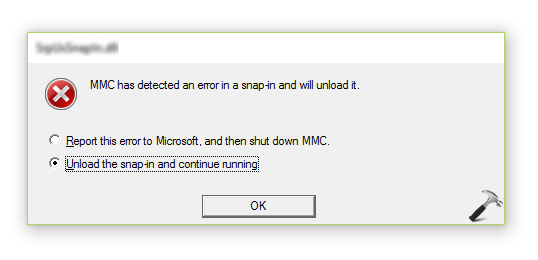
As you can see in the above shown error message, you’ve two options. You can either report the error and shut down MMC or unload the snap-in and let MMC be running. Most of these kind of errors can be solve by simply rebooting your system. You may run built-in troubleshooters in Windows 10, such as Hardware and Devices, System Maintenance troubleshooters to deal this issue.
However, if the problem still occurs even after restarting/troubleshooting the machine, you can try the fixes mentioned below:
FIX: ‘MMC Has Detected An Error In A Snap-in And Will Unload It’ In Windows 10/8/7
FIX 1 – Using System Properties
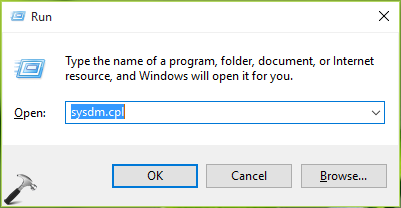
1. Press  + R and type sysdm.cpl in Run. Click OK or press Enter key.
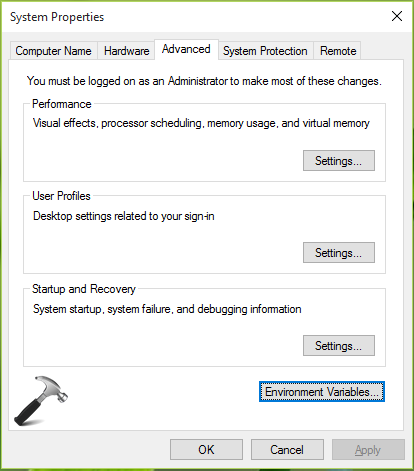
2. In System Properties window, switch to Advanced tab, click Environment Variables.
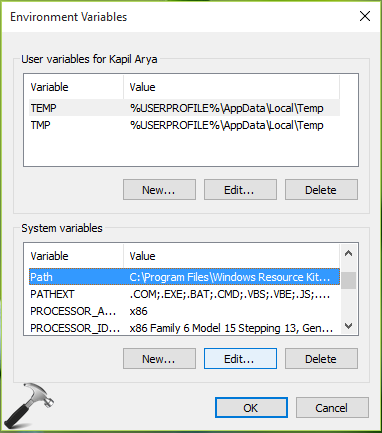
3. Next, in the Environment Variables sheet, under System variables, highlight Path Variable, then click Edit.
4. Finally, add the following values to the Variable value and click OK. Make sure you do not remove or change existing Variable value here.
%SystemRoot%\system32;%SystemRoot%;%SystemRoot%\system32\WBEM
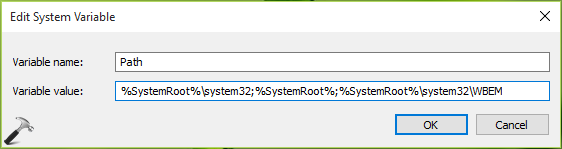
Once done, reboot the machine and the issue should be fixed then.
If issue still persists, try FIX 2 mentioned below.
FIX 2 – Via File Explorer (Added 7 Jul, 2019, Referenced From Comments)
1. Open File Explorer.
2. Assuming Windows is installed on C: drive, go to C:\ProgramData\Microsoft\Event Viewer\Views.
3. Right click on View_XX.xml file (XX may be some number) there and delete it.
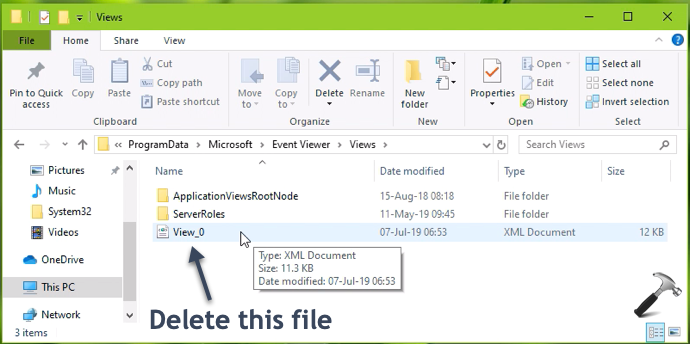
Checkout this video to illustrate this fix:
Hope this helps!
Related: MMC could not create the snap-in. The snap-in might not have been installed correctly.

![[FIX] An Attempt Was Made To Reference A Token That Does Not Exist](https://www.kapilarya.com/assets/Settings-2-768x595.jpg)

I am trying to unload cortana because I have problem in that area so I’m trying to simplify and get out what I can.
But when I run MMC I get the error ‘MMC has detected an error in the snapin….’
I tried this fix. It hasn’t worked.
Can I get some other suggestions maybe, hopefully ? :)
^^ To disable Cortana, you can refer this guide: https://www.kapilarya.com/how-to-completely-disable-cortana-in-windows-10
Hi,
we are getting same issue in Event Viewers mmc has detected and error in a snap in and will unload it in Windows Server in window server 2012 .
Can we apply same solution for window Server 2012
^^ Yes, you can.
no success …. server 2008 r2
no success…Windows 10 X64 (1903)
I just removed all View_XX.xml files at C:\ProgramData\Microsoft\Event Viewer\Views on my WS 2008 R2 and it fixed the issue.
^^ Thanks Andre for adding this! Further information in FIX 2 here: https://www.kapilarya.com/fix-event-viewer-not-working-in-windows-10.
Now fixed in this update: support.microsoft.com/en-us/help/4501371/windows-10-update-kb4501371
^^ Thanks for adding this!
Andre’s solution worked for me!! Thank you!!!
^^ Glad it helped!
Hello i confirm !!! :-D
Andre’s solution above :
” I just removed all View_XX.xml files at C:\ProgramData\Microsoft\Event Viewer\Views on my WS 2008 R2 and it fixed the issue.”
is too good it works on my desktop pc windows10 pro 64bits version 1903 18362.175 !!!! awesome fantastic a thousand thanks @Andre you are the best a pure expert !!!
I searched desperately the solution on all forums on the net for hours and hours and all the ones that sites and forums gave, none worked ! thanks again for your help Andre ! ;)
^^ Thanks debstarz for confirming the solution!