

In case of Modern Apps for Windows 8 or later, users have faced various kind of error messages and hence they couldn’t complete download, installation of these apps. We have already shared fixes for some common errors faced by users in following article:
FIX : Windows Apps Troubleshooting In Windows 8/8.1
But recently I came around the this error message while downloading an app via Windows Store:
Page Contents
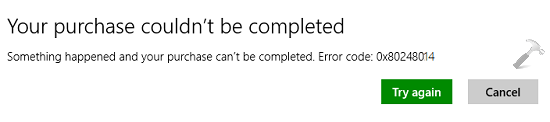
Your purchase couldn’t be completed
Something happened and your purchase can’t be completed. Error code: 0x80248014
Previous suggestions to fix similar error message didn’t worked here, as the error code is different. This time we have to manually reset Windows Update components to cure this problem. But before proceeding to fix, I suggest you run Windows Apps Troubleshooter and Windows Update Troubleshooter, in case if they resolves the issue automatically. Else, here is how to solve this:
FIX : Something Happened And Your Purchase Can’t Be Completed In Windows 8/8.1
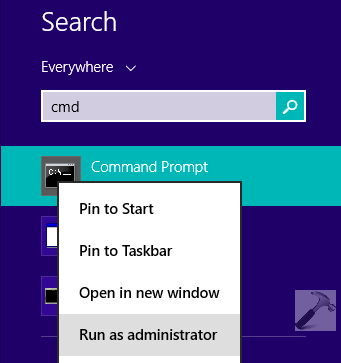
1. Press  + R and put cmd in Search input box so appeared. From the results, right click on the Command Prompt and select Run as administrator:
2. Now type following commands (assuming Windows is installed on C: drive) one by one and press Enter key after each command:
net stop wuauserv
net stop cryptSvc
net stop bits
net stop msiserver
ren C:\Windows\SoftwareDistribution SoftwareDistribution.old
ren C:\Windows\System32\catroot2 catroot2.old
net start wuauserv
net start cryptSvc
net start bits
net start msiserver
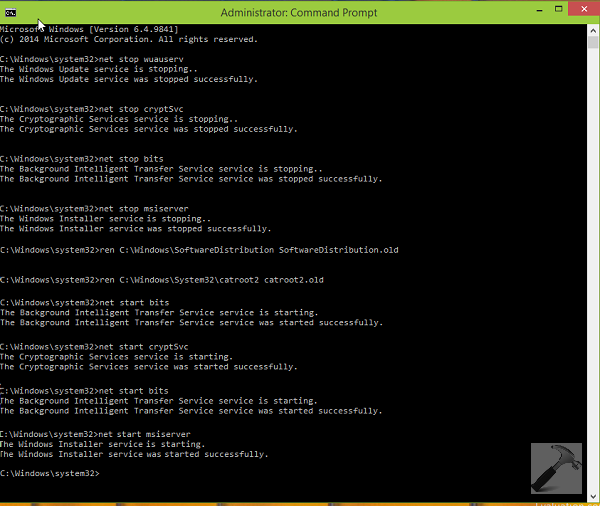
You can now close the Command Prompt and reboot, install the latest updates available. Then go to Windows Store and you’ll observe that the issue no longer exists.
That’s it! Also checkout what to do when you can’t install Windows Store apps.






Worked for me thanxxx ;D
hllo sir,
I am facing the problem
Something Happened And Your Purchase Can’t Be Completed
I have tried all the tweaks you recommend but can’t help it out
so any further suggestion
^^ Have you tried Windows App Troubleshooter? Do try it and let me know what it reports back.
https://www.kapilarya.com/download-microsoft-account-windows-store-apps-troubleshooters
It displays the message
window store cache may be damaged Not fixed
Window store configuration may be damaged Detected
Display adapter drivers might be out of dare Detected
I have used wsreset.exe in command
Reregister windows app store
and display driver is up to date when searched in the internet.
but still face same error
^^ Try to repair cache: http://www.kapilarya.com/fix-windows-store-hangs-or-crashes-in-windows-8-1. Also checkout by creating a new user account if the problem exists on that.
C:\Users\\AppData\Local\Packages\winstore_cw5n1h2txyewy\LocalState
the folder packages doesn’t exist in my computer
^^ It’s a hidden folder, checkout the comments on that same thread.
i think i should give up and reinstall the window
any thanx for your kind effort
Nice soln. Worked for me atleast. Thankss
Every time I try and download an app on the windows store it says ” Your purchase couldn’t be completed Something happened and your purchase can’t be completed. Error code: 0xc03f40c8″ I don’t know what to do can someone help. It doesn’t let me download any apps at all.
^^ Have you tried this solution? Do try this and let me know if issue persists.
I haven’t fixed it yet. I can’t understand some where in your write, could give me a video?
Hey! Thank
hello sir i am also having same problem as nancy had can you please help
^^ Suggest you to try Windows App Troubleshooter and see if it could help you: https://www.kapilarya.com/download-microsoft-account-windows-store-apps-troubleshooters
whatever i tried it says access is denied
Hello,
I want to download an app and there is an error code 0x80070422..
I’ve been try every solution in internet like enable and manual the windows update services and deleting software distribution but when I try I always can’t fix it..
Can someone help me to solve this problem with new and another solution…
^^ Try steps 1 & 5 mentioned here, see if they helps: https://www.kapilarya.com/how-to-re-register-a-specific-app-in-windows-10
whenever i try to download anything…Choose Account appears…i select my acount..,a black box appears and nothing happens….PLZ HELP SIR
^^ Try switching to Microsoft account and then retry to download app from Store: https://www.kapilarya.com/how-to-switch-to-microsoft-account-from-local-account
does it work on phones because i’m facing the same problem on my phone
^^ This is not applicable to phones. You can try re-syncing your Microsoft account (MSA) or using different MSA, see if it helps.
I still have this problem.. After applying all of the tricks mentioned on youtube. Kindly help me..I m running windows 8.1 Enterprise with update 1..and i can’t even update my windows..
and it shows the same error when i tried from another computer using my hotmail account
^^ See if creating new user account helps you in this case.
I cant download my windows store apps and games
it says error code=0x80070422
I can’t even update the apps to the newer versions.
^^ If you’re on Windows 10, run Windows Store Apps troubleshooter: https://www.kapilarya.com/how-to-use-built-in-troubleshooters-in-windows-10
I can’t download an app because I forgot my Microsoft password
I have tried the troubleshooter but it is saying that it cannot sync