

We can easily customize Windows from Personalization window. But sometimes, you may face the issues to open Explorer and thus you may not be able to switch theme. In that case, Command Prompt is the only way to change the theme for current Windows installation. But this is not as easy as we’re thinking of, since Windows doesn’t provide us any rich UI or user-friendly environment to do so.
Meet WinAero Theme Switcher, a freeware, a light weight utility, especially designed and launched by our friend “Sergey Tkachenko” for the purpose of changing theme via Command Prompt. The tool is claimed to be worked on Windows 7 and 8. Although, it has a GUI, but it is primarily intended to be used with the Command Prompt or in a batch file where you want to automate the applying of a custom theme.
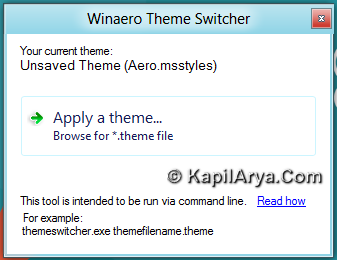
The software operates with the built-in theme manager of Windows 7 and 8 and uses it to apply themes. Here is how it works:
WinAero Theme Switcher : Methodology
The syntax is as follows:
ThemeSwitcher.exe path_to_file.theme
e.g. to apply the Windows 8‘s “Earth” theme, you can run the following command:
themeswitcher.exe C:\Windows\Resources\Themes\theme1.theme
If theme is located in one of the following folders:
C:\Windows\Resources\Themes
C:\Windows\Resources\Easy of Access Themes
C:\Users\%username%\AppData\Local\Microsoft\Windows\Themes
then you need not specify the full path to the theme file or even its extension, just specify the file name. So, the example above can be shorten to:
themeswitcher.exe theme1
That’s all about the working of this software.Here is the video illustration of using this tool:
You can download this cool tool using following link at http://winaero.com/download.php?view.55.
Hope you find the tool useful!

Will be handy in certain scenarios. Small setup is positive point. Thanks for share :)