

Whenever Microsoft is going to release a new operating system of Windows series, they provide the upgrade assistant tool for ease of users in updating their machines. With Windows 10, Microsoft is now offering Get Windows 10 app, pushed via Windows Updates.
Recommended : Checkout the Windows 8.1 Installation Media Creation Tool.
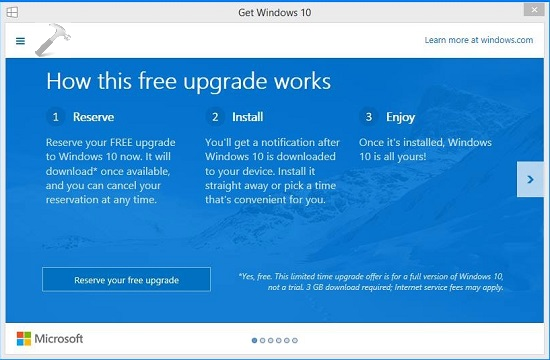
Using this app, you can checkout whether your system is compatible for Windows 10 or not. Also using it, you can reserve your copy of Windows 10, and thus when the stable build is released officially, on behalf of this app, your system will automatically download it.

We’ve already seen the Upgrade Matrix and paths in this article. So accordingly, the Get Windows 10 app is available for Windows 7 SP1 and Windows 8.1 Update running systems. Even if you’re running these editions and don’t having Get Windows 10 app running, these may be reason behind it:

- Your device isn’t up-to-date with at least Windows 7 SP1 or Windows 8.1 Update
- Windows Updates is turned off or is not set to received updates automatically
- You’ve blocked or uninstalled the necessary Windows Updates functionality
- Your device is not running genuine Windows and activated copy
- Your device is running Windows 7 Enterprise, Windows 8 or 8.1 Enterprise, or Windows RT/RT 8.1, which are excluded from this reservation offer
- Your system is a part of a domain
- PCs that are listed as non-compatible with Windows 10 will not see the Get Windows 10 app before July 29th. After July 29th, they’ll have the Get Windows 10 app icon in the system tray.
Additionally, you must have installed updates KB3035583, KB2976978 installed on Windows 8.1 Update and KB3035583, KB2952664 installed on Windows 7 SP1.
==========UPDATE [10 June, 2015]===========
You can download KB3035583, KB2976978 for Windows 8.1 Update directly using these links if you’re not getting them via Windows Update:
32-bit edition | 64-bit edition
For Windows 7 SP1, you can use these links:
32-bit edition | 64-bit edition
Even if after confirming these points you’re not able to have Get Windows 10 app, here are the steps you need to follow:
FIX : Get Windows 10 App Icon Missing From Taskbar
1. Open Notepad and paste following into its window:
REG QUERY “HKLM\SOFTWARE\Microsoft\Windows NT\CurrentVersion\AppCompatFlags\UpgradeExperienceIndicators” /v UpgEx | findstr UpgExif “%errorlevel%” == “0” GOTO RunGWX
reg add “HKLM\SOFTWARE\Microsoft\Windows NT\CurrentVersion\AppCompatFlags\Appraiser” /v UtcOnetimeSend /t REG_DWORD /d 1 /f
schtasks /run /TN “\Microsoft\Windows\Application Experience\Microsoft Compatibility Appraiser”
:CompatCheckRunning
schtasks /query /TN “\Microsoft\Windows\Application Experience\Microsoft Compatibility Appraiser”
schtasks /query /TN “\Microsoft\Windows\Application Experience\Microsoft Compatibility Appraiser” | findstr Ready
if NOT “%errorlevel%” == “0” ping localhost >nul &goto :CompatCheckRunning
:RunGWX
schtasks /run /TN “\Microsoft\Windows\Setup\gwx\refreshgwxconfig”
2. Save this file into C:/Temp folder with name ReserveWin10.cmd and select All files as Save as type.
3. Finally go to C:/Temp and right click above saved ReserveWin10.cmd file and select Run as administrator. You should now see a Command Prompt window executing the script, which may take up some minutes to complete.
After successfully executing the script, reboot the machine. After rebooting the system, you’ll have Get Windows 10 app running on your computer, whose icon will be visible in taskbar notifications area.
That’s it! Go here to learn about cancelling reservation to Windows 10 and completely disable Get Windows 10 app.



excellent article thanks for shraring this!
^^ Glad you find it helpful!
When I run the command line script, I get an error saying that the REG QUERY is missing. I opened REGEDIT and hunted for the key. It is indeed missing. My copy of Win7 is updated, legit and activated. The prerequisite KB’s are also installed. I have the GWX folders. How is it that the registry keys are missing?
I also tried using fix from the Task Scheduler but the snap-in errors out and closed the program.
I even tried to just manually run GWX.exe but nothing happened.
^^ Try to manually add the registry key and see if it helps.
Thanks alot kapil, your instructions wworked perfectly :-)
^^ Glad we could help :)
not successful 4 times win 10 10074
^^ Change if NOT “%errorlevel%” == “0” ping localhost >nul &goto :CompatCheckRunning with if NOT “%errorlevel%” == “1” ping localhost >nul &goto :CompatCheckRunning and see if it helps. I haven’t tried on a Win10 build, I’ll just try it and get back to you.
it makes the infinite running loop :|
worked for me, yippie!!!!
I’m plenty excited to install Windows 10 when it is released. I have the technical preview installed on other systems. I reserved the download for this one.
And now I need the GWX icon spam to go away.
At minimum, remember that I neither want the icon nor notifications showing up. I don’t like my system tray being hijacked everytime I restart my computer. (Not thrilled about GWX being plastered in windows update either, but that’s somewhat easier to cope with). Ideas?
^^ You can disable it using Task Scheduler (Microsoft\Windows\Setup\gwx\refreshgwxconfig) or simply uninstall KB3035583.
^ it worked but can you suggest a permanent fix, please?
^^ Okay, add a DWORD named DisableGWX at HKEY_LOCAL_MACHINE\SOFTWARE\Policies\Microsoft\Windows\CurrentVersion\GWX registry location and set its Value data to 1.
I didn’t have the icon, (I have win8.1). after following the instructions and restarting the icon appeared. I did not do anything BUT the second re-boot it vanished!
why? should I do that again?
^^ Can you locate these items gwx and GWXTriggers under:
Task Scheduler Library > Microsoft > Windows > Setup
and
In File Explorer, C:\Windows\System32\Tasks\Microsoft\Windows\Setup
If no, retry the steps to get the app running again.
I’ve tried running the command, but it keeps looping saying the following:
C:\Temp>schtasks /query /TN ô\Microsoft\Windows\Application Experience\Microsoft
Compatibility Appraiserö | findstr Ready
ERROR: Invalid argument/option – ‘Experience\Microsoft’.
Type “SCHTASKS /QUERY /?” for usage.
C:\Temp>if NOT ô1ö == ô0ö ping localhost 1>nul & goto :CompatCheckRunning
Not sure where to go from here since I am completely illiterate when it comes to this stuff.
I’m running Windows 7 Home Premium SP1, by the way. And I’m completely updated with the required KBs.
^^ Try running the batch file in this fix : dropbox.com/s/0u0au9xgy6ss18p/win10fix_full.zip?dl=0
Referenced from Yaqub K (Microsoft Forum Moderator’s post) at answers.microsoft.com/en-us/windows/forum/windows_10-win_upgrade/i-want-to-reserve-my-free-copy-of-windows-10-but-i/848b5cce-958b-49ae-a132-a999a883265b
That did it!!! Thanks, KA.
^^ Glad it helped! :)
It worked thanks…
^^ Cool!
Hi and thanks for all this info.
I am missing Apps on two laptops.
Have tried all fixes you have suggested including the ‘full’ notepad version and the three shorter ones on link. All to no avail even though everything seems to be OK to qualify. Is there anywhere elso to go or shall I just wait for 29th July?
^^ Refer my previous comments, try the Dropbox fix :)
Hi, I want to reserve W10 but the app show This report isn’t available at the moment error . Any help on this?
^^ Keep trying it periodically. Although the reservation is no longer mandatory, and you’ll get Windows 10 if you’re genuine and activated Windows 8.1 Update or Windows 7 SP1.
Hi, I don’t seem to have access to the temp folder, any help?
^^ You must be signed in as administrator to perform steps.
I tried to follow your instructions but ended into errors below and script executed for in loop i believe recursion.
C:\Windows\system32>schtasks /query /TN ô\Microsoft\Windows\Application Experien
ce\Microsoft Compatibility Appraiserö | findstr Ready
ERROR: Invalid argument/option – ‘Experience\Microsoft’.
Type “SCHTASKS /QUERY /?” for usage.
What am i missing here, any suggestions.
Cheers!!!
^^ Refer my previous comments here on this same thread and try the Dropbox fix instead. I hope it will help you for sure.
Thanks man it worked :) :D
worked for me too thanxxxxxx…
I had so wished this would work for me but the following is what I encountered:
This is showing up when running and running in continuous loop.
Only putting in error versus all script in window.
C:\Windows\system32>schtasks /TN
ERROR: Invalid argument/option – ‘Experience\Microsoft’
Then when changing “0” to “1” and trying it flashes the command prompt
window so fast I can’t see if there is anything or not.
Sorry didn’t see the Manoj post prior but I had tried the dropbox idea all ready but continue to get “5xx” error when trying to download file.
I am not getting the dropbox batch file. Please help.
Hey,
I just did what u suggested to get icon back (win8.1) but the cmd is falling into a infinite loop and i have waited very long to end any suggestions
^^ You can check the Windows Updates now and install all of them, it will automatically install Windows 10 if your system matched requirements.
Hi Kapil, I had reserved for windows 10 offer long time back…everything was okay till 29th July. But suddenly then it was not working for me….. The GWX icon is disappeared and not coming again in taskbar. I have checked and found folder “C:\Windows\System32\GWX” is available and when i have double clicked on GWX.exe, nothing is happening. Please help me. I want windows 10 asap.
^^ Install the latest updates available to you right now, you must get Windows 10 :)
Hi Kapil, Thanks for your response. I tried it many times but noting is there. :(
I am running win7 SP1. I got the GWX app on my taskbar and I reserved it too, but suddenly it vanishes.What should I do?
I’m getting the infinite loop as well and can’t seem to get the dropbox file. (It says: Error (5xx)
Something went wrong. Don’t worry, your files are still safe and the Dropboxers have been notified. Check out our Help Center and forums for help, or head back to home.”
I’m running Win7 SP1. The necessary files seem to be there. The Win 10 reservation notification isn’t in the taskbar. Now that win10 has been launched can you still reserve a copy? Someone in the Microsoft Forum said that the reservation was no longer available but it should be downloaded directly from MS at this point. Can I run your REG QUERY now to get the Win10 notification or isn’t it necessary.
Thanks,
Bill
^^ Forgot the reservation, you can directly download Windows 10 via Windows Updates now.
hi
i tried all 4 method in your batch file (Dropbox). but i have not seen GWX notification please give me some guidance.
^^ Check for available Windows Updates, there must be some Windows 10 updates.