

We all know Microsoft has kept Windows Insider program alive even after release of Windows 10, so that they could keep collecting feedback for new builds of Windows 10. Windows Insiders are also actively participating to provide valuable feedback to Microsoft and helping them to test new builds.
If you’re a Windows Insider, make sure you keep an eye on this post to stay updated about newer builds. However, sometimes due to incorrect settings on your machine, you may not able to receive new preview builds. In this article, we’re going to talk about one such issue, when you can’t get new builds delivered to your system. In such case, when you open Settings app, you get following message in Windows Update section:
Page Contents
There’s a problem with getting preview builds…
Your preview build settings need attention. Go to Advanced options to fix this issue.
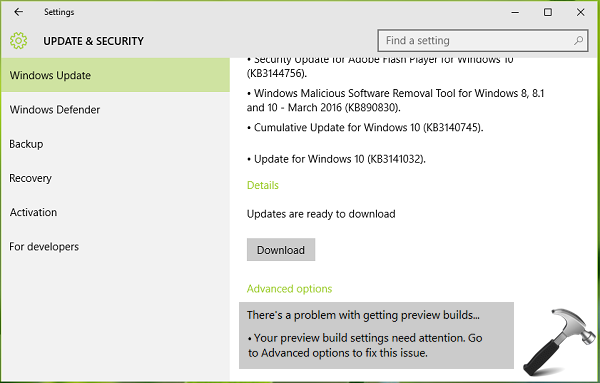
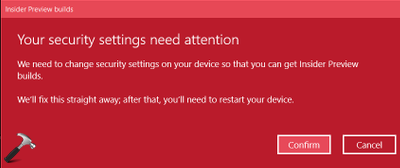
Windows usually fixes this problem automatically on your behalf and you need to confirm this under following message:
Your security settings need attention
We need to change security settings on your device so that you can get Insider Preview builds.
We’ll fix this straight away; after that, you’ll need to restart your device.
But sometimes Windows may not be able to fix this issue itself and hence its the time for you to start troubleshooting at your end. Your first troubleshooting step should be to confirm that there is nothing wrong with Windows Updates. If you’ve trouble receiving updates, that might have caused the issue for receiving preview builds as well. Hence, you should try running Windows Update troubleshooter or resetting Windows Update components. You should also disable your third-party antivirus tool (if any) and see if you can get newer build.
After investing a bit on this, we came around this thread at Microsoft’s Answers forum. In this thread, Jason, a Microsoft employee has suggested a selective fix for this problem. Here is what you need to do:
FIX : There’s A Problem With Getting Preview Builds In Windows 10
1. Open Settings app and navigate to Update & security > Windows Update > Advanced Options. Select Stop Flighting.
Registry Disclaimer: The further steps will involve registry manipulation. Making mistakes while manipulating registry could affect your system adversely. So be careful while editing registry entries and create a System Restore point first.
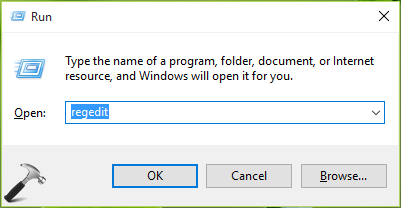
2. Press  + R and put regedit in Run dialog box to open Registry Editor (if you’re not familiar with Registry Editor, then click here). Click OK.
3. In the left pane of Registry Editor, navigate to following registry key:
HKEY_CURRENT_USER\Software\Microsoft\WindowsSelfHost\Applicability
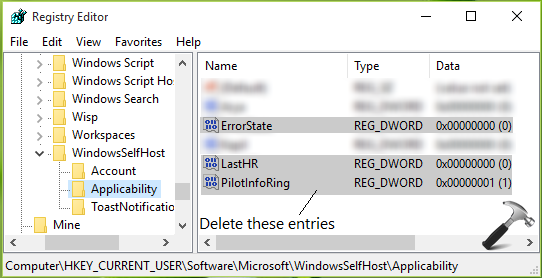
4. In the right pane of this Applicability registry as shown in above screenshot, locate registry DWORDs named ErrorState, LastHR, PilotInfoRing. Now right click on these DWORDs one-by-one and select Delete. After deleting these 3 DWORDs, close the Registry Editor.
5. Now go to Update & security > Windows Update > Advanced Options under Settings app and choose Enable Insider Builds option. Follow on-screen instructions now and re-enter your Microsoft Account (MSA) information valid for Windows Insider program. Once you’re done, you may reboot and after restarting the machine, problem should be fixed.
Hope this helps!
Related: Your Windows Insider Account Requires Attention To Get Insider Preview Builds In Windows 10.






Thanks! It worked for my Surface Pro 3!
^^ Glad we could help :)
Didn’t do a thing…
I am just going to try to manually download the newest build and install (as an ISO if I must)
Thanks,
^^ FYI: You may also use Refresh Windows tool to download newest build. https://www.kapilarya.com/download-refresh-windows-tool-to-fix-resetting-problems
i dont have this folder ?
HKEY_CURRENT_USER\Software\Microsoft\WindowsSelfHost\Applicability