

Sometimes you may not be able to connect to the Internet due to miscellaneous causes. Most of the problems in such cases occurs due to network adapters. But in few situations, culprit may be network server rather than network adapter, which is preventing you from being connected. Today, we’ll discuss one such issue we faced recently on Windows 10 – it is still applicable to previous Windows editions.
In this scenario, we were not able to connect our system to web server. As usual, we performed some troubleshooting using Network Adapter troubleshooter. We also recommended you to try it as a first step of troubleshooting.
Recommended: How to use built-in troubleshooters in Windows 10
But running the troubleshooter found a problem that generally happens with wired (LAN and Ethernet) connections. Following was the error, which even the troubleshooter wasn’t able to fix.
Page Contents
Your computer appears to be correctly configured, but the device or resource (DNS server) is not responding.
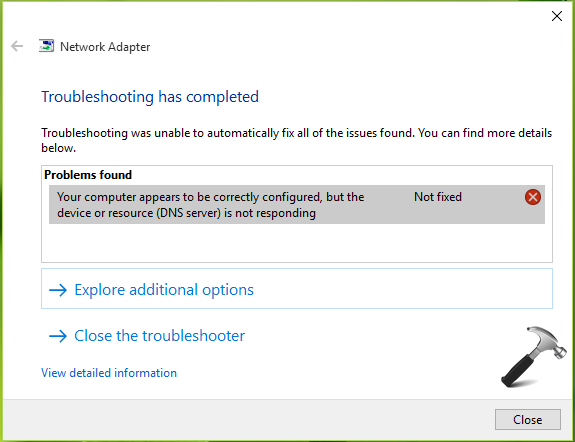
Now since the automation tool didn’t fixed the problem, we’ve to fix it manually. Here we also suggest you to restart your router and see if it makes any differences in the situation. If the problem still persists, you can try the fixes mentioned below.
FIX : Your Computer Appears To Be Correctly Configured, But The Device Or Resource (DNS Server) Is Not Responding In Windows 10/8.1/8/7
FIX 1 – By Configuring/Correcting TCP/IP Settings
1. Open Control Panel and navigate to Network and Internet > Network Connections. Here, do a right click on your Local Area Connection or Ethernet connection and select Properties.

2. In the connection property sheet, select Internet Protocol Version 4 (TCP/IPv4) and then hit/tap Properties.
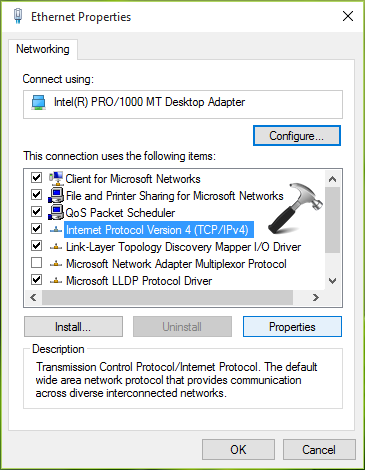
3. Next, select Obtain an IP address automatically and then select Obtain DNS server address automatically option. Click/tap OK.

4. Again in the network connections property sheet, select Internet Protocol Version 6 (TCP/IPv6) this time and perform step 2 and 3 with it. Close Control Panel and check the status of issue.
If the problem still exists, try FIX 2.
FIX 2 – Using Command Prompt
1. Right click on Start Button and select Command Prompt (Admin).
2. In the administrative or elevated Command Prompt, type following commands one by one and press Enter key after each:
ipconfig /flushdns
ipconfig /registerdns
ipconfig /release
ipconfig /renew

3. Once all commands executed successfully, close the Command Prompt and reboot. After restarting machine, you’ll find that problem is fixed and you can connect to the Internet now.
You can also checkout this video for further information:
Hope this helps!





Thanks Kapil !! Will be helpful..
^^ :)
Thank you, that fixed a major issue for me!!!
^^ Glad we could help :)
i am getting an error while executing the command ipconfig/release ..the error quotes……no operation can be performed on LAN while it has its media disconnected
I am getting the same error when I try to release and renew , I also have done every other fix that I have found on here to fix the “one or more network protocols are missing on this computer ” error, and nothing has worked yet.. still no Internet. . What else can I try?
^^ Look forward to this fix and see if it helps you: http://www.kapilarya.com/windows-sockets-registry-entries-required-for-network-connectivity-is-missing
Thanks You, :)
^^ ☺️
Fix 1 worked, wow! Thanks so much
^^ Awesome 😀
Hey kapil when i typed 3rd and 4th command error is howing
media diconnected
^^ If you ignore those errors for a while, is the issue resolved?
My issue is not yet resolved. If i put a DNS server manually it says device or resource is not responding and if i let it be dynamic like you told it says DNS server not responding. Also, i have tried different open DNS servers, none is working and i have tried fix 2 as well. It couldn’t help me. If u can help me i shall be greatful.
Also to inform my proxy settings and firewall both are off. This isn’t continuous with me i.e. Rarely, my net is connected but once or twice a day. I cant understand the issue, if it gets connected for sometime why not the other time?
^^ Try FIX 1 mentioned here and see if it helps: https://www.kapilarya.com/windows-sockets-registry-entries-required-for-network-connectivity-is-missing
It was helpful. Thanks alot
^^ Glad to hear that 😊
On my PC there is no ‘Network and Internet’ just ‘Network and Sharing Center’ which does NOT have the same menu options. Strange that you dont cover this.
^^ In ‘Network and Sharing Center’, click Change adapter settings and you’ll arrive in window shown in step 1.
None of it helped me.. arghh it pissing me off.. help other options???
I’VE TRIED IT ON MY OTHER COMPUTER WHICH IS USING ETHERNET. BUT I TRY IT ON THE OTHER COMPUTER USING WI-FI. ITS NOT WORKING. PLEASE HELP
I tried it but it didn’t help. Still cannot connect to the internet
^^ You may try refreshing Windows 10: https://www.kapilarya.com/reinstall-windows-10-without-affecting-personal-files
Tanks a ton Mr. Arya
^^ Welcome!
Thank you so much for your help, I spent almost 3 hours looking how to fixed it!
^^ Happy to help 😎
didn’t work!
thanks it worked
kind regards
Thanks for answering to my question. I spent two days using some youtube suggestions similar to yours and did not work. I left it overnight and it started working again. Besides that I’m in Mexico
using hotel WiFi everyone complains for unstable internet, when I’m at home in Canada this never happened . I will keep your suggestion in my files .
Ed
^^ Sure Ed, glad I could help 😊
Ive tried both methods but the problem still persists… I’m using Windows seven.
What can i do ?
^^ Please check with different network connections, see if the issue still persists.
Hey kapil when i typed 3rd and 4th command error is howing
media diconnected
How to fix?
^^ It may show “Media disconnected” but have found to resolve the issue at the same time. So is the issue fixed for you?
“Your computer appears to be correctly configured, but the device or resource (bhkinternational.com) is not responding”
I Have Receive Detection of my Pop Mail Id Login time Show.
Please, me suggest how can i have resolve it.
i try above step but not working with popEMail.
Thank you. Thank you. Thank you. Fix 2 saved the day!
^^ Glad it worked for you 😊
I’ve tried those methods perfectly just like you mention but my problem still persist. I’ve problem connecting with my university WiFi but there’s no problem to connect with my own phone via mobile Hotspot.
It didn’t work.
Thank you ! It worked and was explained soo clearly.
^^ Glad it worked for you!
I just restore to a previous restore point and it worked….
Wanas
^^ That’s awesome :)
to admin,may I contact you by whatsapp to fix this problem?,I am really stressfull when I execute 3rd and 4th command in command prompt
Step 1 helped me to solve this issue, thank you very much!
^^ Thanks a lot for your feedback 😊
open command prompt as admin and execute ipconfig/flushdns command to flush dns. Also change the dns to open dns or google dns. It will fix the issue.
on restarting every time i have to flush and renew dns ..plzz help
^^ Try resetting the Network, see if it helps you: https://www.kapilarya.com/how-to-reset-network-settings-to-default-in-windows-10
Thanks man !! It worked well finally .
Thank you so much! It helped! :)
^^ You’re most welcome!
Avast Premier cost this problem…… go to Firewall Policies – preferences and unclick everything
Thank you so much, amazing
^^ Awesome!!
Thank you so much!
^^ Happy to help, Jay 😊
Saved me from tearing out my hair. Thankyou very much!!
^^ Most welcome, Matt 😎
just passing by to say thanks! tried many things, but this was the best solution, worked perfectly!
^^ Glad I could help 😎
i followed all commands..but in ipconfig/renew
THis shows
An error occurred while renewing interface Local Area Connection: unable to contact you DHCP server. Request has timed out..
what is this ..please help me
Thank you sir!
It was showing like this THE REQUESTED OPERATION REQUIRES ELEVATION
Hello Kapil, not sure if this thread is still active, but I’m working on my nephews HP Pavilion notebook running windows 10 (64), and it seems to be connecting to the router, but not to the internet. The network adapter is a Intel(R) Dual Band Wireless-AC 3165. I created a Wlan report also. I’m not the most knowledgeable, but I know my way around a bit. I’ve tried pretty much everything that has been list in most of these threads. Wondering if you could lend me a hand please. Let me know what other info you need.
I can’t thank you enough! The first fix worked for me. I’ve been searching all over and other websites suggested the command prompt fix and some others but none of them worked.
^^ Glad to help Steve 😊
by trial and error have limited knowledge of pcs,but get by ,well sort of with lot of hssle,as disabled in sight and psysically withcrippling poly artritis ,hand very crippled,fingers bent hard work,but bought new laptop bigger keys ,so little bit better now ,but still having problem connecting to the internet!
^^ Perform Network Reset: https://www.kapilarya.com/how-to-reset-network-settings-to-default-in-windows-10
I cant get onto the internet tried for days also nights still locked out and paid my provider much money for this!
I’ve tried ALL the suggestions I’ve looked up on the internet and none of them work. Still can’t fix the DNS error. I’ve been working on my computer for two days. Ugh!
^^ Have you tried Network Reset as well?
It didn’t work. After I install cynet, I can’t browse internet but connected to wifi
Thanks alot🌹
^^ Glad to help!
Having the DNS server not responding error (With WiFi). Tried every suggested solution, including resetting network, still no luck. Driving me insane. Any other suggestions?
^^ Try changing DNS server to Google or Open DNS, see if it helps: https://www.kapilarya.com/how-to-change-dns-server-in-windows
Thanks a million! My Windows is somewhat damaged because of a botched system restore, but having no internet was the last straw. I was already about to reinstall before the last “wait a minute!” moment.
^^ Glad to help!