

Start Screen is one of the biggest feature introduced in Windows 8, many of us are already evident with this fact. With the introduction of Start Screen, it has provided the capability to the user to customize the Start Screen. Start Screen customization includes adding, drag & drop, resizing etc. operations with the Metro tiles. In latest released Windows 8.1, you can even group the tiles by a particular name and the Start Screen can be viewed in Start or Apps mode.
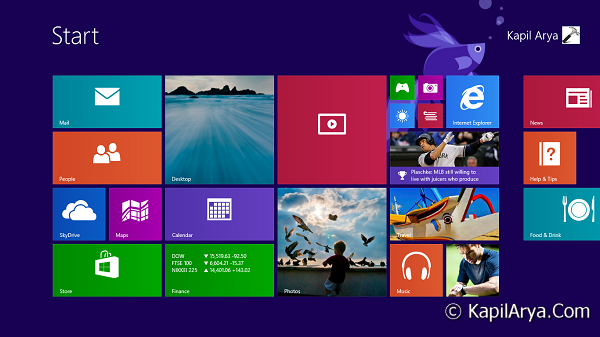
The customization ability of Start Screen resides in the setting covered in Group Policy. So, in case if you are unable to customize Start Screen, then you need to give the above mentioned setting, a proper orientation. There also exists the possibility that some sort of registry based corruption may affect you to rearrange Start Screen items. If it was only the case of tiles, then you can fix it with “Tile Locker” tool, we’ve posted couple of weeks ago. Well, in this article, we’re going to fix the issue of not being able to do customization for Start Screen, here is how to:
FIX : Unable To Customize Start Screen In Windows 8.1
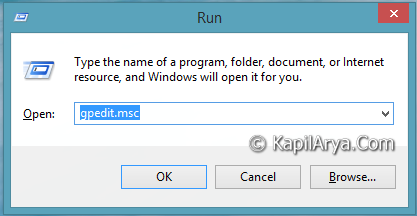
1. Press  + R and put gpedit.msc in Run dialog box to open Local Group Policy Editor. Click OK.
2. Navigate here:
User Configuration -> Administrative Templates -> Start Menu and Taskbar
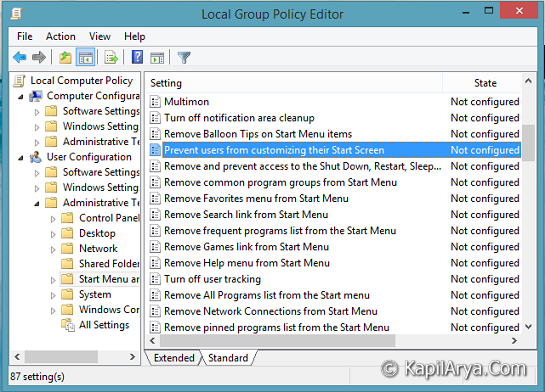
3. In the right pane of this location, look for the policy Prevent users from customizing their Start Screen. Since you’re facing the issue of being not able to customize Start Screen, then you may find this policy as Enabled. Double click on the same policy to get this:
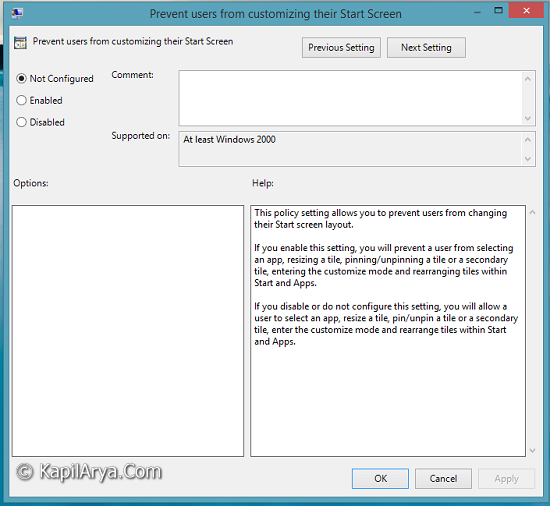
4. In the above window, select Not Configured or Disabled to fix up the issue. Click Apply followed by OK. Reboot to get results. If you’re facing the issue about drag and drop functionality, then this article may be help you in fixing that.
Hope you find the fix useful!


You can do it via registry also! By the way nice article :D
^^ Yep, but registry trick is same as in this article:
http://www.kapilarya.com/fix-unable-to-use-drag-drop-in-windows-8
So to avoid duplication, and to let users learn about this policy, I posted GPO method only :)
Hey Kapil.
There is another policy setting named Start Screen layout which can prevent users to customise Start Screen. Wish you can post about it also.
Rgds. Robert,
Microsoft MVP
^^ Hello Robert! Great to see your comment here. I’ll surely post about Start Screen Layout policy soon :)
Hello! I tried this fix but it didn’t work. I can’t change the start screen color or image, since everytime I click on personalize is leading me to the screen configuration: background and stuff like that, but not the windows 8.1 options.
^^ Make sure Start Screen layout policy is not configured. I have posted about it here:
http://www.thewindowsclub.com/fixed-start-screen-layout-windows-8-1
Press Windows Key + I while you’re on Start Screen, you must be able to get Personalize, using which you can pick layout and set background and accent color:
http://www.kapilarya.com/how-to-force-windows-8-1-for-specific-accent-background-color
Just a quick note that “Remove Common Program Groups from the start menu” also stops the start screen XML working, or if it does work it doesn’t show the group names across the top. This is an older policy.
^^ Thanks for the inputs; have to check it out :)
When i am typing this gpedit.msc in Run dialog box to open Local Group Policy Editor it says windows cannot find. i want to customize my start screen and im unable to do it.can u help me out.thanks
^^ Group Policy Editor is only available in Pro and Enterprise editions.
I use windows 8.1 single language.Do i have other ways to get my start screen customized?
^^ Go to this registry location:
HKEY_CURRENT_USER\Software\Microsoft\Windows\CurrentVersion\Policies\Explorer
In right-side pane, create a new DWORD NoChangeStartMenu and set its value to 0.
I did this and restarted my laptop.Nothing has changed.When i hit the button of personalize through charms button im taken to place when we change desktop theme and screen resolution but the start menu thing option didnt come:(
^^ Please try the Ultimate Windows Tweaker 3.0. In this tool, pick the Customization section and switch to Additional. Check the option Lock Start Screen Tile So That They Can’t Be Rearranged, click Apply and now uncheck the same option.
Didnt work.what is the reason behind the problem which im facing? im using a licensed operating sytem which was through my hp laptop purchase.
^^ Try the third DISM command mentioned here:
https://www.kapilarya.com/fix-do-inbox-corruption-repair-using-dism-in-windows-8
Dism /Online /Cleanup-Image /RestoreHealth < r you talking of this command?
^^ Yep.
ok i have done it all …
am running windows 8.1 pro build 9600 and i am not able to coustomze my start which comes with pre installed backgrounds, colors.
I am not getting that personlize thing which others are getting in right pane of windows.
am just getting personliztion option which takes me to personlize page not that one with windows pre installed features.. tried yours method also but its not working.
^^ You can try to create a new local user account and see if the issue persists with it.
i have done it
i have created a local user account but the problem still exists.
Dont know what to do ….
do i switch to ENTERPRISE instead of PRO.
IS THIS POSSIBLE TO UPGRADE TO ENTERPRISE FROM PRO will i be able to overcome from this problem …
^^ Nope, there is no supported way to do so, you can read more here:
social.technet.microsoft.com/Forums/windows/en-US/305ac35b-9a14-4244-8e95-dd0b0c23b70a/change-windows-8-pro-to-enterprise
I tried this but I am nnot getting PREVENT USER FROM CUSTOMISINZ THEIR START SCREEN.
I am using windows 8 enterprise.
Please help me to change the start screen background nd lock screen
^^ Recheck the policy, it must be there :)
Hi the problem which i was facing had a solution.when the charms button is pressed>Settings Then it takes me to personalization which is of wallpaper,screen resolution etc as like in the same way when u rightclick on desktop area and click >personalization. When the start screen personalization is needed,jus click on start screen.move ur cursor to the top right in the start menu itself.now u get the charms button which has settings>personalize.There you go.Personalize ur Start screen which is required
why i can’t found the Tattoos and background and accent colors configuration? can u help me?
Hi Kapil…. nice to meet you….. I have windows 8.1 enterprise 32 bit….. when im clicking personalize, control panel theme personalization is getting opened… Help me!
^^ Let me know the error message you recieve? If there is no error message, try SFC /SCANNOW command in administrative Command Prompt and see if it helps.
hello Kapil, I solved a problem-Windows license will expire soon popup. in my 64 bit Windows 8.1 .and now I’m unable to personalize my start screen(background).