

When you’re deploying Windows 10 in a customized environment, you specify the selective settings in an answer file. For those, who are not familiar with an answer file, here is what it is. An answer file is an XML file, usually contains the customized settings that would be used by Windows Setup during the installation. Most of the IT professionals like to deploy custom settings in their workplace/organization and it raises the need of answer file. It is located as unattend.xml in Panther folder under windows directory (%windir% or C:\Windows). Extended information on answer file is available in this documentation.
So if there are some incorrect entries in the answer file, Windows Setup won’t be able to process the file. In such a condition, following error will come into play:
Page Contents
Windows could not parse or process the unattend answer file for pass [specialize
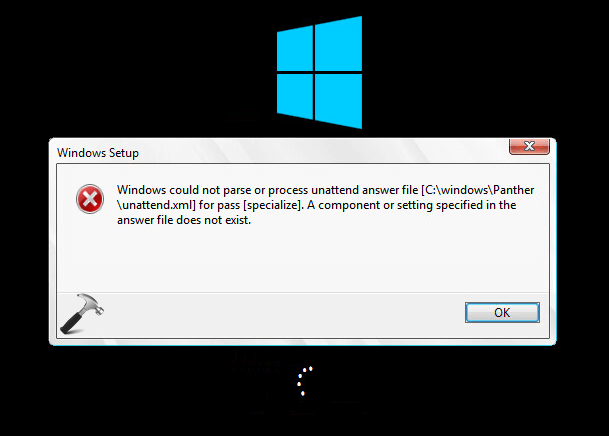
So if you’re facing this issue while deploying Windows 10, and if you know how to correct answer file errors, simply recheck the unattended.xml file and remove the extra code that is not applicable to your environment or causing the issue. Here, note the in some cases, Windows displays the components which is causing error so it would be easy for you to rectify the code. But if you’re an end user with not enough knowledge about modifying answer file and you incidentally started facing this problem, here is how to correct it.
FIX : Windows Could Not Parse Or Process The Unattend Answer File For Windows 10
Windows usually checks for unattend.xml file in %windir%/Panther. By following the steps mentioned below, you’ll be able to allow Windows to skip looking for unattend answer file. Once it skipped answer file verification, it would be able to boot without the above mentioned error. Here’s how to make this possible:
1. When this error appears, simply press Shift + F10 to bring Command Prompt.
2. Now in the Command Prompt window, type regedit.exe command to open Registry Editor. In the Registry Editor window, navigate to following key:
HKEY_LOCAL_MACHINE\SYSTEM\Setup\Status\ChildCompletion
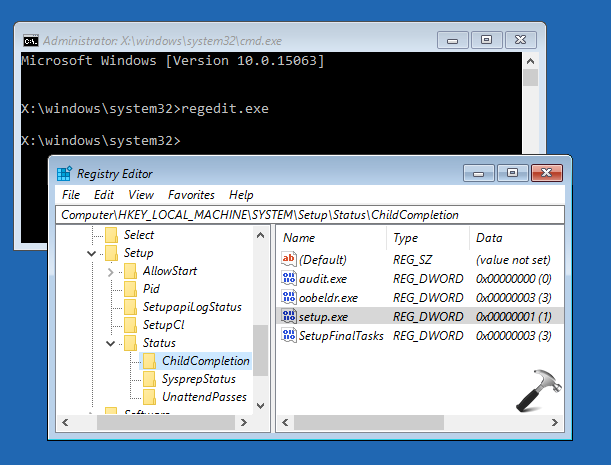
3. In the right pane of ChildCompletion folder, look for setup.exe named registry DWORD (REG_DWORD), the value for which might be corresponding to 1. Double click on that same DWORD and change its Value data to 3 (refer below screenshot). Click OK. Close Registry Editor and Continue to your existing operating system and reboot then.
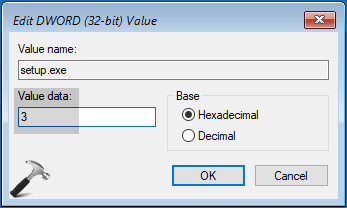
After restarting your system, Windows will be able to skip checking for unattend answer file and you’ll be able to boot fine, without the error.
That’s it!




This is a stand alone laptop. It is not being deployed. The user says it happens when booting. Should we try this registry change anyway?
^^ Yup.
Mine was at 3 when I check so any other fixes?
Thanks so much. You saved me a lot of time.
^^ Glad it helped!
windows could not parse or process unattend answer file [X:\autounattend.xml]. the answer is invalid
^^ Have you tried steps mentioned here?
Expellant solution just followed your steps it was resolved. Thank you
^^ Glad to help 😎
Changing the Registry key of the Child Completion is the only fix that has worked for me. My question is, does this open a security risk? What does changing this do?