

Recently Microsoft has announced the Office 365 Preview aka Microsoft Office 2013. As we all are aware that editing of PDF files is not an easy task. To do this, you have to use highly customizable PDF editors. These software are bulky in setup and requires license to use them.
But recently released Microsoft Office 2013 has made you work so easy that you can edit the PDF files like a text document inside Microsoft Word 2013 itself. So without wasting anymore time in talks, let us share this awesome trick…
How To : Edit PDF Files In Microsoft Word 2013
1. Select the PDF file which you want to edit. Right click on this PDF file, and select Open with -> Microsoft Word.
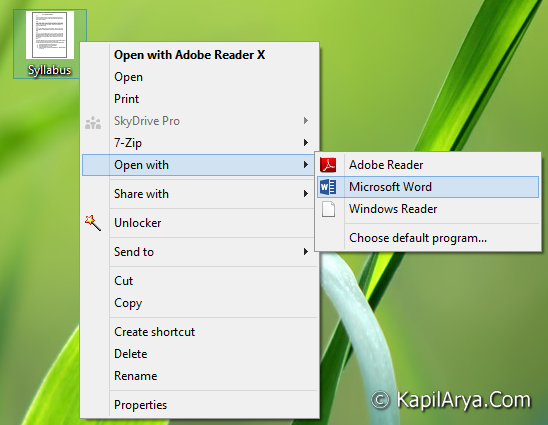
2. As soon as you select Microsoft Word, it will start conversion of PDF file, so that it can create editable environment.
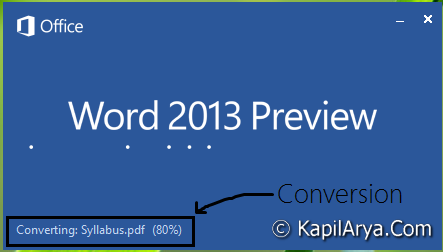
3. After converting the file, you’ll see below shown screen. Here you can look up the contents of PDF file. Now click on the button (Print layout) as indicated.
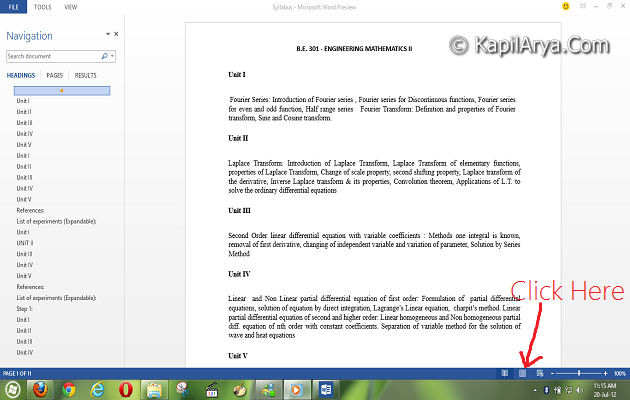
4. That’s it! It will now turn the PDF file into editable environment. So you can now edit or add the contents of your wish as per requirement, just as we do in simple word processing document.
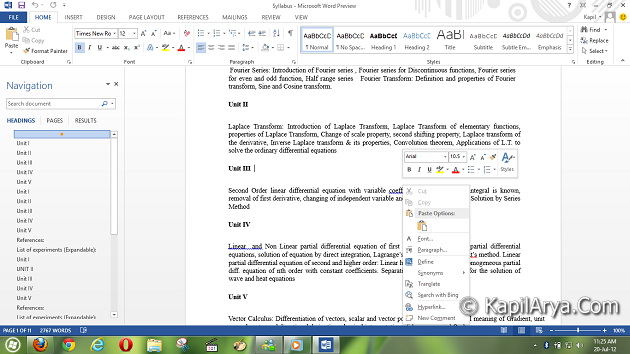
5. Now lets see the final markup. After done editing, click on FILE near to left top corner in above image, you’ll be taken to below shown image.
In left pane, select Save As. A Save As window will open up after choosing location in Metro layout. All you need to do here is to provide the necessary .pdf extension after file name and select PDF as Save as type.
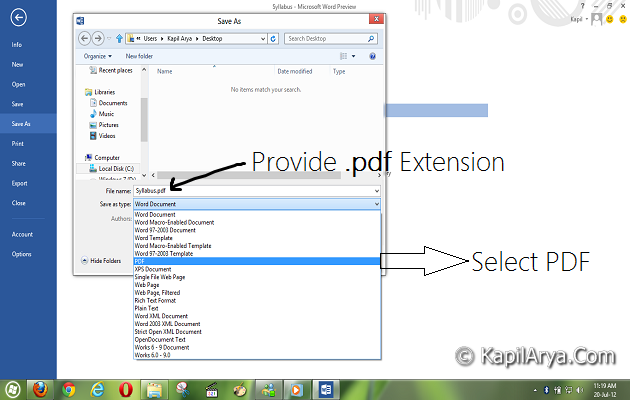
Thus you have edited the PDF file successfully. To ensure the edition, open the file with any other PDF reader like Adobe Reader. The changes you have made will now reflect.
That’s it!






Really helpful the end-users, very nice to try………. thanks :)
Lolz this is great ttrick!!
Thank for gud tip :D
wow… nice :D… i’ll try :)
Taking the ovevreiw, this post is first class
I mostly use PDFfiller to edit or create fillable PDFs. Its not the same thing, but maybe you someone needs it. It also allows you to erase in a pdf, esign, efax, add logos, pics to pdfs, and upload word or powerpoint document to convert it to fillable PDFs. Its pretty easy to use and its pretty cheap.
wen i open the pdf file with word it doesnt convert and dialog box opens ..it shows word cant convert pdf file..wat could be the reason..
^^ Check if the problem persists with other documents. If yes, make sure you don’t have installed any other PDF converter software and re-install Office, see if that helps,