We know that Microsoft has introduced Metro tiles in Windows 8. Metro UI have the policy of highlighting text on the front of screen. Microsoft has used the idea of Windows Phone Metro UI to bring it to desktop series of their Windows editions. Metro is anticipated since its interference to Windows editions but with the advancement of time, users have finally habituated themselves for Metro UI. Today, we came across a weird issue, whenever we right clicked on a Metro tile then the bottom screen options have some disgusting characters:
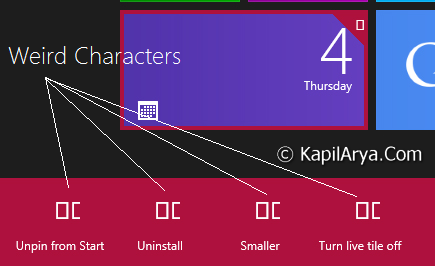
As you can see in the image shown above, the options in the bottom of screen have some box typo icons and they looks really weird. You can face this problem on Windows 8 in the regions where Metro UI is extensively used.
So how to fix this problem? What should we do so that we can get usual Metro UI interference icons. Well, we have a solution for you. The issue is being faced due to outdated version of native font on Windows 8. For Windows 8, including Metro UI, Segoe UI font is default. Hence you should have an updated version of this font. So without wasting your time anymore, lets share the fix:
FIX : Weird Characters For Metro Tiles Manipulation Options
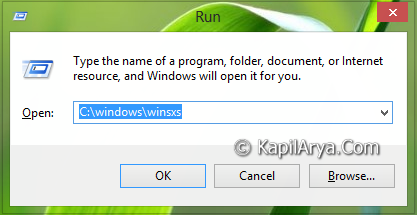
1. Press  + R and put C:\Windows\winsxs in Run dialog box to open Winsxs folder:
2. In the search panel, type segui*.ttf and hit Enter. If you are really facing the issue, then you will find about 5 results.
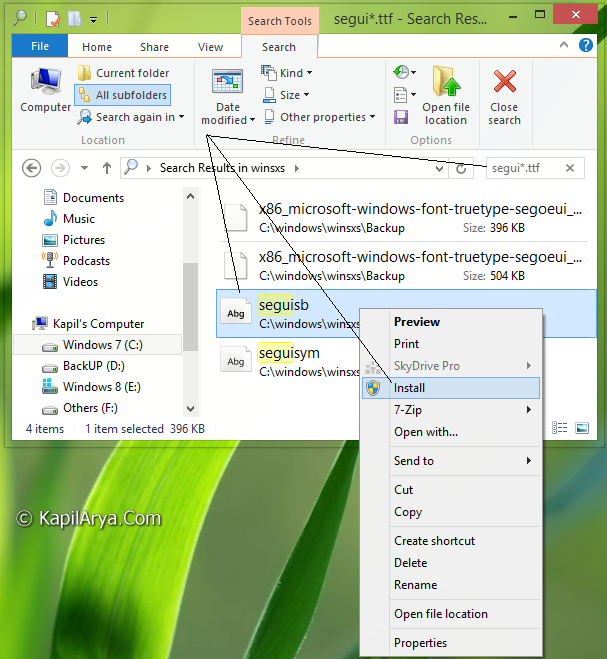
3. The above shown results will include the list of required Metro UI fonts, so right click on them one by one and select Install. That’s it! Reboot the system and your issue should be fixed up.
Hope you find the fix useful!