

 UPDATE: Windows 11 users can check this guide to enable .NET Framework 3.5.
.NET Framework 3.5 is the basic need for some apps you’ll use on your Windows 10 machine. Since these apps are written/coded with .NET language, hence you additionally need to enable .NET framework to run them. This framework is not enabled by default in Windows since the OS uses C, C++, C#, V# etc. language packages. So when you run any app requiring .NET Framework, you’ll receive this window:
An app on your PC needs the following Windows feature:
.NET Framework 3.5 (includes .NET 2.0 and 3.0)
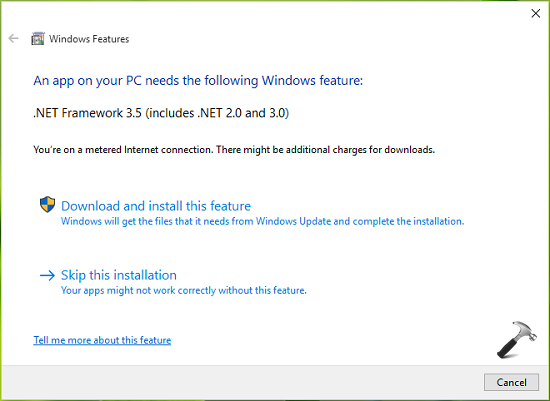
Thus to enable .NET framework, you click or tap Download and install this feature in above shown window. But if you notice this window carefully, there is a message at top that you’re on Metered Connection and will require additional charges for download. Also, enabling .NET framework is better processed by Deployment Image Servicing and Management Tool aka DISM tool. If you have Windows 10 ISO file with you, which you used for installation of the OS, you can use it to enable .NET framework in few seconds.
Here is the how-to part:
How To Enable .NET Framework 3.5 On Windows 10
1. Create a temporary folder under system root drive directory (i.e. if Windows is installed on C: drive, then create Temp folder such that its can be located at C:\Temp).
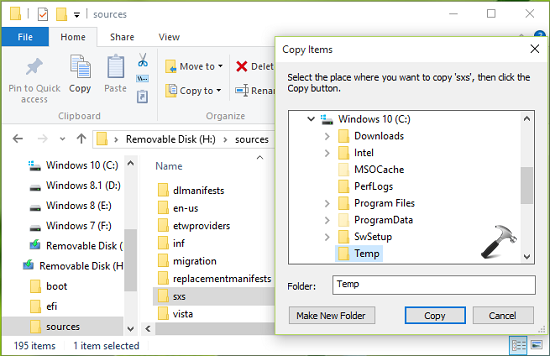
2. Locate the Windows 10 ISO file in File Explorer, right click on it and select Mount. Reboot the machine, you’ll find that ISO file is mounted to DVD drive with temporary drive letter. You can also or alternatively plug Windows 10 installation bootable USB like the way I did. Open this drive and open Sources folder. Copy the sxs folder now to temporary folder you’ve create in step 1.
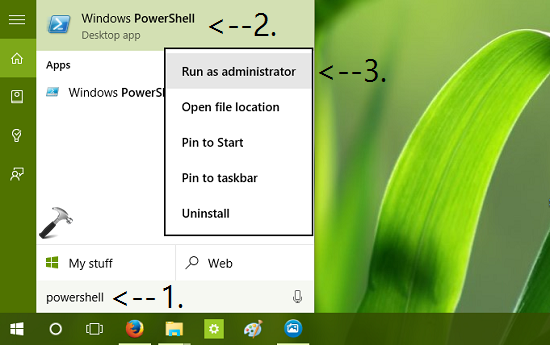
3. Now search for powershell in Windows and spot Windows PowerShell from search results. Right click on it and select Run as administrator.
4. Finally, in the administrative or elevated Windows PowerShell, type following command and press Enter key:
dism.exe /online /enable-feature /featurename:NetFX3 /All /Source:c:\temp\sxs /LimitAccess
* Substitute c:\temp with the temporary folder location we created in step 1.
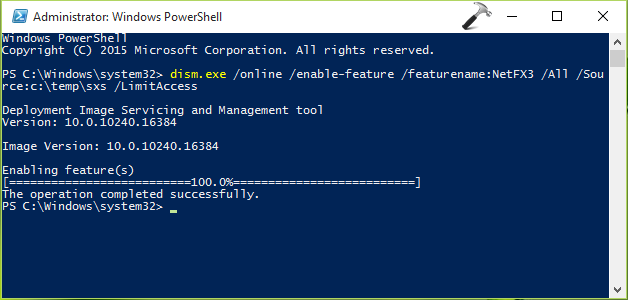
In few seconds, you’ll get The operation completed successfully message, which indicates the .NET Framework has been enabled on your system.
Check this video to illustrate above steps:
Run .NET Framework Repair Tool in case if you’ve any issue with .NET Framework.
That’s it! See this fix if you receive “The referenced assembly is not installed on your system” error while enabling .NET Framework.
To install .NET Framework 4.8 offline in Windows 10, see this guide.
Also check: .NET Framework 3.5 error 0x800F0954 in Windows 10.



Another easyer method:Control Panel classic—-Programs&Features—-Turn Windows Features on or off(on the left side);on the right side a list will appear—tick the box,which refer to Net Framework 3.5.Windows will download&install the requested features
^^ Yeah, its also a good alternative if you have fast web connectivity :)
Yes,a decent internet connection is needed,because windows need via windows updates to download requested installer whose size is something like between 200 MB-250 MB.
P.S.: I like your site
^^ :)
very helpful
Thanks
^^ Glad you find it helpful 😊
Bro I am getting error 0x800f0907
^^ What is the error message you got with this code?
The source files could not be found
^^ It seems you’ve not followed step 1 & 2. Try those steps, because they are for locating source files.
Believe me bro I am following these steps
microsoft-windows-netfx3-ondemand-package
This is the file inside sxs
I just need to enable dotnet 3.5 for a software. i have windows 8.1 installed and my windows is not updating.tried your power shell solution but after each command i just get get the next command line .
Hello i know this is from like 2 years ago but i’m having this problem and i don’t know what to do, i did everything like it is in this guide, but it keeps apearing “Error :2 The source files could not be found” and i don’t know what to do, i know this guide it’s super old, but i really need help
^^ Try: https://www.kapilarya.com/download-microsoft-net-framework-repair-tool-for-windows-10
Thank You So Much
Hi Kapil,
I followed your guide and it was able to install it to 100% but then Error: 17.
“The system cannot move the file to a different disk drive.”
I have no clue why that is.
Please advise and help.
Appreciate it very much.
Thank you.
Please disregard my comment above.
User error on my part. Everything is working now because of your guide.
Thank you so much!! Keep up the good work.
Cheers.
I don’t understand step 1 and step 2 , where I can found my iso file ? my windows 10 is installed when I buy this laptop, and I don’t have any cd or anything..
^^ You can download latest ISO files here: https://www.kapilarya.com/download-latest-windows-10-iso-files
Thanks a lot Kapil
^^ Glad we could help 😎
Thanks to this!
^^ 👍
Kapil, I know this article is quite old. but, im hoping for some help. I am trying to enable .net frameworks on my hp pavilion that comes with windows 10. when i go to enable .net frameworks, I get error 0x800703f1 “the configuration registry database is corrupt”. Im lost, and dont know what to do! just trying to start a new small business and need to get this on here asap! hope to hear from you. Thanks a bunch.
^^ Try in-place upgrade to deal registry database issue: https://www.kapilarya.com/how-to-repair-windows-10-using-in-place-upgrade
I’m getting the” source files could not be found error” even thought I mounted the Windows ISO, and placed the sxs folder in the C:/temp folder. Any further suggestions?
I got error 50 operation complete but netfx3 not enabled
Error 87 shows
Thank you for providing this. Worked perfectly.
^^ Glad it worked 😊
Thanks you for this wonderful information. I spent a day looking for information while trying to sort this. This has worked perfectly. :-)
^^ Glad you find it useful 😊
Great job, bro, finally got it to work! Thanks alot!
^^ Happy to help Dave 😎
thanks kapil bro
^^ You’re most welcome!
I have windows 8.1
Many many thanks. After trying other suggestions, some mentioned in the comments, this worked for me.
^^ Glad to help Eric 😊
I get Error code: 0x800736B3. Any ideas?
^^ Try .NET Framework Repair Tool: https://www.kapilarya.com/download-microsoft-net-framework-repair-tool-for-windows-10
why this headache just to enable one feature. I hate MS and their solution.
Dead on dude, thanks for the info. Worked perfectly
^^ Glad to help Joe 😊
Every time I run the dsim powers he’ll command I get an error saying the files could not be found. I followed all the steps including making the temp folder and copying the files from the ads folder to it into my :C: drive.
I couldn’t get this to work until applying the ‘dism.exe /online /enable-feature /featurename:NetFX3 /All /Source:c:\temp\sxs /LimitAccess’ command.
All working fine now, thanks!
^^ Glad you sorted the issue 😊
Hi Kapil,
practically my last chance is, when I call you with the issue regarding my system and ask your help.
My system is W10Pro(1834) with two uncommon ‘features’:
– it is installed (and boots from) a VHD
– I use directory junctions for the followings:
‘%systemroot%\Windows10Upgrade’
‘%systemroot%\Windows\Installer’
‘%systemroot%\Windows\SoftwareDistribution’
‘%systemroot%\Windows\WinSxS’
‘%userprofile%\AppData\Local’
because of theirs extremely aggressive demand for storage capacity. Linked directories are placed to a separate physical drive (not just into a different partition).
Well, I know, that MS does not support (why?) update to VHDs. And it seems that the situation is the same for enabling .net feature, because I tried all methods, what I found for installing .net3.5, but the latest achievable result was a 0x80070011 error: “the installer cannot relocate the directory”. I was not able to repair this error with any of different ways usually suggested to repair the widows update error issue.
So I ask for your kind opinion, whether am I right, and enabling windows feature is neither supported on VHDs. BUT I hope, I’m wrong and you can suggest a solution. Thanks!
This did not work for me. I got Error: 2 (The system cannot find the file specified). This is a pretty old post, so I don’t expect much response.
Took about 50 mins from start to finish –did not need to reboot after mounting folder .
Bit following the rest of instructions worked great –Thank you
^^ Glad it helped you!
Tried lots of tut to fix my problem. so glad it worked with my win 8.1. thanks a lot!
^^ Glad to help Meth 😎
me funcionó a la perfección, para quienes les salia error al activar por el panel de control en el momento de descargar de internet, éste sitio es recomendado.
^^ Happy to help Hector 😊
PS C:\Windows\system32> dism.exe /online /enable-feature /featurename:NetFX3 /All /Source:c:\temp\sxs /LimitAccess
Strumento Gestione e manutenzione immagini distribuzione
Versione: 10.0.17763.1
Versione immagine: 10.0.17763.292
Attivazione funzionalità
[==========================100.0%==========================]
Errore: 0x800f081f
Bad bad o.s.
Unfortunately the only commercial …
^^ Refer: https://www.kapilarya.com/dism-error-0x800f081f-the-source-files-could-not-be-found-windows-10
This is great, thanks Kapil
^^ Glad to help Akash!
So, even this is taking forever to do. Any suggestions? I need the .NET 3.5 for a game I play. I don’t recall it being an issue like this for my last computer. (P.S. – Using Windows 10 Pro)
^^ Have you tried steps mentioned in article? Let me know if any step didn’t worked for you.
All the advice on the net, nothing worked, that finally did the trick. Hate when Microsoft knows a problem exists and does nothing to provide the average user an ability to correct.
^^ Glad we could help Jamie 😊
Thank you!
^^ You’re most welcome 😎
Thank a lot, I had issue installing Autocad Civil 2014 though the tips above helped me install netframe 3.5 in windows 10
^^ Glad to help RasKim!
Thank you for your help.
^^ Glad we could help Cafer!
how can we install offline without internet connection
and where can i get the ISO file ( it is missing )
^^ This DISM method can also be used offline. You can download ISO file using links provided here: https://www.kapilarya.com/download-latest-windows-10-iso-files.
for those who are getting the source cannot be found error try removing the /limitaccess from the command. this worked for me.
^^ Thanks for adding this!
02 October 2019: Bravo! This procedure worked.
^^ Thanks Karl, glad it worked for you!
Thank you this worked perfectly!
^^ Thanks for your comment.
Hey Kapil, I’ve done all the steps but I keep getting stuck on “Enabling feature(s)” with no progress at all. What should I do?
^^ Which version you’re on? Make sure you download the ISO file from official Microsoft page.
I,m getting the error 87 while running the command on PowerShell
Error: 87
The all/source option is not recognized in this context.
For more information, refer to the help.
The DISM log file can be found at C:\Windows\Logs\DISM\dism.log
Salaam Kapil Arya
Im still struggling. Can you please asssit?
Error: 740
Elevated permissions are required to run DISM.
Use an elevated command prompt to complete these tasks.
In some website isnt mention about the non meter connection is required to download the download the update.
^^ Thanks for adding it!
I continue to get DISM failed error:0x800f0922. Been working on this for 3 days. I even went to MS and downloaded the ISO to my hard drive. Any thoughts?
^^ Open administrative Command Prompt and type following commands one-by-one followed by Enter key.
net stop wuauserv
net stop cryptSvc
net stop bits
net stop msiserver
Ren C:\Windows\SoftwareDistribution SoftwareDistribution.old
Ren C:\Windows\System32\catroot2 Catroot2.old
net start wuauserv
net start cryptSvc
net start bits
net start msiserver
Close Command Prompt and retry enabling .NET Framework.
I follow all the steps, and all these steeps: superuser.com/questions/1086646/failure-to-install-net-3-5-on-windows-10-error-800f0922. Finally I tried with Microsoft .NET Framework Repair Tool too. Nothing works, the propmt still say files not found (0x800f081f error)
I followed the steps and when it finished enabling the features it says that the configuration registry database is corrupt.
^^ Run Windows Update troubleshooter. If it doesn’t works, reset update components using Method 2 here: https://www.kapilarya.com/windows-updates-troubleshooting.
Hello Kapil,
I am stuck at enabling feature for hours. any thoughts?
PS C:\Windows\system32> dism.exe /online /enable-feature /featurename:NetFX3 /All /Source:c:\temp\sxs /LimitAccess
Deployment Image Servicing and Management tool
Version: 10.0.17763.771
Image Version: 10.0.17763.805
Enabling feature(s)
^^ Make sure you’ve followed steps 1 & 2 exactly.
High Five!!!
Thank you!
^^ Glad to help!
help my power shell is stuck at “Enabling feature(s)”
^^ Wait, or retry the command. Make sure you use the correct source location and source files remain present on system.
Kapil please help . Error code 0x8000ffff.. tried every possible way
Great. Your remedy worked on mine. Thanks so much.
Glad to help!
gets stuck at 93.4% when enabling features. any suggestions?
Nevermind i got it! Thank you!
^^ Glad to help!
Im trying to install NET Framework 3.5 on win 11, but I always get the following error message:
Error code: 0x800F0922
I have tried enabling the feature, using the offline installer
^^ Refer this fix: https://www.kapilarya.com/how-to-enable-net-framework-3-5-in-windows-11.
It’s 2025 and this just saved my bacon. Thanks man!!
^^ Glad to help 😎