I just found myself in a predicament recently. I wanted to get back some pictures that I had deleted from my iPhone earlier. At the time, I didn’t think much of it, but looking back, some of those pictures were actually pretty good. I wish that I hadn’t deleted them!
So, I decided to try out the software named Stellar Data Recovery for iPhone. I’ll be checking out what it’s able to recover, ease of use, and whether or not it’s worth your time. Let’s see if it lives up to the expectations.
Page Contents
What Is Stellar Data Recovery for iPhone?
Stellar Data Recovery for iPhone is a data recovery software available for both Windows and MacOS that can recover data from the supported iOS devices and local iTunes backups.
Not an app for your iPhone. It has to be installed on Windows or MAC PC to enable direct device recovery.
The software includes several data types such as personal photos and videos, contacts, messages, call history, notes, and voice memos. It also supports some third-party apps, like WhatsApp, Viber, WeChat, Kik, and Line.
It can come in handy if you want to get information about one chat or some photos that you missed out on from an older backup of the computer.
System Requirements: Windows and Mac
Check if your computer has the following requirements before installing Stellar Data Recovery. A standalone version for Mac is also available from Stellar. Published requirements include macOS Golden Gate 27, Tahoe 26, Sequoia 15, Sonoma 14, and Ventura 13.
For up-to-date compatibility information, see the Windows and Mac product page.
What Can You Recover With Stellar Data Recovery for iPhone?
Different kinds of users may have different iPhone recovery needs, and types of data supported with Stellar Data Recovery for iPhone are worthy of further investigation.
Photos, Videos, and what not
Often, photos and videos have information that is hard to replace. These files may not be possible to access if they are accidentally deleted, the iOS update was not successful, or the iOS device was reset.
Stellar can perform a data recovery scan of supported iPhone, iPad and local backups to recover media files, chats, notes, and so on . It also allows for voice memos and Photo Stream images as well. This will provide users with additional choices beyond searching for erased Camera Roll photos.
Contacts, Messages, and Call Records
It’s even more of a hassle to lose a contact or a crucial discussion than it is to lose a simple file.
Stellar can recover a number of types of data related to communication.
- Contacts and telephones numbers
- SMS and iMessages
- Message attachments
- Call history (incoming & outgoing)
- WhatsApp Chat
- WhatsApp Media files
It also includes notes, calendar events, reminders, as well as Safari’s bookmarks.
WhatsApp and Other Application Data
Personal/working information is commonly included in texting applications. In addition to recovering WhatsApp conversations and attachments, Stellar can recover data from some other apps as well, such as WeChat, Viber, Kik, Tango, and Line. This will prove helpful when you need to get a previous conversation or an attachment that is not available within the application.
Note that application compatibility and backup information will impact the results. Not all applications are supported, nor can it be guaranteed that all deleted conversations will be recovered.
Recovering Data From an iPhone or an Existing Backup
Each recovery situation is unique. Stellar offers scanning of the connected iOS device and support for viewing local iTunes/Finder backups.
Recover data straight from iPhone: Link the iPhone to the computer and allow the software to scan the information the computer can access through the iPhone. Useful when the phone is not being used and may be able to communicate with the computer.
iTunes/Finder Backup Recovery: Choose a previously created local backup and search it for content. This will be of great use to you if you already have an old iPhone or are not able to get access to it.
Even encrypted iTunes backups are supported. Before being able to read their contents, however, you have to enter the proper encryption password.
How to Use Stellar Data Recovery for iPhone
The recovery path is a relatively simple process. You need not to know complicated recovery commands or to be able to use technical scripts.
The following is an explanation of how to get started:
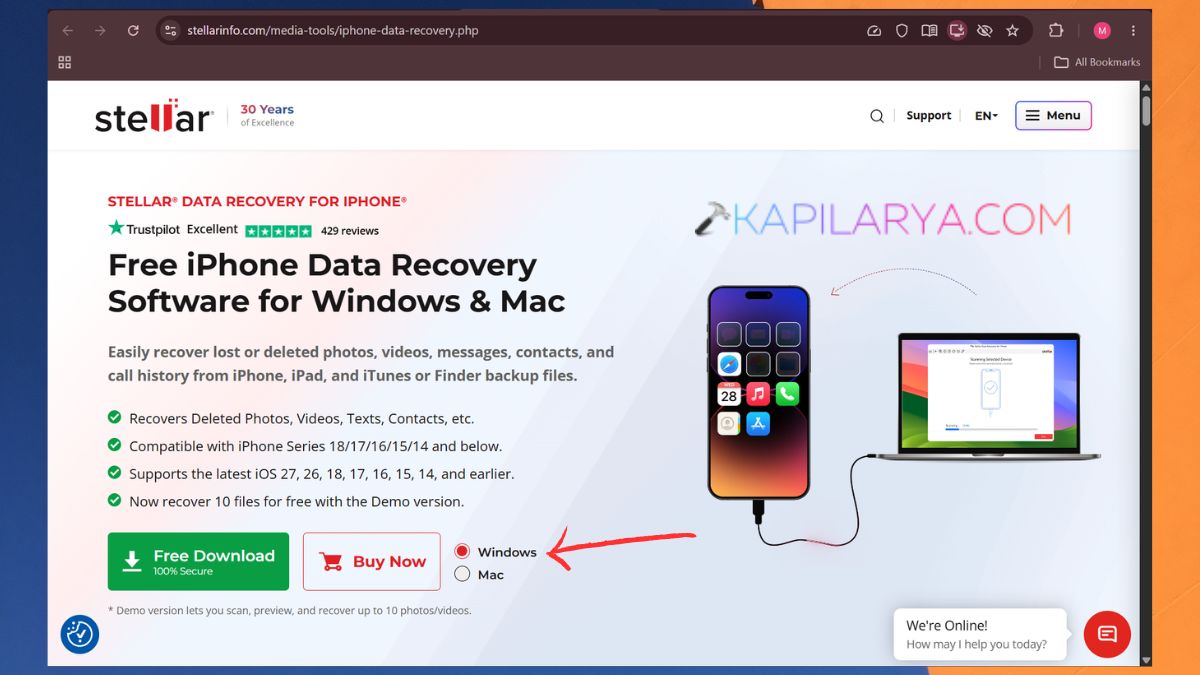
1. Download from the official Stellar website; the version you download will depend on the type of OS you have. I am choosing Windows 11.
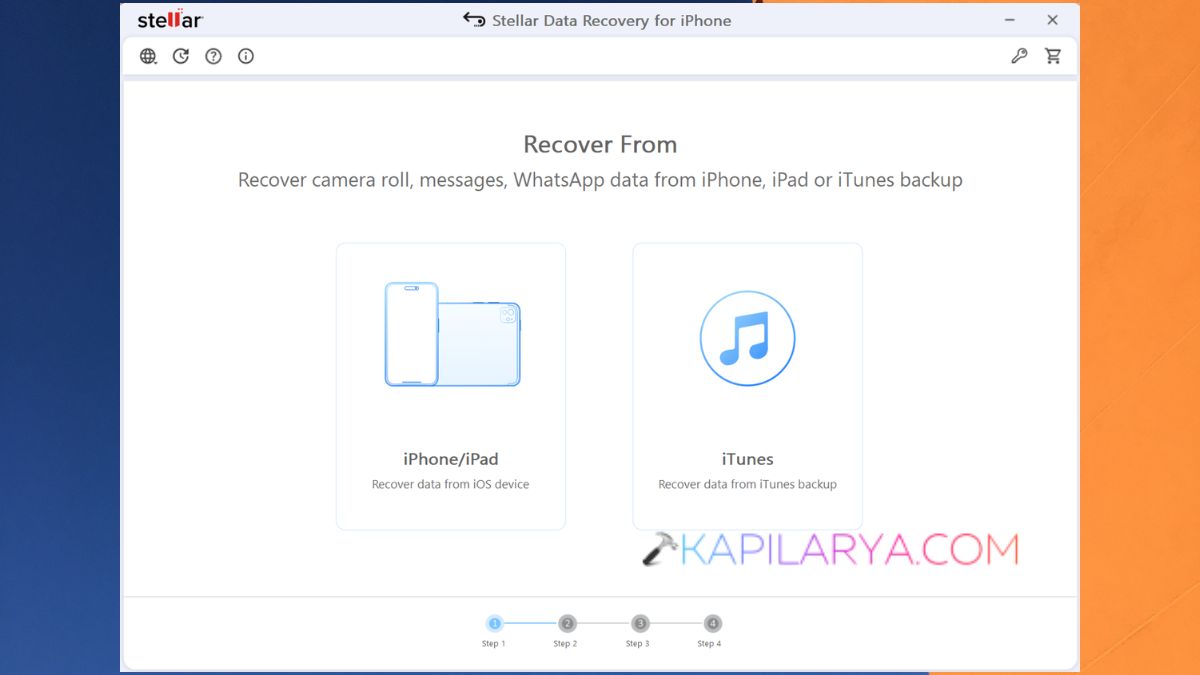
2. Finish up installing, and it will run. Connect via a USB cable. Now, choose iPhone/iPad or iTunes.
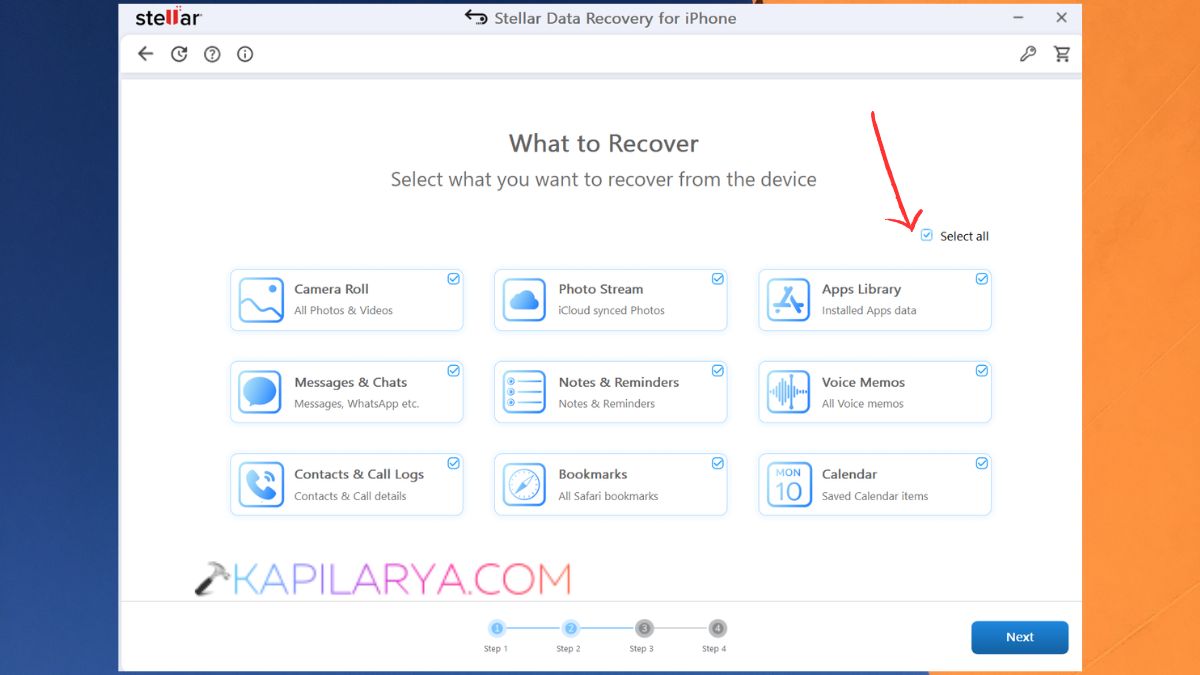
3. Select what you wanna recover.
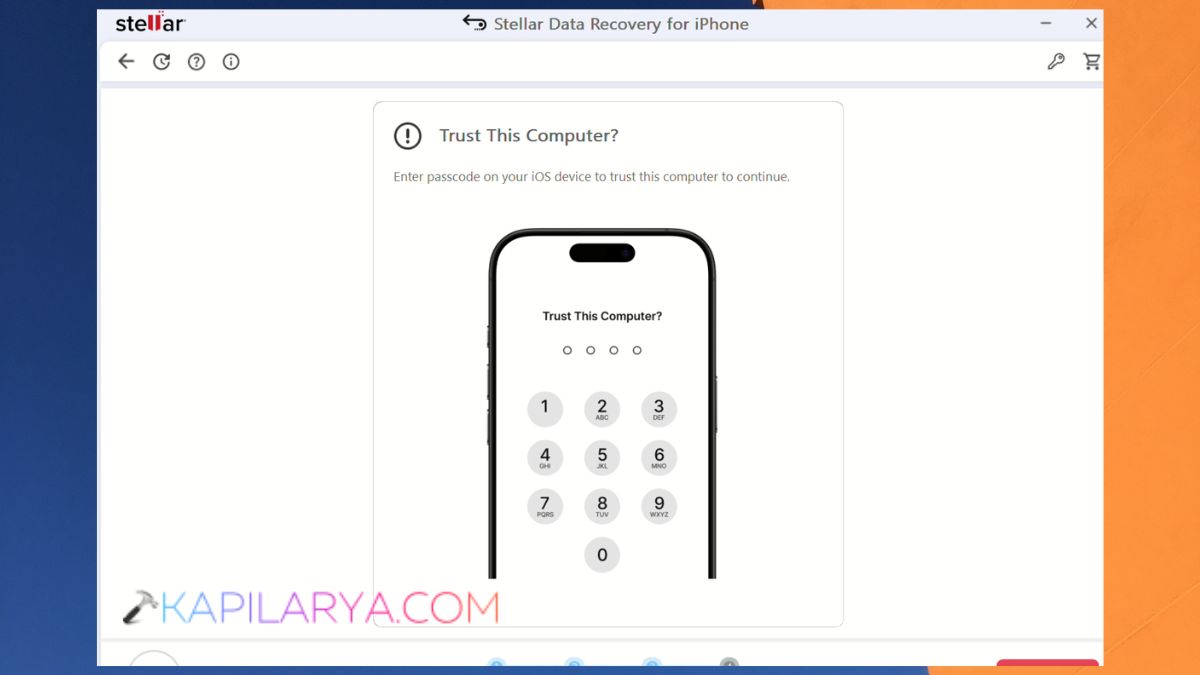
4. If it displays Trust This Computer, you will have to enter your passcode or use face recognition, if applicable, on the iPhone.
5. Once the scanning is complete, choose what you want to select to Save the data recovery. The Deep Scan option is also available if you want to search for more.
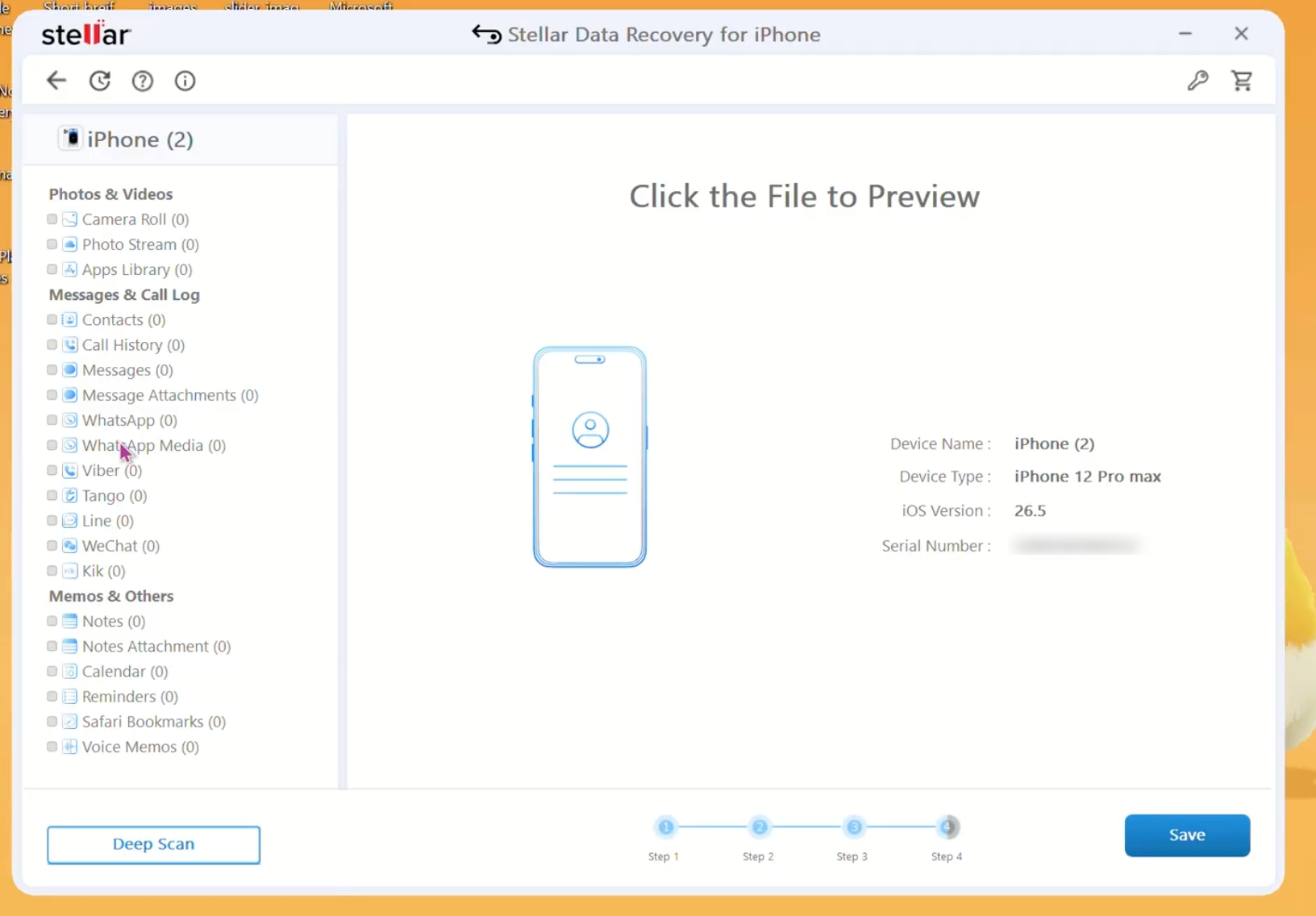
6. Select the necessary things and store them somewhere on your computer. Be sure to have the password for an encrypted backup available. Also, I would suggest that you copy the recovered data onto the computer before copying it back onto the original iPhone.
Is Stellar Data Recovery for iPhone, Free?
Stellar is available in a demo form, so you may check out the application prior to making an acquisition. The new version of the software offers users to scan and preview recoverable data. It will also recover files up to 10 MB each, and up to 10 photos or videos for free.
If you want to restore other supported data types or more files, then you must have a paid license. The pricing details are mentioned on the Stellar Data Recovery for iPhone page on Stellar’s website. The demo is helpful in case you wish to see if the software is able to identify the information you’re searching for before paying for it.
Pros and Cons
Here are some of my favourite aspects of Stellar Data Recovery for iPhone and some of its drawbacks. Here are some of my favorite features and some downsides to playing with Stellar Data Recovery for iPhone.
Advantages
- I really liked the simplicity of the startup. The interface is straightforward, and even a tech novice can use it.
- It is compatible with different kinds of iPhone and iPad data, such as photos, videos, contacts, iMessage and WhatsApp chats and media.
- You can scan your iPhone or an existing backup from iTunes or Finder.
- I liked the preview option, as you can look at recoverable files before saving them. It allows selection of files you actually want to retrieve rather than saving all of the files.
- The free demo allows you to scan and preview files prior to buying.
Limitations
- Recoverability is limited in the free version; it will require a paid license to recover more than 10 photos and video files.
- To scan an encrypted iTunes backup, you must have the right iTunes backup password.
- As of yet, backup recovery from iCloud is discontinued.
- It is a tool to recover files like all other recovery tools and does not promise to be able to recover any file that has been overwritten or is no longer available.
Should You Give It a Try?
If you’re looking for a desktop program to search for missing data on an iPhone, an iPad or a backup for your local database, then you may want to consider using this program called Stellar Data Recovery for iPhone.
It supports a variety of data types that are helpful in various scenarios. You may be looking to recover a deleted photo, a contact from years ago, find the attachment in a message, or analyze a secure iTunes backup.
But the software has its drawbacks, including its modest free edition and absence of recent iCloud backup recovery.
It is my suggestion that you should give the demo a shot first. Before purchasing a full license, see if it can find the exact information you require.
Frequently Asked Questions (FAQs)
That’s it!