Earlier, we’ve shared you following guide to backup your Windows 10 to external drive or network location:
How To Backup Windows 10 To External Hard Drive/Network Drive
In the above mentioned guide, while configuring backup settings, the backup is automatically scheduled for some specified time. This means backup will itself run at this time and create new definitions accordingly. However, if there are some hiccup with your backup drive or location, the backup will fail to work. You’ll see following error in such a case:
Page Contents
Windows cannot find the disk or network location where your backups are being saved.
The backup location cannot be found.
Error code: 0x81000006
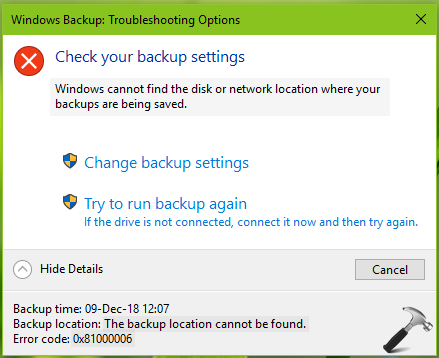
This error may come into play, if you backup drive/location is changed. Another factor involve here might be third-party software on your system (such as security suites). If you’re also victim of this issue, refer below mentioned suggestions to fix it.
FIX: Windows Cannot Find The Disk Or Network Location Where Your Backups Are Being Saved
FIX 1 – General Suggestions
1. First of all, make sure your external drive or network location is accessible through File Manager. If you’ve trouble accessing them via File Explorer as well, fix that and it will also fix backup issue.
2. Make sure Windows Backup and Volume Shadow Copy services are running in Services snap-in and have their Startup type set to Automatic.
3. Perform clean boot.
4. Temporarily uninstall your third-party software on your system, especially security suites (antivirus program) and see if that helps.
5. Scan your system with Windows Security/Defender, if you’re using it as primary security suite.
FIX 2 – Save Backup On Network Instead Of External Drive
If you’re saving your backup to external drive, we suggest you to backup it to network to avoid this issue. Please try these steps:
1. Click on Change backup settings link in the error message.
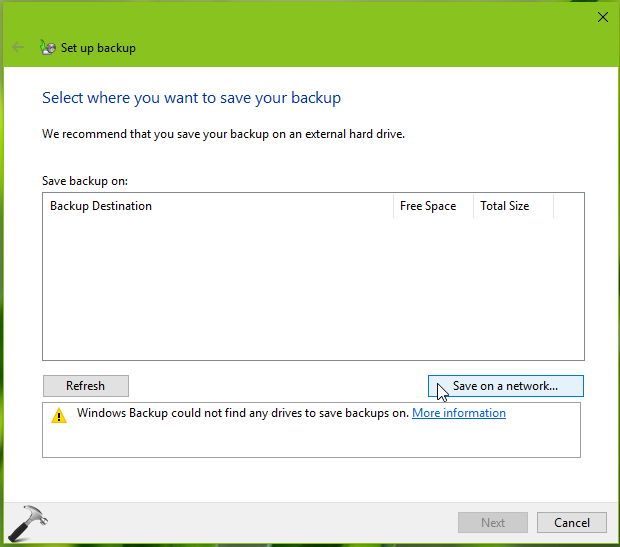
2. Then under Set up backup, select Save on a network. Type in your network credentials and choose the backup location in the network.
3. Once you selected your network backup location, click on Next and let the backup run.
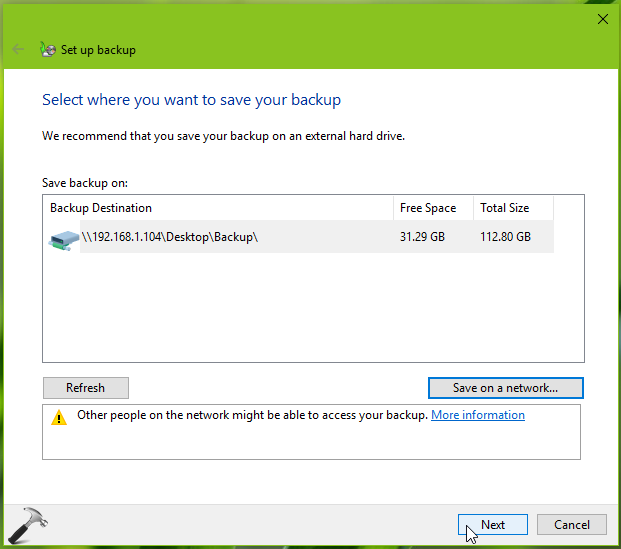
We believe after re-configuring your backup settings, the error will no longer occur.
Hope this helps!