

In Windows 10, you may often use Microsoft Store to install new apps of your choice. While you download any app from Store, you need to sign in first. In some cases, if you’ve already switched to Microsoft account, you may not need to sign in separately to Store app as it would directly pull your information.
Recently, while signing in to Microsoft Store app using the Microsoft account, we came around following error:
Page Contents
This doesn’t look like a work or school email. You can’t sign in here with a personal account. Use your work or school account instead.
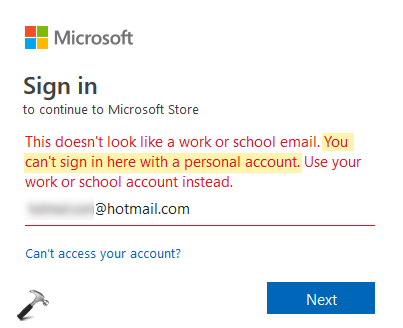
Worth to mention here that above error message isn’t limited to Microsoft Store app and may appear while signing in to other Microsoft products/services such as OneDrive, Teams, Microsoft Office applications. Here is what you can do to bypass this message and sign in to the app or service you wish to.
FIX: You Can’t Sign In Here With A Personal Account
FIX 1 – Identify And Sign-in With Correct Account
First of all let us focus on the error message and make sure you’re trying to sign-in with the correct account. It is true that a Microsoft account can be used to sign-in to most of Microsoft services but if your device is part of organization, you may need to use their credentials instead. If you’re using Office 365 at your work/school, a global administrator must have assigned a unique username and password for you. These are the actual credentials which are supposed to be used on your system, since the device is maintained by global administrator and their applied policies. So use the work or school account assigned to you and the error will not appear.
If you don’t use Office 365, or if your system is not being used at work/school, see FIX 2 below.
FIX 2 – Other Suggestions
So if your personal system is giving this error, try these things:
1. Try switching to Microsoft account from local account.
2. Try resetting the app which gives you this error.
3. If resetting the app doesn’t works, try re-registering the app.
4. Use another Microsoft account, and see if you can sign in then.
Hope something helps!






Resetting the app (One Note app that comes with Win10) solved my problem. Thanks!
^^ Glad we could help!
thank u this worked
^^ Glad to help!
I uninstalled and reinstalled my Mail app for my iPhone and it allowed me to sign back into my hotmail account for all of thirty minutes. I have important emails I need to keep track of this week and now this piece of **** is keeping me from them.
My Microsoft account is asking for a pin but I did not set one up when downloading it. How do I set a pin or get around having to give one to get into my account?
^^ Go to Settings > Accounts > Sign-in options and under PIN, click Add.
The option “Add personal account” is not available on my PC. Am only able to select “Add work or school account” when signing in…
^^ You need to contact your IT admin as it seems this machine is being connected to company or work account.
Dude.
“Use a different account” is not a solution to the problem of not being able to sign in with an account.
Trying to use Office Online because when I rebuilt my pc there was no way to migrate my Office 2016 which I paid for legally. So I’m stuck and I don’t intend shelling out more money to MS. I keep getting this error message and have to clear all History then it works. MS login procedures are horrific, they need to take a lesson from Google.
^^ Please submit your feedback via Feedback hub app.
When Students at colleges use Office 365 they are using their school accounts. But Now WHEN YOU GRADUATE soon after you start getting this message EVEN though I purchased a legal copy of Office 2019 I still get it… Microsoft Answers DO NOT ADDRESS this transitional problem!