

We all know that Windows Update is important to ensure safety of our Windows 10 system. It is often recommended to install the latest updates available to you. But if you’re not able to install updates or even access the Windows Update section, then this post is for you. You might get Windows Update is disabled message in such a case, as shown in the screenshot. The error code is 0x80070422.
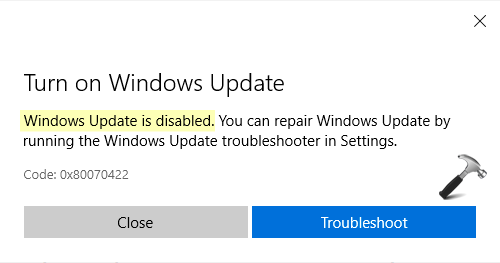
Recently one of my reader contacted me and asked about this issue. He tried to access Microsoft Store but couldn’t because of this error. Moreover, when he goes to Windows Update section under Settings app, then nothing is loaded. Running the Windows Update troubleshooter resolve the issue but it is back after sometime. I suggested him some of the recommendations mentioned below and that helped to resolve the problem. So in case if you’re also facing this issue, here is how you can fix it.
Page Contents
Fix: Windows Update Is Disabled In Windows 10
FIX 1 – Start Windows Update Related Services
Open Services snap-in by running services.msc command.
In Services window, locate following services and make sure they are Running.
- Cryptographic Services
- Windows Update
- Windows Update Medic Service
- Background Intelligent Transfer Service
- Remote Procedure Call
- RPC Endpoint Mapper
- DCOM Server Process Launcher
Once all of the above services are running, the issue will be automatically sorted.
Check FIX 2 mentioned next, if you continue to face the problem.
FIX 2 – Using Group Policy
1. Open GPO Editor by running gpedit.msc command.
2. In the GPO Editor window, navigate here: User Configuration > Administrative Templates > Windows Components > Windows Update
3. In the right pane, locate and double-click on Remove access to use all Windows Update Features policy setting.
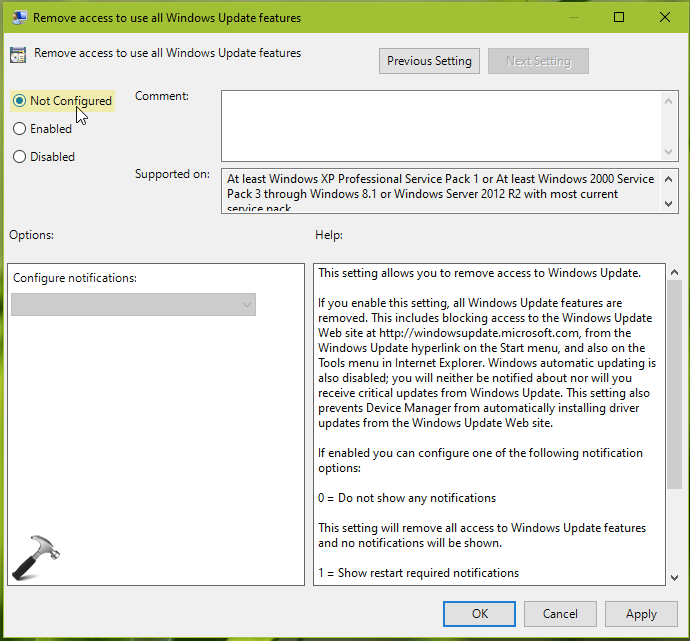
4. Set the policy setting to Not configured. Click Apply followed by OK.
5. Close GPO Editor window and update GP engine by running gpupdate /force command.
Now check Windows Update and you will find that issue is no longer appearing.
That’s it!





how do i run updates if i keep getting this 0X80070422 Error
I dont know how to do anything,command, am not a pc geek at all. so all I have read here is all over my head and into space.
it says i have no permission to make changes, im not admin … what the hel;l is all that? then i look at update history… nothing follows. no updates