

Usually, we have seen the problem of Internet not working in Windows 10. In such cases, the network icon says no Internet access and you cannot connect to web on browsers and wherever it is required. Now in this article we have the reverse problem. Sometimes you might see that network icon shows no Internet access but you are connected to the Internet. So how to resolve the problem, we will see in this article.
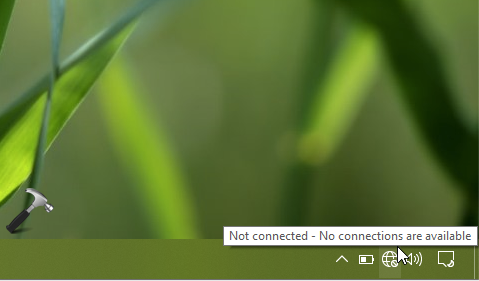
It is often recommended to perform Network Reset to resolve such problems. But resetting the network regularly is not a fair solution. So to permanently resolve the issue, we can try below mentioned registry manipulation. Here, we have to change certain registry values. It has previously worked for many clients on Windows 10 with similar issue and we hope that it should work for you too. The solution was proposed by a community user at this thread.
Network Icon Shows No Internet Access But Connected In Windows 10
1. Press  + R and type
 regedit in Run dialog box to open Registry Editor. Click OK.
2. In the Registry Editor window, go to following registry location:
HKEY_LOCAL_MACHINE\SYSTEM\CurrentControlSet\Services\NlaSvc\Parameters\Internet.
3. Now, in the right pane of Internet registry key and make sure these values exists with corresponding Value data mentioned against them:
| ActiveDnsProbeContent | REG_SZ | 8.8.4.4 |
| ActiveDnsProbeContentV6 | REG_SZ | 2001:4860:4860::8844 |
| ActiveDnsProbeHost | REG_SZ | dns.google |
| ActiveDnsProbeHostV6 | REG_SZ | dns.google |
| ActiveWebProbeHostV6 | REG_SZ | www.msftconnecttest.com |
| EnableActiveProbing | REG_DWORD | 1 |
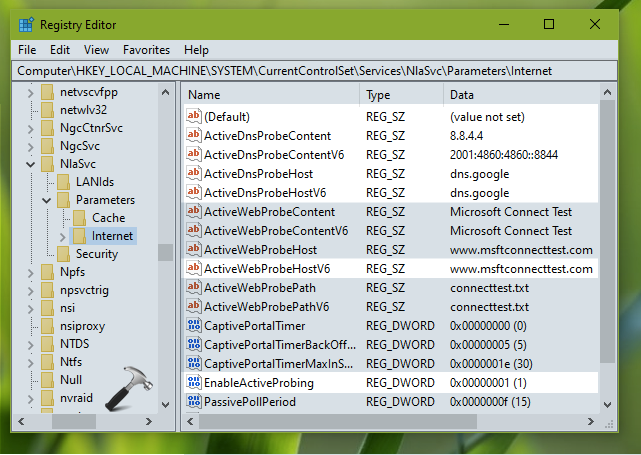
Once you set these values, simply close the Registry Editor and reboot your system.
After restarting, you will no longer face the problem. Check this video to illustrate above steps:
In case if you still face the problem, do let us know your comments.
Hope this helps!
Also check: How To Use WiFi And Ethernet At Same Time In Windows 10.



Hi Kapil, I’ve tried what you’ve suggested above to no avail.
Regards
^^ Have you tried Network Reset?
Hello,
Worked for me, Thank’s !
LIlian.
^^ Glad to help!
Hi Kapil,
I have surface studio locked with bitlocker. I am not getting the recovery key for that. When I went to command prompt, it only show numerical ID, and TPM ID. I have not found any way to get the key. Need your suggestions.
^^ Try to locate recovery key here: onedrive.live.com/recoverykey
Still can’t fix my case, please help
^^ Try Network Reset.
nothing’s change when i changed the data. once i restarted the pc, its still giving me no internet access. what i did is just uncheck ipv6 on the network settings and it will be connected (internet access). my solution for now is to check or uncheck ipv6.
^^ Thanks Eric for sharing that!
This didn’t fix the issue
Why is the DNS host entry dns.google instead of dns.google.com?
You can solve it by running these PowerShell commands:
Set-NetAdapterAdvancedProperty * -RegistryKeyword “*IPChecksumOffloadIPv4” -RegistryValue 0
Set-NetAdapterAdvancedProperty * -RegistryKeyword “WaitAutoNegComplete” -RegistryValue 0
These commands will turn off “Wait for Link” status check.
You don’t need any restart.
^^ Thanks Patrick for sharing this!
IT’s working Thanks
^^ Glad to help!
Can I install it to start up with Windows and remember whether it’s enabled or disabled? Also, I believe the tray is not password-locked. Thank you very much.
^^ You can create a batch script file and put it into shell:startup folder.
I have a slightly different issue… From Control Panel Home (Start – Settings (gear) – Network & Internet. The status window that pops up shows internet not connected but in fact I am connected. The WiFi conncetion icon on the task bar shows the connection. I also have access to this website and others.
hi Kapil . I have tried everything including the solution by Eric KSA and Patrick (got a not found on the Set-NetAdapterAdvancedProperty * -RegistryKeyword “WaitAutoNegComplete” -RegistryValue 0)
any help would be appreciated.
My Network icon always showed, no connection, even when this really has network access and internet.
Your info fixed my Network icon.
Thank you!
^^ Glad to help Ian 😎
I tried by running these PowerShell commands:
Set-NetAdapterAdvancedProperty * -RegistryKeyword “*IPChecksumOffloadIPv4” -RegistryValue 0
Set-NetAdapterAdvancedProperty * -RegistryKeyword “WaitAutoNegComplete” -RegistryValue 0
These commands will turn off “Wait for Link” status check.
After that Restart compuetr
^^ Thanks for adding this!
Hi Kapil, just to confirm i am running Win 10. I indeed have this issue where i am certainly connected to the internet as i am surfing etc, however windows is not recognizing that i am connected. Symptoms i am suffering (or should i say my pc is suffering) is that due to this i cannot connect with windows updates as i am not connected to a network, i also can not use windows update for drivers update. I have been on this for the last 3 days and most of the nights as this is now becoming a vendetta.
I have seen and tried your method in every position possible but no joy! I would really appreciate some help before having to visit a psycologist ;-)
Thanks for helping so many!
it not work for me, although i do like video, i use wifi