Usually, Windows Updates are provided by Microsoft to fix a known issue on your operating system. However, sometimes new updates installed may introduce new issues on some systems. Recently, Microsoft has confirmed News and Interests button blurry text issue after installing the update KB5001391. In this article, we will explore more details about this.
Here is the screenshot showing this problem on Windows 10 system:
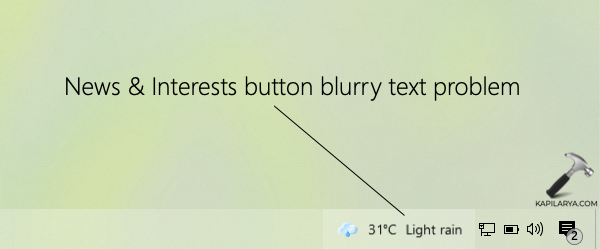
You can clearly see that News and Interests button has a blurry text. This clearly seems messing the experience of UI on taskbar.
Fix: News and Interests button blurry text after KB5001391
According to Microsoft, this issue may appear after you install the update KB5001391. It doesn’t occurs on all devices having this update installed. It may happen on some devices with specific display resolutions. KB5001391 was released on Apr 28, 2021. When this update was released, Windows 10 version 20H2 was the latest Windows 10 version available. At that time, this update upgraded the existing 20H2 build on system to 19042.964. As we all know that, Windows 10 version 20H2 and 2004 shared same core operating system files, this issue may also affect users on Version 2004.
If you are still on Windows 10 version 20H2 or 2004, and you just installed this update right now, you might face this problem of News and Interests having blurry text on the taskbar. This is currently unknown issue according to the Microsoft and the company is investigating on this problem and may offer a fix in upcoming updates.
To work around this problem currently, you can follow these steps:
- Open Settings app and go to Ease of Access.
- In Ease of Access, go to Display.
- In right pane, make sure text size is set to 100%.
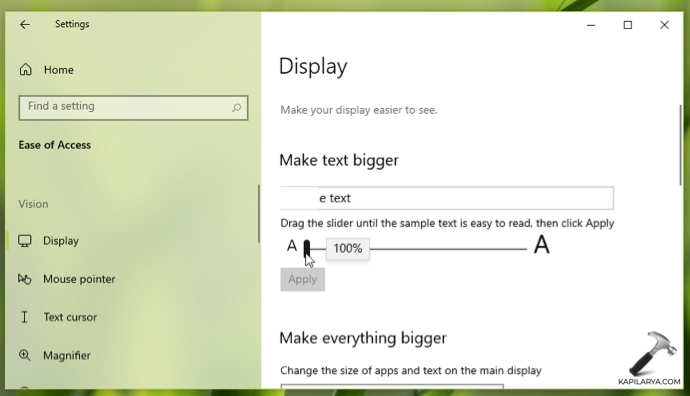
Also make sure that DPI scaling level on your system is set to 100% or Recommended level.
You can also try installing updates released after KB5001391 and see if that fixed the problem. Updates KB5004476*, KB5003637, KB5003173 were released after the problem update. Read more about these updates in this article.
If you continue to face this issue, you can uninstall KB5001391 temporarily and install the new updates when Microsoft fixes this problem.
That’s it!