

Xbox Game Bar is built in to Windows 10 or later so you can capture videos and screenshots while playing PC games. While you’re playing a game, press the  + G on your keyboard to open Xbox Game Bar. This shortcut works in both Windows 11 and 10. If you have an Xbox 360 or Xbox One controller plugged in to your PC, press the Xbox button. In case if you get We can’t record right now, try again later error for Xbox Game Bar, this article will help you to fix.
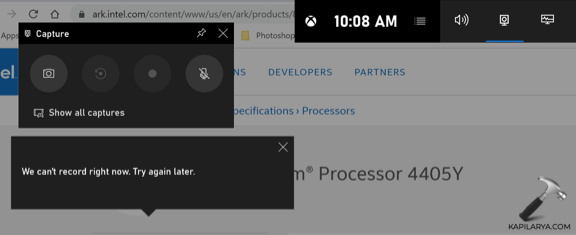
So recently a user reached to me in official Microsoft Tech Community with this error. According to the user, she was not able to record screen due to this error. She tried to reinstall Xbox, as well as to upgrade all drivers including the display one. Additionally, she tried to clear temporary files but still the issue was not resolved. She continued to face this problem, and hence she reached forums. I offered her a working solution that resolved this problem. So in case if you’re also facing same issue, you can try below mentioned solution.
Fix: We can’t record right now, try again later error for Xbox Game Bar
Well, this problem could be due to corrupted Xbox app installation files. Unless you repair those files, you won’t be able to fix this.
To resolve this error, you can try following steps.
1. Open administrative Windows PowerShell.
2. In Windows PowerShell, type or paste the following command and press Enter key:
Get-AppxPackage *xboxapp* | Remove-AppxPackage
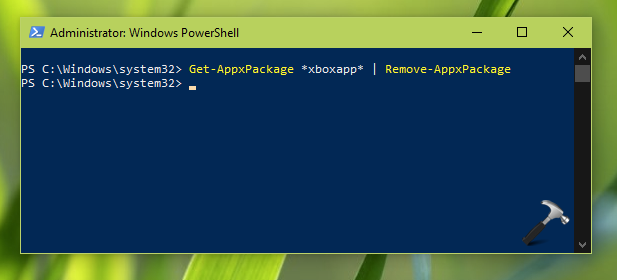
Let the command completed.
3. Close PowerShell and reboot the machine.
4. After reboot, download and install Xbox app from Microsoft Store.
Now try to record screen with Xbox Game Bar and this time the error will not appear.
Hope this helps!
Related fix: We Can’t Sign You In Right Now. Try Again Later Error For Xbox App In Windows 10.




That error is really annoying! I updated Minecraft to the latest version,(1.17.1) and still gives me that stupid error!
hi i’ve tried everything eventually from reset, repair, uninstalled but still not working