

If you are on a Windows 11 Preview Build and want to change Windows Insider Program settings but you can’t, this post is for you. Recently, some of the users have reported this problem into the various Microsoft forums. According to these users, when they go to the Windows Insider Program settings, they instead receive We can’t reach the Windows Insider Program right now error. In this article, we will see how you can fix this problem.
Here’s the screenshot showing this error:
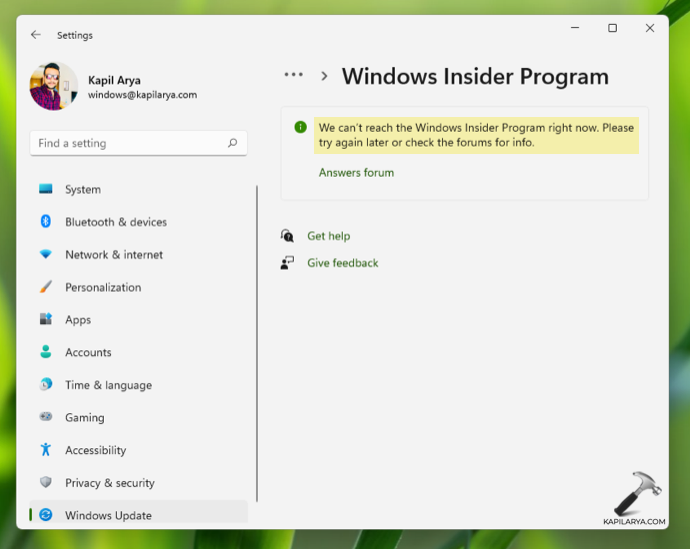
As you can see in the screenshot above, due to this error the Windows Insider settings will not load. This means you can’t change the Windows Insider Channel, Windows Insider Program ID and other Windows Insider settings. This error is expected to occur when you’re not connected to the network or Internet. However, if you’re still seeing this error even after connecting to network, there’s something wrong and you need to fix it.
Here’s how you can fix this problem, so that you can easily change these settings.
Page Contents
Fix: We can’t reach the Windows Insider Program right now
Fix 1: Using Settings app
1. Press  + I keys to open Settings app.
2. In the Settings app, go to Privacy > Diagnostics & feedback.
3. Now come to the right pane of Diagnostics & feedback, ensure that the Optional diagnostic data is turned On.

Close Settings app and check with the Windows Insider Program settings. You should be able to resolve the problem with above steps.
Alternatively, you can try registry solution mentioned next, if above solution didn’t helped.
Fix 2: Using Registry
1. Run regedit command to open Registry Editor.
2. In left pane of Registry Editor window, navigate to:
HKEY_LOCAL_MACHINE\SOFTWARE\Microsoft\WindowsSelfHost
3. Right click on WindowsSelfHost registry key and select Delete.
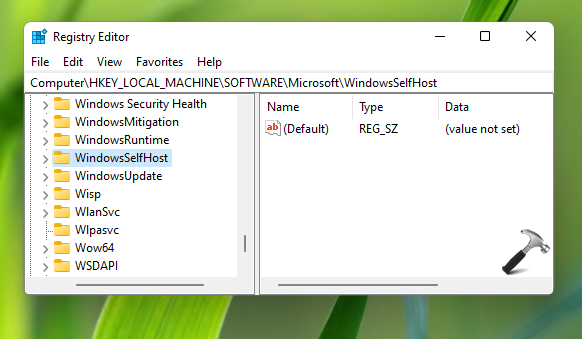
4. Close Registry Editor window and restart your system.
After rebooting your device, issue must be resolved.
Video fix
You can also refer this video fix for better assistance on this issue:
Hope this helps!
Related Fix: Can’t switch Windows Insider Channel on Windows 11.




0001 Didnt work.
Also did not help.
For those who will do registry fix – you have to connect to the Windows Insider once again.
Is the 2nd one safe to do?
^^ Yes. Create System Restore point, if you want to proceed to take extra precaution.