[How To] Change Windows 7 Product Key Using Command Prompt

Windows 7 advanced users have must noticed this that they can change the product key of their copy using command prompt. There is an easy method to do so. This

Kapil Arya
11x Microsoft MVP · Admin
1 min read
Add as a preferred
source on Google

Windows 7 advanced users have must noticed this that they can change the product key of their copy using command prompt. There is an easy method to do so. This is an alternating way for what we do using System Properties.

How To : Change Windows 7 Product Key Using Command Prompt

If you are good in command line then you must try this. The method is as follows:

1. Open administrative Command Prompt.
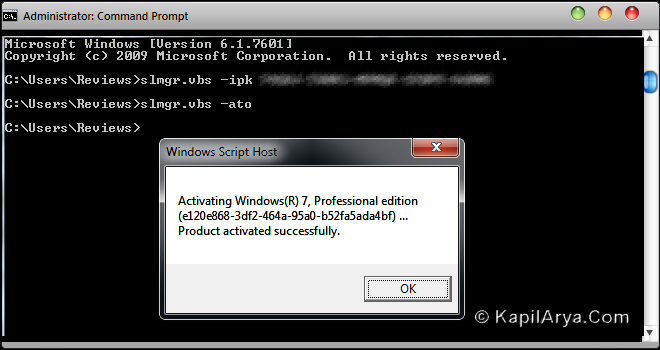
3. Now type the following command and hit Enter:

slmgr.vbs -ipk YOUR PRODUCT KEY

4. If the above entered key is new, type the following command and hit Enter key:

slmgr.vbs -ato YOUR PRODUCT KEY

That’s it!

Share this article
https://www.kapilarya.com/change-windows-7-product-key-using-command-prompt

Shareable URL

Article by

Kapil Arya
11x Microsoft MVP · Admin

Kapil holds Microsoft MVP title in Windows IT Pro expertise, 11-times in a row (2014-2025). He is 8-times Windows Insider MVP as well, and author of 'Windows Group Policy Troubleshooting' book. In 2015, Microsoft India accomplished him as 'Windows 10 Champion'. Being passionate Windows blogger, he loves to help others on fixing their system issues. Kapil has worked with official Microsoft Community Engagement Team (CET) on several community projects. You can subscribe him for news/updates and fixes for Windows.

2 Comments
Kevin

actually there is a alternative of it … type using windows 7 search type slui and search it.. you will get an application. use it to change the product key.

rgds.

kevin :)

Kapil Arya Author

Yes, it is also a good alternative :)

Leave a Comment

Your email address will not be published. Required fields are marked *